Which Submagic alternative lets you fix captions before you post?
The best Submagic alternative depends on why you are leaving. CapCut Pro gives you a full Mac timeline, and OpusClip and Klap cut long videos into clips. Captions suits phone-first creators, and Descript lets you fix captions like a document. For word-by-word captions you fix by hand, octuedit, an AI video editor, costs $99 once with a 14 day refund, plus your own Claude Code or Codex plan.
Updated 29 November 2026 · By Shivank Goura, co-founder of octuedit. We make octuedit.
What is the best Submagic alternative for Mac?
There is no single best replacement, because people leave Submagic for different reasons. Decide first whether you need a full editor, clips from long videos, a phone app, or captions you can correct. For names you fix every week, pick a tool with a word list on the plan you can afford.
The Submagic alternative that lets you fix captions before you post depends on what you leave it for. Submagic is a browser tool for short clips with animated captions. It costs $19, $39 or $69 billed monthly and caps each video at 2, 5 or 30 minutes by plan. If you want long videos cut into clips, look at OpusClip, Klap or Vizard. If you want a full Mac editor, look at CapCut, and for a phone app, Captions. If fixing words is the problem, the tools differ most. Descript fixes words like a document and learns from your corrections. Final Cut Pro makes word-by-word captions on an Apple silicon Mac, and you edit each caption clip. octuedit transcribes on your computer, lets you lock a fixed word, and exports SRT too.
We make octuedit, so read this with that in mind. Every competitor price below is the regular list price from the company's own page, with monthly and annual billing labelled, checked on 23 November 2026. Where a page only shows a sale, I link it instead of printing a number.
| Tool | Runs on | Regular price | Best for |
|---|---|---|---|
| Submagic | browser, no Mac app | $19 to $69 billed monthly; $144 to $492 a year billed annually | short clips with animated captions |
| ZapCap | browser | $10 to $40 billed monthly; $96 to $384 billed annually | Submagic-style captions on short clips |
| Typito | browser | $15 or $29 a month billed annually; monthly price on its page | branded social videos with text |
| Vizard | browser | see its pricing page | clipping podcasts and webinars |
| CapCut | Mac app | Pro $19.99 billed monthly or $179.99 a year | a full timeline editor |
| OpusClip | browser | $15 or $29 billed monthly; Pro $174 billed annually | long videos into many shorts |
| Captions | phone and web | Max $24.99 billed monthly (iOS) | shooting and posting from a phone |
| VEED | browser | $25 or $45 per user billed monthly; $12 or $22 a month billed annually | all-round browser editing |
| Descript | Mac app | $24 to $65 per person billed monthly; $16 to $50 a month billed annually | fixing captions as text, teams |
| Klap | browser | $29 to $189 billed monthly; $174 to $1,134 billed annually | clips from recordings up to 3 hours |
| Final Cut Pro | Mac app | $299.99 once, or $12.99 a month or $129 a year | word captions on Apple silicon |
| octuedit | macOS 13+ (Apple silicon and Intel), or Windows 10 or 11 (64-bit, beta) | $99 once, 14 day refund, plus your Claude Code or Codex plan | captions you fix on a timeline |
A poster on r/podcasting put the problem that sends most people looking:
Having to replay the video and clean up the captions eats into the time I'm supposed to be saving.
a poster on r/podcasting thread
Which route fits you?
- You want animated captions on short clips, in a browser: stay on Submagic, or try ZapCap or Typito.
- You start from long podcasts or webinars: OpusClip, Klap or Vizard.
- You shoot and post from your phone: Captions, with Max at $24.99 billed monthly on iOS.
- You want a full editor on the Mac: CapCut Pro, or Final Cut Pro at $299.99 once if you have an Apple silicon Mac.
- You fix the same names every week: Descript's 30 term glossary, on every plan, or octuedit's 60 term vocabulary at $99 once with a 14 day refund, plus your Claude Code or Codex plan.
What does Submagic cost, and where does it fall short?
Submagic costs $19 a month on Starter, $39 on Pro and $69 on Business, billed monthly. Billed annually, it is $144, $276 or $492 a year. Starter allows 15 videos of up to 2 minutes; Pro 40 of up to 5; Business 100 of up to 30. The pricing page lists no free plan, and Submagic has no Mac app: you work in the browser.
| Plan | Billed monthly | Billed annually | Videos a month | Longest video |
|---|---|---|---|---|
| Starter | $19 a month | $144 a year | 15 | 2 minutes |
| Pro | $39 a month | $276 a year | 40 | 5 minutes |
| Business | $69 a month | $492 a year | 100 | 30 minutes |
What each plan adds
Starter exports 1080p at 30 fps with no watermark and lets you trim by editing the transcript. Pro adds AI removal of bad takes and silences, plus publishing to social accounts. Business adds 4K at 60 fps, a custom words dictionary and 100 API minutes a month, against 10 on the lower plans.
Billed monthly, a year of Pro comes to $39 x 12 = $468 and Business to $69 x 12 = $828. The annual plans are $276 and $492.
Where it falls short
- Length caps. A 20 minute podcast episode is over the Starter and Pro limits, so you need Business or a different tool.
- Names and brand words. The custom words dictionary is listed only on Business. On the cheaper plans you fix the same names by hand each time.
- Edits that change back. Submagic's help centre has an article titled "I cannot edit the captions! It changes the words automatically if I try to edit them", with a tutorial to fix it. It dates from December 2024, so the behaviour may have changed since.
- Upload first. It is a web app, so every file goes to Submagic's servers before you can caption it.
- Accuracy claims. Submagic says it captions in 118 languages with 99% accuracy. That is the company's own figure, not an independent measure.
One creator's review on r/ContentCreators described a rougher experience. It is a single user's account, so weigh it as that:
The quality is good about 60% of the time. You'll get a lot of glitched exports. Some will be out of sync.
a commenter in r/ContentCreators thread
Why do auto captions need fixing before you post?
Auto captions go wrong in two ways. Names, brands and product terms fail every time, while crosstalk, accents and mumbled lines fail once. A word list fixes the first kind across every video. The second kind needs a quick read and a hand edit, so the tool has to make each fix fast and cheap.
A creator on r/ContentCreators listed what they wanted from a clip tool. Caption fixing sits in the middle:
I want to adjust the start/end times, fix captions, change the framing, etc. Bonus if it's fast but doesn't lock me into whatever the AI decides.
a commenter in r/ContentCreators thread
What to look for in a caption fixer
- A word list on the plan you pay for, so names and brands come out right in every video.
- Click a word, change it, and see it update in the preview.
- Fixes that cost no credits and don't make you wait for a re-render.
- An SRT export, so YouTube gets the corrected text too.
- No per-video length cap that makes you split a recording first.
No tool here wins every point. Descript has a word list on every plan, and octuedit includes one. Descript and Final Cut Pro have no per-video cap. Captions makes fixing easy but charges credits for it.
Which tools have a word list for names?
| Tool | Word list | Limit |
|---|---|---|
| Submagic | custom words dictionary | Business plan only |
| Descript | transcription glossary | 30 terms per Drive, English only |
| OpusClip | brand vocabulary | Business plan |
| octuedit | custom vocabulary | up to 60 names and brands |
Descript also adds a word to the glossary on its own once you correct it 3 times. For ZapCap, Typito, VEED, Vizard, Klap, CapCut, Captions and Final Cut Pro, I found no word list on their own pages. That does not prove they lack one, so check before you pay.
How do you fix a wrong word in each tool?
| Tool | How you fix it | Catch |
|---|---|---|
| Submagic | edit the caption text | dictionary on Business only |
| Descript | correct the transcript | syncs to the cloud |
| Captions | tap a word, edit, apply | about 1 credit a fix |
| OpusClip | text and timeline editor | none on the free plan |
| Klap | edit in the preview | download needs a paid plan |
| Final Cut Pro | edit each caption clip | You pick the language; some need macOS 27 |
| octuedit | fix the card and lock it | needs your own Claude Code or Codex plan for requests |
On desktop, Captions lists phrases in a side panel and you press "Apply edits", and each fix regenerates the video for about 1 credit. ZapCap's own blog says its captions are editable. The pages I read for Typito, Vizard, VEED and CapCut don't say how a word is fixed. Try one fix on the free plan first.
How do the other Submagic alternatives compare?
Browser caption tools such as ZapCap, Typito and VEED do Submagic's job most closely. Clipping tools such as OpusClip, Klap and Vizard start from a long video and hand you many short ones. Desktop editors such as CapCut, Descript, Final Cut Pro and octuedit give you a full timeline. Our comparison index has deeper pages on several of them.
Free plans and limits
| Tool | Free plan | Limit |
|---|---|---|
| ZapCap | 3 videos, watermark | 2 to 10 min a video |
| Typito | 30 export min, branding | 600 export min |
| Vizard | 60 credits, watermark | credits |
| CapCut | yes, no auto captions | not stated |
| OpusClip | 60 credits, watermark | 150 or 300 credits |
| Klap | 1 trial video | 100 to 1,000 clips |
| Captions | yes, basic tools | 500 credits on Max |
| VEED | yes, watermark | 50 subtitle hours |
| Descript | yes, 720p export | 10 to 40 media hours |
| Final Cut Pro | 30 day trial | no cap stated |
| octuedit | no (14 day refund) | your agent plan's limits |
Animated captions and uploads
| Tool | Animated captions | Uploads footage |
|---|---|---|
| ZapCap | yes, templates | yes |
| Typito | yes, text templates | yes |
| Vizard | yes | yes |
| CapCut | caption templates | not stated |
| OpusClip | yes | yes |
| Klap | yes | yes |
| Captions | yes, templates (100+ on Max) | yes |
| VEED | styles by plan | yes |
| Descript | yes, dynamic captions | syncs to cloud |
| Final Cut Pro | yes, by word | no |
| octuedit | yes, by word | no; transcript lines reach your agent |
ZapCap
ZapCap is the closest copy of Submagic. It sells Starter, Pro and Agency+ plans for 15, 50 or 200 projects a month, with animated caption templates. Each video can run 2, 5 or 10 minutes by plan, and Pro adds API access. The plans cost $10, $20 or $40 billed monthly, or $96, $192 or $384 billed annually.
The free plan gives 3 videos a month of up to 1 minute 30 seconds, with a watermark. ZapCap says it covers 90+ languages.
Pick it if you want Submagic-style animated captions on short clips, with similar length caps.
Typito
Typito is a browser editor built around text: animated titles, subtitles and brand kits. Solo costs $15 and Pro $29 a month billed annually; I could not read a monthly price. The free plan gives 30 export minutes a month with Typito branding. Its pricing FAQ says refunds are difficult, and it works in Google Chrome.
Pick it if your videos are designed social posts with branded text, more than talking clips.
Vizard
Vizard turns long podcasts and webinars into clips, with animated subtitles and a full video editor.
Its pricing page shows struck-through prices, so I don't print a number here. See the Vizard pricing page. The free plan gives 60 credits a month at 720p, with a watermark and three days of storage. Its API docs list source videos up to 600 minutes.
Pick it if you start from hour-long recordings and want many clips out of each.
CapCut
CapCut has a desktop app for macOS 10.14 or later, with a full timeline. Its own comparison page says the auto caption generator is "exclusive to Pro users". Pro is listed at $19.99 billed monthly or $179.99 a year in the US.
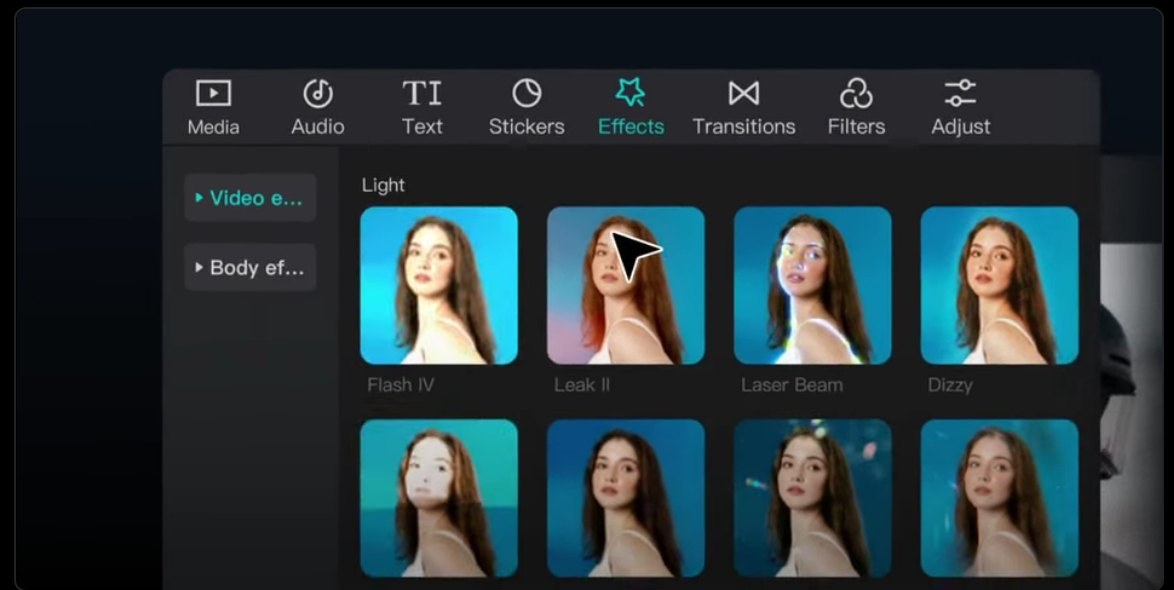
Pick it if you want a full editor and caption templates in one app. Our CapCut comparison goes deeper.
OpusClip
OpusClip cuts long videos into captioned shorts and scores each clip. Starter is $15 billed monthly for 150 credits. Pro is $29 billed monthly for 300, or $174 billed annually, with captions in 20+ languages.
Pro adds exports to Premiere Pro and DaVinci Resolve. The free plan has 60 credits, a watermark and no editing.
Pick it if you clip podcasts or streams at volume. Our page on whether OpusClip is worth it covers its credits in detail.
Klap
Klap also turns long videos into shorts, and costs $29, $79 or $189 billed monthly for 100, 300 or 1,000 clips. Billed annually, it is $174, $474 or $1,134 a year.
Source videos can run up to 3 hours, with captions in 99+ languages. The free trial covers one video, and downloading needs a paid plan. Klap also offers an API and an MCP server.
Pick it if your source is long and you want clips counted per clip, not per minute.
Captions
Captions is a phone-first app with a web editor. Max costs $24.99 billed monthly for 500 credits, and the page says its prices reflect iOS plans only. There is also a free version with basic tools, and Captions covers 100+ languages.
To fix a word, you tap it, edit and apply. Each fix regenerates the video and costs about 1 credit. Max credits also pay for generative features such as AI actors, which you may not need for captions.
Pick it if you shoot, caption and post from your phone.
VEED
VEED is an all-round browser editor with subtitles, translation and AI avatars. In the US, Creator costs $25 and Pro $45 per user billed monthly, or $12 and $22 a month billed annually. Paid plans are billed per seat and include unlimited subtitles under a 50 hour monthly fair use limit. They also remove the watermark that free exports carry.
Pick it if you want one browser editor for a small team and don't mind uploads.
Descript
Descript edits video by editing the transcript, which makes caption fixes feel like proofreading a document. Hobbyist costs $24 per person billed monthly, Creator $35 and Business $65. Billed annually, they are $16, $24 and $50 a month, and a free plan exports at 720p.
The Mac app needs macOS 14 or later. Descript saves and syncs your work to the cloud and does not support offline editing.
Pick it if you fix captions as text, or share projects with a team. Our Descript alternatives guide compares it with Mac editors.
Final Cut Pro
Final Cut Pro's Generate Captions turns speech into caption clips that start and end in sync with the words. You can animate by word with a Highlight or Fill style and use a Vertical Social Media Safe layout for 9:16. It needs a Mac with Apple silicon, and some languages need macOS 27. It costs $299.99 once, or $12.99 a month or $129 a year inside Apple Creator Studio, which has a 30 day free trial.
Pick it if you already edit in Final Cut on an Apple silicon Mac. See how it fits an AI rough cut workflow.
octuedit
octuedit is a desktop app that transcribes speech on your computer by default, with word-level timing, then lays captions out in one of 18 styles. Captions can show the whole line, highlight the spoken word, reveal words as spoken, or show one word at a time. Every card stays editable on a normal timeline: fix a word by hand and lock it, and a rebuild keeps your text.
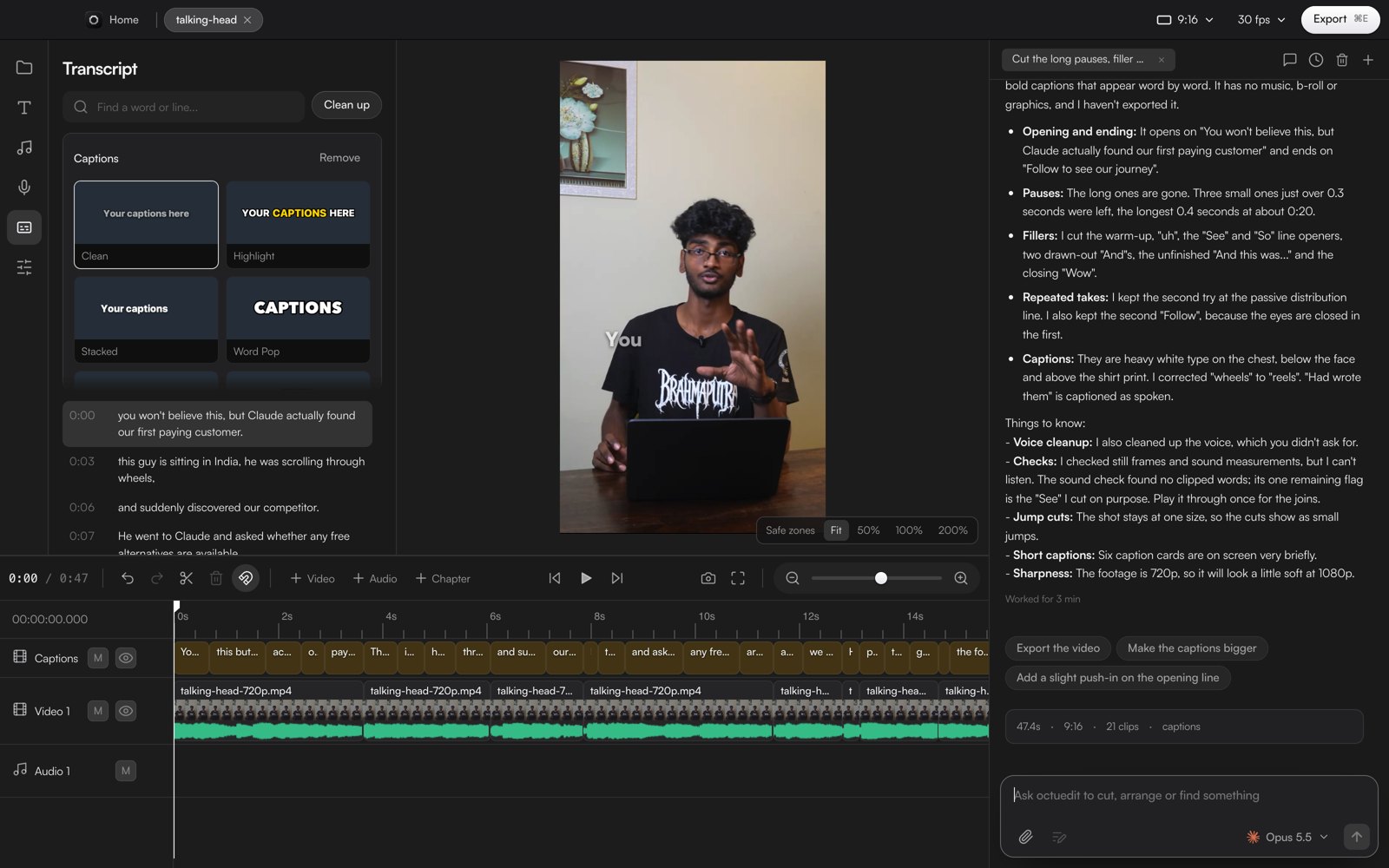
A custom vocabulary of up to 60 names and brands keeps your spelling consistent. You can export captions burned into MP4, MOV or WebM, or as SRT and WebVTT files from the same timing. It also writes Hindi as readable Hinglish, covered on our Hinglish captions page.
octuedit costs $99 once with a 14 day refund, and runs on macOS 13 or later (Apple silicon and Intel), or Windows 10 or 11 (64-bit, beta).
Editing by request uses your own Claude Code or Codex plan, billed by Anthropic or OpenAI, so the AI is a separate monthly cost. Claude Pro is $20 billed monthly, or $200 a year. A first year on monthly billing comes to $99 + ($20 x 12) = $339. If you'd rather pay once for everything, our one-time purchase guide lists the editors you can still buy outright.
Where octuedit falls short
- Caption accuracy depends on your audio, so check names and numbers before you post.
- Caption styling does not carry over when you hand a project to Premiere Pro, Final Cut Pro or DaVinci Resolve. Export SRT for those.
- It needs internet for editing requests. It has team seats but no shared team workspace.
- It makes no AI generated video or AI actors, and it does not publish or schedule posts.
Is there a free, open source or local Submagic alternative?
Yes, with trade-offs: free plans from ZapCap, Vizard and OpusClip add a watermark, and CapCut's own page puts auto captions on Pro. The routes with no watermark are local ones. MacWhisper has a free tier that transcribes on your Mac. Open source tools built on whisper.cpp can caption a video if you are happy working in Terminal.
Free plans with a watermark
- ZapCap: 3 videos a month, up to 1 minute 30 seconds each.
- Vizard: 60 credits a month at 720p, kept for three days.
- OpusClip: 60 credits a month, with no editing.
- VEED: free exports are watermarked; paid plans remove it.
Local apps for subtitle files
MacWhisper is a native Mac app that runs speech models on your machine. Its page says "all transcription is done on your device" and lists SRT and VTT export. It has a free tier and a one time Pro licence. It makes a subtitle file, not styled animated captions, so you still need an editor to burn them in.
Open source routes for people who code
- whisper.cpp runs the Whisper speech model on Apple silicon. It is MIT licensed, has over 55,000 stars on GitHub and was updated in November 2026.
- auto-subtitle generates and burns subtitles in one command. Its last code change was November 2023, and an open issue is titled "DEAD".
- captacity makes word-highlight captions for Shorts but has not been updated since June 2024.
- pycaps styles animated subtitles with CSS and was updated in September 2026.
- Remotion's TikTok template captions every video in a folder with whisper.cpp, then renders it as code. Remotion is free for individuals and companies of up to 3 employees.
Remotion also publishes instruction packs that its repo says work with Claude Code, Codex and Cursor. That makes it the closest free route to asking an AI for captions. The catch is that every style change and word fix happens in code, with no timeline to drag.
Which ones keep your footage on your Mac?
Browser tools upload every file: Submagic, ZapCap, Typito, Vizard, OpusClip, Klap and VEED. Descript works on your Mac but syncs to the cloud. MacWhisper and the open source tools transcribe on your machine. Final Cut Pro edits on your Mac, though Apple's caption page doesn't say where transcription runs.
octuedit exports on your computer and transcribes there by default; Groq is an option you turn on with your own key. Your own agent, Claude Code or Codex, receives your requests and its work on the project, including transcript lines. If Claude Code is installed, your Claude also gets still frames from each clip for visual search, with no off switch. The app sends octuedit diagnostics and shared edits, linked to your licence email. Each has its own switch, and shared edits start off in the EEA, the UK and Switzerland.
Our privacy comparison covers each tool in more detail.
One Hacker News builder made a Mac caption app for exactly this reason.
Built this for a friend who needed to add captions to videos without uploading to third-party services.
nick_wolf on Hacker News thread
When is Submagic still the better choice?
Stay with Submagic if you post clips under 2 to 5 minutes and like its animated caption templates. It also suits working from any computer with a browser. It has an API on every paid plan and publishing on Pro. Leaving means giving up its templates, b-roll and posting in one place.
Other tools win in these cases
- You work on a Chromebook or a borrowed computer. ZapCap, Typito and VEED run in a browser, with nothing to install.
- You post from your phone. Captions is built for it.
- You start from hour-long recordings. OpusClip, Klap and Vizard find the clips for you. Our guide to turning long videos into shorts compares those routes.
- You work as a team. Descript and VEED bill per seat, and Descript syncs shared projects to the cloud.
- You want AI generated video. Submagic, Captions and CapCut sell generative features that desktop editors like octuedit don't have.
What we'd do next
Start by writing down the three caption errors you fix most often, then pick the tool that makes those three fast. If they are names and brands, you need a word list on your plan. If they are scattered misheard words, you need click-to-fix editing with no credit charge. If your videos run over 5 minutes, skip any tool with a per-video cap.
- Run one real video through the free plan or trial of your top two picks.
- Fix every wrong caption, and note whether the fixes stay after a re-cut.
- Export an SRT as well, so YouTube gets the corrected words.
Our captions feature page shows what fixing a word looks like on a timeline, if you want to compare.
Questions
Is Submagic free?
No. Submagic's pricing page lists no free plan. The regular prices are $19 for Starter, $39 for Pro and $69 for Business, billed monthly. Each plan caps both the number of videos a month and the length of each video.
Does Submagic have a Mac app?
No. Submagic runs in the browser and lists no Mac app, so you upload each video before captioning it. If you want a native Mac app, CapCut, Descript and Final Cut Pro all have one, with different caption tools and prices.
What is the best free Submagic alternative without a watermark?
With no watermark, the free routes are local. MacWhisper's free tier makes subtitle files on your Mac, and open source tools built on whisper.cpp can burn them in. Free plans from ZapCap, Vizard and OpusClip add watermarks.
Can you edit captions in Submagic?
Yes, you can edit caption text and trim by transcript. Submagic's help centre has a 2024 tutorial for edits that change back on their own. Its custom words dictionary for names is listed only on the $69 Business plan, so cheaper plans need repeat fixes.
Is Submagic worth it?
It is worth it if you post many short clips with animated captions and like working in a browser. It is weaker for recordings over 5 minutes and for anyone who would rather not upload footage. On cheaper plans you also fix the same names every week.
Does Submagic have an API?
Yes. Every paid Submagic plan includes API minutes: 10 a month on Starter and Pro, and 100 a month on Business. The caption limits still apply, so check your plan for how many videos and how many minutes each video can run.
How long can a video be in Submagic?
It depends on the plan. Starter takes videos up to 2 minutes, Pro up to 5 minutes, and Business up to 30 minutes. For full podcast episodes or long talks, a clipping tool or a desktop editor with no cap fits better.
Submagic vs Captions: which is better?
Captions suits creators who shoot and post from a phone, at $24.99 a month for Max on iOS. Submagic suits browser work on a computer, from $19 a month. Both caption in over 100 languages, and both upload your video to their servers.
Sources
- Submagic pricing (plans, limits and API)
- Submagic home page (languages and accuracy claim)
- Submagic help, add custom words to the dictionary
- Submagic help, caption edits change automatically
- ZapCap pricing
- ZapCap blog, free plan details
- Typito pricing and FAQ
- Vizard pricing
- CapCut desktop video editor
- CapCut Standard vs Pro
- CapCut pricing
- OpusClip pricing
- Captions pricing
- Captions help, edit spelling
- VEED pricing
- Descript pricing
- Descript help, transcription glossary
- Descript system requirements
- Descript help, cloud sync and offline editing
- Klap pricing and FAQ
- Apple, generate captions in Final Cut Pro for Mac
- Apple, Final Cut Pro
- MacWhisper
- whisper.cpp on GitHub
- auto-subtitle issue "DEAD"
- pycaps on GitHub
- Remotion TikTok template
- Remotion instruction packs for coding agents
- Remotion licence
- Claude pricing
- octuedit captions and titles
- octuedit pricing
- Vizard API pricing docs
- octuedit with Codex
- captacity on GitHub
- ZapCap languages
Facts about other tools come from each company's own website, checked 23 November 2026, and may change.