Is OpusClip worth it, or should you cut your clips on a timeline?
OpusClip is worth it if you post many clips a week from long podcasts or streams and want the moments picked, captioned and reframed for you, from $15 a month.1 If you keep fixing start points, cut sentences and captions, cut the clips on a timeline instead. octuedit, an AI video editor for Mac, lets your own Claude Code find the moments you ask for, for $99 once.
Updated 10 November 2026 · By Shivank Goura, co-founder of octuedit. We make octuedit.
Is OpusClip worth it, and what does it cost?
OpusClip is worth it when you post many clips a week from long podcasts or streams. It picks the moments, captions them and reframes them for you. It costs $15 a month on Starter or $29 on Pro. It charges one credit for every minute of the source video you import, not for the clips you keep.123
A podcaster on r/podcasting described the other side of that deal:
Then you’re fixing captions, adding back a sentence the AI cut out, and checking how many credits you have left.
u/Senior-Cod5733, r/podcasting thread
We make octuedit, so read this with that in mind. Competitor facts below come from each company's own pages, checked on 10 November 2026. I'll say where another tool is the better pick.
What each OpusClip plan includes
| Plan | Price | Processing minutes a month | What matters here |
|---|---|---|---|
| Free | $0 | 60 | Watermarked exports, no text or timeline editing, media expires after 3 days |
| Starter | $15 a month | 150 | Virality score, no watermark, text and timeline editing, posting to YouTube, TikTok and Instagram |
| Pro | $29 a month | 300 | Adds export to Premiere Pro and DaVinci Resolve, a social scheduler and 100GB of storage |
All figures are list prices from OpusClip's pricing and plans pages.12 Starter and Free have no export to other editors, so you finish the clips inside OpusClip.
How the credits add up
OpusClip counts the length of the original video you import. A 60 minute episode uses 60 credits, whatever number of clips you keep. Partial minutes round down, and a video under one minute counts as one.3
Take four 60 minute episodes a month. That is 4 x 60 = 240 source minutes. Starter's 150 minutes cover two episodes (2 x 60 = 120). Pro's 300 minutes cover all four, with 60 left over.23
At monthly list prices, Starter is $15 x 12 = $180 a year and Pro is $29 x 12 = $348 a year. Monthly plan credits expire after 60 days, and you can buy top-up credits.3
So the first question is volume. If you cut one or two episodes a month, Starter may be enough. If you cut four or more, you are paying for Pro.
Why do I still spend hours fixing OpusClip clips?
An auto clipper moves your time from picking moments to checking them. You still trim start and end points, restore a sentence the cut dropped, and fix captions. A tool can score a clip highly and still miss the answer you would have picked, and only someone who knows the episode can tell.
The thread that started this page says it plainly.8 A creator who repurposes long YouTube videos wrote:
In real, I still spend a lot of time fixing the clips, adjusting start/end points, editing some parts.
u/yerassyldesign, r/ContentCreators thread
The top practical reply did not call that a bug:
That's pretty normal. We treat Opus as a first draft, not the final edit.
u/Money-Ranger-6520, r/ContentCreators thread
I think that is the honest way to read OpusClip. It gives you a first draft fast. Whether that draft saves you time depends on how much of it you keep.
The cut-sentence problem
A second poster raised it. A short cut can sound fluent and still change what the guest meant, and fixing that means redoing the selection.9
What to try inside OpusClip first
Before you leave, there are things worth a try. The same commenter gave three tips for getting more from it:8
- Feed it 10 to 15 minute segments instead of full hour long videos.
- Export more clips than you need and keep only 10 to 15 percent.
- Always do a final manual pass for hooks, captions and start and end points.
The first tip can also cut your credit use, since you pay for the minutes you import. Two more options sit in OpusClip itself. The pricing page lists a clipping timeframe setting on every plan, so you can point it at the part of the episode you care about.1 The Pro plan also exports a project to Premiere Pro or DaVinci Resolve, so you can finish the cut in an editor.12
If the fixing still takes most of your time, picking is not what you need help with. You need a timeline where each clip is already cut, and where a trim is a drag.
How do I cut the same clips on a timeline instead?
In octuedit, an AI video editor for Mac, you import the long recording and ask your own Claude Code for the moments you want. Each clip lands on a normal timeline. You trim start and end points by dragging, fix any caption word by hand, and export vertical. The app costs $99 once, plus the Claude plan you already pay for.
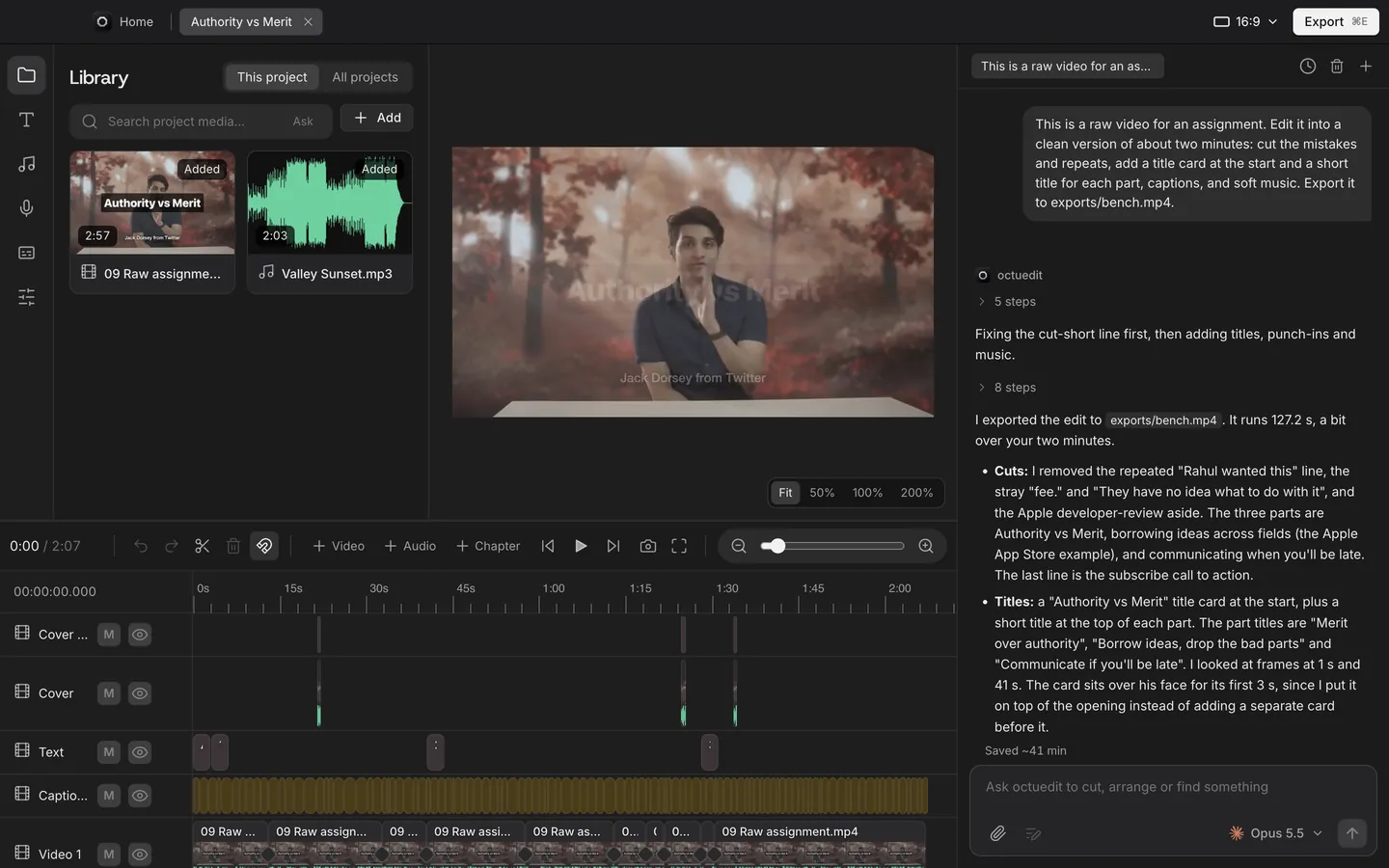
Here is the routine, step by step:
- Import the episode. octuedit transcribes it on your Mac and indexes what is said and what is on screen.
- Ask for the clips. Type one request in the chat, such as "Find the three best moments in this episode and make a short for each." Or be specific: "Make a 45 second vertical clip of the part about pricing, with bold captions."
- Play each clip at normal speed. Check the first and last second, and listen for a sentence that ends too early.
- Fix the edges by hand. Drag a clip edge to bring back a dropped sentence or cut a slow start. Undo covers the agent's edits too, so nothing is locked.
- Fix and lock the captions. Captions are built from word timings in one of 18 styles. Change any word by hand and lock it, so a rebuild keeps your text. Check names and numbers, because accuracy depends on audio and accents.
- Check the vertical framing and export. The 9:16 reframe follows faces and subjects with Apple Vision and is written as keyframes you can nudge. Export MP4 or MOV at 1080x1920 or 4K.
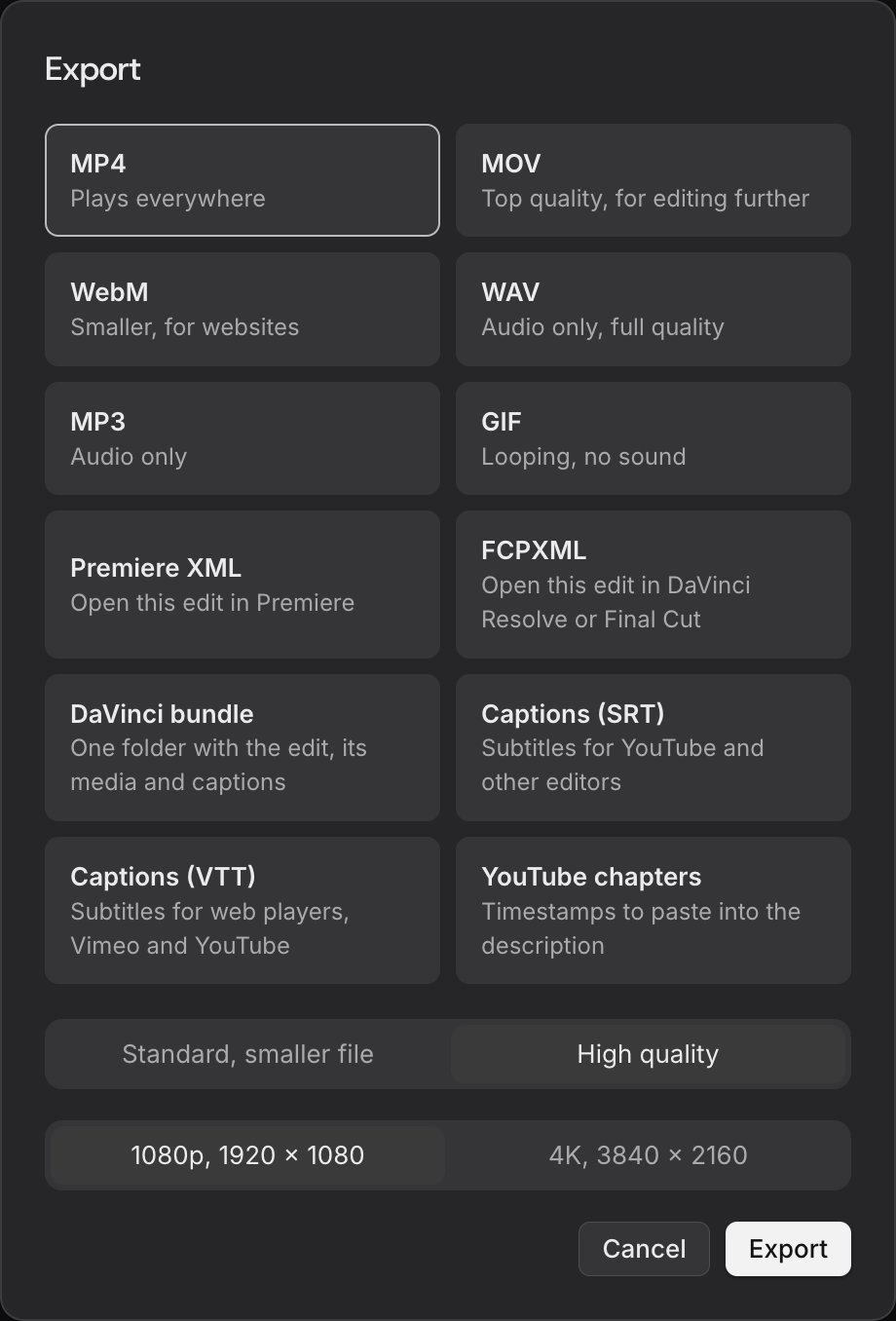
If you would rather finish in another editor, octuedit exports project files for Premiere Pro, Final Cut Pro and DaVinci Resolve. Those files skip keyframes and caption styling, so export an SRT file if you want the captions along. The short form video page shows more example requests.
What you give up
This is not the same product as OpusClip, and I would not pretend it is. You choose the moments by asking, so there is no virality score. octuedit does not post or schedule clips, and it does not generate video. It runs on a Mac with macOS 13 or later, and the agent needs an internet connection.
The AI runs on your own Claude Code or Codex plan, billed separately by Anthropic or OpenAI, and that plan has its own usage limits.7 Footage, projects, transcription and export stay on your Mac. Your agent receives your requests and its work on the project, plus a few still frames per clip for search unless you switch that off.
What it costs next to OpusClip
octuedit has no credits to buy from us and no per-minute meter. The plan behind it is separate. Claude Pro is $17 a month billed annually ($200 up front) or $20 monthly, and Claude Code is included.7
| Setup | Year one | Notes |
|---|---|---|
| OpusClip Starter | $15 x 12 = $180 | 150 minutes a month |
| OpusClip Pro | $29 x 12 = $348 | 300 minutes a month |
| octuedit with a new Claude Pro plan | $99 + $200 = $299 | Plan is $200 a year after that |
| octuedit if you already pay for Claude | $99 | Plan usage limits still apply |
If you do not use Claude for anything else, Starter is cheaper in year one. The comparison changes when you already pay for Claude, or when the fixing time is what you are trying to cut.
Is there something better for Shorts than Premiere, CapCut, Descript and Kapwing?
If you are never happy with Shorts cut in Premiere Pro or CapCut, the timeline is probably not what is failing. The slow parts are finding the moment, reframing to vertical and captioning it. An editor that does those for you and leaves a timeline covers the gap. OpusClip covers it by picking for you, with less control.
A creator coming back to YouTube, planning five or six Shorts a week, put it this way:10
when I use premiere pro or CapCut too cut my videos I am never happy with them. I tried opus clip once and was happy with a few results.
u/LuckyBoyAlex_, r/NewTubers thread
Another poster on r/NewTubers had used Descript and Kapwing for a long time. They said the clips never quite fit the brief or the format.11 That matches the pattern in the other threads: the tools that pick for you leave you with repair work.
There are three routes, and they trade effort for control differently:
- Cut by hand. CapCut is free to try online with no credit card, and it has auto captions.5 You find every moment yourself.
- Let a tool pick. OpusClip and Klap choose the clips, caption them and reframe them. You repair what they got wrong.
- Describe the clip. In octuedit you say which moment you want, and your Claude Code cuts it onto a timeline you can change.
For five or six Shorts a week, the third route is one request a week plus a check of each clip. I have not checked Descript's and Kapwing's current plans for this page. For Descript, see our Descript alternative page, and for CapCut our CapCut comparison.
When is OpusClip, Klap or a free editor the better choice?
Stay with OpusClip if its picks need little fixing and you want posting and scheduling in one place. Pick Klap if you want to pay per clip. Pick CapCut or DaVinci Resolve if you want a free timeline and do not mind finding every moment. Pick octuedit if fixing is your cost and you work on a Mac.
| Tool | Price | How clips are made | Runs on | Catch |
|---|---|---|---|---|
| OpusClip | Free, $15 or $29 a month | Picks, scores, captions and reframes for you | Web app | Credits per source minute; you fix the picks |
| Klap | $14.50 a month billed yearly, or $29 monthly, for 100 clips | Picks and scores clips for you | Online account | Still a pick-for-you tool |
| CapCut | Free to try online | You cut by hand, with auto captions | Desktop, online and mobile | You find every moment |
| DaVinci Resolve | Free; Studio adds smart reframing | You cut by hand | Mac, Windows and Linux | Steepest learning curve |
| octuedit | $99 once, plus your Claude or Codex plan | You ask, the agent cuts, you finish | Mac only | No virality score, no posting |
Prices and limits come from each company's own pages.145612
When OpusClip wins
OpusClip is a web app, schedules posts on Pro, and needs no agent account.112 If you post daily and its picks are mostly right, that hands-off flow is hard to beat.
Many creators will find it the right answer. octuedit asks more of you for each clip. If you also edit the full video, our comparison of AI video editors covers that case.
When Klap, CapCut or Resolve wins
Klap bills per clip, not per source minute. Its Basic plan gives 100 clips a month, and a source video can run up to 3 hours without using up your plan.4 That suits a few very long videos.
CapCut and DaVinci Resolve cost nothing to start, and the Resolve free version runs on Mac, Windows and Linux.56 The cost is your time. A podcast host in the same thread described the manual route:
I know a guy that as he does his show writes down time stamps. Then he later uses his time stamps to go to that part of his show, make the perfect clip, and move on.
u/podcastcoach, r/podcasting thread
That commenter also runs a podcasting company and said so in the thread. Their point still holds: if you know the moments, a free timeline is enough. If you do not want to scrub for them, an agent finding them by what was said is the part you are paying for.
For the wider buying question, our guide to video editors you can buy once compares the pay-once options.
What should you do next?
Take one episode you already ran through OpusClip and write down how long you spent fixing it. Count start points, sentences and captions, not the time it took to generate. If the fixing took a few minutes, stay and pick Starter or Pro by volume.
If it took most of an afternoon, cut that episode on a timeline instead, by hand in CapCut or Resolve, or by asking octuedit. octuedit has a 14 day refund, so you can check it on your own clock. More long-to-short guides sit in the shorts hub.
Questions
Is OpusClip worth it for a podcast?
It is worth it if you post several clips a week and its picks need little fixing. Four 60 minute episodes a month is 240 source minutes, so that needs Pro at $29 a month. If you keep repairing sentences and captions, a timeline is cheaper in time.
How many credits does OpusClip use for one video?
One credit per minute of the original video you import, so a 60 minute episode uses 60 credits. Partial minutes round down and a video under one minute counts as one. Free gives 60 minutes a month, Starter 150 and Pro 300.
Is the OpusClip free plan worth using?
It is good for trying the picks on one episode. Free gives 60 processing minutes a month, but exports carry a watermark, there is no text or timeline editing, and projects expire after 3 days. Starter removes the watermark and adds editing.
Can I export OpusClip clips to Premiere Pro or DaVinci Resolve?
Yes, but only on Pro at $29 a month. OpusClip's pricing page lists export to Adobe Premiere Pro and DaVinci Resolve under Pro, not under Starter or Free. On those plans you finish the clips inside OpusClip.
What is an OpusClip alternative without credits?
Klap bills per clip instead of per source minute. CapCut and DaVinci Resolve have free versions and no credits. octuedit has no credits either, at $99 once, but it needs your own Claude Code or Codex plan, which has its own usage limits.
Does octuedit have a virality score?
No. You choose the moments by asking, for example "find the three best moments and make a short for each". octuedit does not rank clips or predict views. If a score matters to you, OpusClip and Klap both include one.
Can I use octuedit without a Claude or Codex plan?
No. The editing runs on your own Claude Code or Codex plan, billed separately by Anthropic or OpenAI. octuedit sells no AI credits. The app is $99 once, and editing by request needs an internet connection for the agent.
Does octuedit upload my footage?
No video or audio files go to octuedit. Transcription and export run on your Mac. Your agent receives your requests and its work, such as steps and transcript lines. It also gets a few still frames per clip for search, unless you switch that off.
Sources
- OpusClip pricing
- OpusClip help, plans
- OpusClip help, how credits are consumed
- Klap pricing
- CapCut
- DaVinci Resolve, Blackmagic Design
- Claude plans and pricing, Anthropic
- I still spend hours editing after using Opus Clip, r/ContentCreators
- OpusClip alternatives thread, r/podcasting
- Opus clip worth it? Or any other recommendations?, r/NewTubers
- Best shorts / reel maker from longer videos, r/NewTubers
- OpusClip home page
Facts about other tools come from each company's own website, checked 10 November 2026, and may change.