How do you add captions to a video on a Mac, word by word included?
If you own Final Cut Pro, it's the quickest route: it generates captions on Apple silicon and highlights each word as it's spoken. Free routes are iMovie titles typed by hand, an SRT file, or free open source apps. CapCut makes captions free, but Pro-only caption features need Pro to export. octuedit, an AI video editor, transcribes on your computer and styles word by word captions from a plain request.
Updated 29 November 2026 · By Shivank Goura, co-founder of octuedit. We make octuedit.
Can a Mac add captions to a video on its own?
Not with what ships in macOS. Live Captions shows a live transcript of audio playing on your Mac. macOS 27 adds generated subtitles while you watch in supported apps. Both are for watching, and neither writes a caption into your video file. Apple's free iMovie can't make captions from speech, so you type every line.
To add captions to a video on a Mac, first choose between burned in captions and a separate file. Burned in captions are part of the picture and suit Reels, TikTok and Shorts. A subtitle file such as SRT sits next to the video, viewers switch it on, and it suits YouTube. For free, type titles in iMovie, write an SRT file by hand, or use whisper.cpp or Shotnix, which transcribe on your Mac. If you own Final Cut Pro and have an Apple silicon Mac, Generate Captions makes captions from speech. Premiere Pro's Speech to Text makes captions you can restyle. For word by word captions you need a tool that times every word, so typed titles won't do. On a Mac, Final Cut Pro, CapCut, Descript, whisper.cpp, Shotnix, Takes and octuedit can do it.
Apple's own caption help page is about viewing captions, which confuses many people. Here is what each built-in tool and player really does.
| Built-in tool | Adds captions to your file? |
|---|---|
| Live Captions | No, it's a live transcript only |
| macOS 27 generated subtitles | No, playback only |
| QuickTime Player | No, it plays a video |
| VLC | Saves a copy with an existing subtitle file embedded, but can't make captions from speech |
| iMovie | Yes, as titles you type and time by hand |
A player shows captions, an editor makes them. So you need an editor, a subtitle file, or a caption app. The rest of this guide covers each one, free first.
Just want to add text to a video, not captions of speech? QuickTime can't do that either. Use Titles in iMovie, the same on any MacBook or desktop Mac.
What are all the ways to add captions to a video on a Mac?
There are five routes, and the best one is usually the tool you already own. Two are typed by hand and free. Pro editors make captions from speech. CapCut and Descript style them for social video. Open source tools and Mac apps transcribe on your own computer.
- Type captions by hand in iMovie or in an SRT file.
- Use the automatic captions in Final Cut Pro, Premiere Pro or DaVinci Resolve.
- Use CapCut or Descript, which style captions for social video.
- Run the open source Whisper model yourself, or let an AI agent run it.
- Use a Mac app that transcribes on the Mac and burns the captions in.
Which route fits you?
- You own Final Cut Pro: run Generate Captions with the Highlight style.
- You want free and the clip is short: iMovie titles, or the free Shotnix app.
- You post one long YouTube video: an SRT file, or YouTube's automatic captions fixed by hand.
- You post styled Reels every week: CapCut Pro, Descript Hobbyist or octuedit, with prices in the table below.
- You're happy in Terminal: whisper.cpp with ffmpeg, free.
Prices and word by word support
| Route | Regular price | Word by word? |
|---|---|---|
| iMovie titles | Free | No |
| SRT typed in TextEdit | Free | No |
| YouTube automatic captions | Free, after upload | No |
| Final Cut Pro | $299.99 once, or $12.99 a month or $129 a year in Apple Creator Studio | Yes, Highlight or Fill |
| Premiere Pro | See its plans page | Requested by users |
| DaVinci Resolve | Free; Studio $295 once | No |
| CapCut | Free; Pro $19.99 billed monthly or $179.99 a year for Pro-only caption features | Animated templates |
| Descript | Free (720p, watermark); Hobbyist $24 billed monthly, or $16 a month billed annually | Yes, word highlighting |
| whisper.cpp with ffmpeg | Free | Yes, experimental |
| Shotnix | Free, open source | Yes |
| Takes | Free, open source, plus your own Claude Code or Codex plan | Yes |
| octuedit | $99 once, plus your own Claude Code or Codex plan | Yes, four caption modes |
Prices are regular list prices, checked 23 November 2026. We left out sale and launch prices. Where a page showed a struck-through price, we linked it instead.
What each route gives you
| Route | Output |
|---|---|
| iMovie | Burned in |
| SRT file | Sidecar file |
| YouTube | Captions on YouTube only |
| Final Cut, Premiere, Resolve | Burned in or caption files |
| CapCut, Descript | Burned in |
| whisper.cpp, Shotnix | SRT, VTT or burned in |
| Takes | Burned in |
| octuedit | Burned in, SRT or WebVTT |
How do you add captions for free on a Mac?
You have four free routes. The first three are iMovie titles for a short clip, an SRT file typed in TextEdit, and YouTube's automatic captions fixed after upload. The fourth is a free tool that transcribes on your Mac, such as whisper.cpp in Terminal, or the open source apps Shotnix and Takes. Only that last group can do word by word.
iMovie titles, typed by hand
iMovie is free from Apple, and the current version needs macOS 26.6 or later. Apple's iMovie guide covers titles, not speech to text, and lists no SRT import or export. What it can do is put text over your video.
- Open the project and select Titles above the browser.
- Drag a title such as Lower Third above the clip on the timeline.
- Type one line of what's said, then drag the title's edges to fit that line.
- Repeat for every line, and play it back to check the timing.
This is fine for a 30 second clip. For a ten minute video it means hundreds of titles. Any later trim breaks the timing.
An SRT file typed in TextEdit
An SRT file is plain text: a number, a start and end time, and the words, then a blank line. In TextEdit choose Format, then Make Plain Text, and save the file with the .srt ending. YouTube accepts SRT files as uploaded captions.
- Line 1: the cue number, such as
1. - Line 2: start and end time, such as
00:00:00,000 --> 00:00:02,400. - Line 3: the words spoken, then a blank line before the next cue.
YouTube automatic captions
YouTube makes automatic captions for free after you upload, in many languages, and you can edit them in YouTube Studio. YouTube itself says quality varies, so read them through. They live on YouTube only and are never burned into the video.
Free tools that transcribe on your Mac
whisper.cpp runs OpenAI's Whisper speech model on a Mac using Apple silicon's GPU. Its command line tool writes SRT or VTT files. It can also time single words, and render a karaoke style video with the current word highlighted. Its own docs mark both word features as experimental.
To burn those captions in, you need ffmpeg built with libass. One catch: as of November 2026, Homebrew's standard ffmpeg formula no longer lists libass. The ffmpeg-full formula does. One user hit exactly this when burning subtitles on a Mac, and also got boxes in place of non-Latin letters.
If you'd rather not touch Terminal, two free open source Mac apps transcribe on the Mac.
Shotnix is a screen recorder with word timing and a Highlight words option. It burns captions in or exports SRT or VTT, and it's still in beta. Takes uses your own Claude Code or Codex to burn word-timed captions into takes you record in it. It needs Apple silicon and macOS 15 or later.
Built this for a friend who needed to add captions to videos without uploading to third-party services.
nick_wolf, Hacker News (Show HN: CapSlap) thread
How do you add automatic captions in Final Cut Pro, Premiere Pro or DaVinci Resolve?
All three can caption, with different limits, so start with the one you already own. Final Cut Pro generates captions from speech and animates them word by word, on Apple silicon Macs only. Premiere Pro's Speech to Text makes captions you can restyle. Free DaVinci Resolve has a subtitle track you fill by hand or from an SRT file.
Final Cut Pro: Generate Captions
Final Cut Pro is $299.99 once in the Mac App Store, and the listing says it needs macOS 26.6 or later. It's also part of Apple Creator Studio at $12.99 a month or $129 a year.
Generate Captions needs a Mac with Apple silicon. You choose the spoken language, and some languages need macOS 27 or later. The first run downloads a language model, so you need internet once.
- Select the clips with speech in the timeline.
- Choose Edit, then Generate Captions, then Subtitles (Shift-Command-S). Final Cut adds title clips in sync with the spoken words.
- Select a subtitle and set Animation Style to Highlight (words light up in color, one at a time) or Fill.
- Set Animate By to Word.
- For a 9:16 video, tick Vertical Social Media Safe so captions stay clear of the app buttons.
- Fix any wrong words in the text, then export with the captions in the picture.
Final Cut also has a separate closed caption workflow. You can import and export caption files and convert closed captions to subtitles. For long videos going to YouTube, that sidecar file is often the better choice.
Want an AI rough cut before you caption? See our guide on handing an edit to Final Cut Pro.
Premiere Pro: Speech to Text
Premiere Pro is a subscription; see its plans page for the price. Its Speech to Text tool transcribes a sequence and creates captions you can restyle. You can burn them in or export an SRT file.
Word by word highlighting is something users ask for. Adobe's community board has a May 2025 request for "automatic animated subtitles with word highlighting in sync with speech". Check your version before you plan on it. If you're weighing Premiere against other editors, our Premiere Pro comparison lays out the trade-offs.
DaVinci Resolve: subtitle tracks
The free DaVinci Resolve has subtitle tracks. You can import SRT, TTML or XML files and style the font, color, size and position. Then burn them in or export SRT or VTT. Blackmagic's edit page also lists transcribing clips for subtitles, so check which version a feature needs.
Resolve Studio is $295 once. If you want Claude to work inside Resolve, see our guide to Claude and DaVinci Resolve.
How do you make word by word captions on a Mac?
Word by word captions show two to four words at a time and light up, reveal or pop each word as it's spoken. They need the time of every word, so they come from a tool that transcribes speech, never from typed titles. On a Mac, Final Cut Pro, CapCut, Descript, whisper.cpp, Shotnix, Takes and octuedit can do them, and in practice they are burned into the picture.
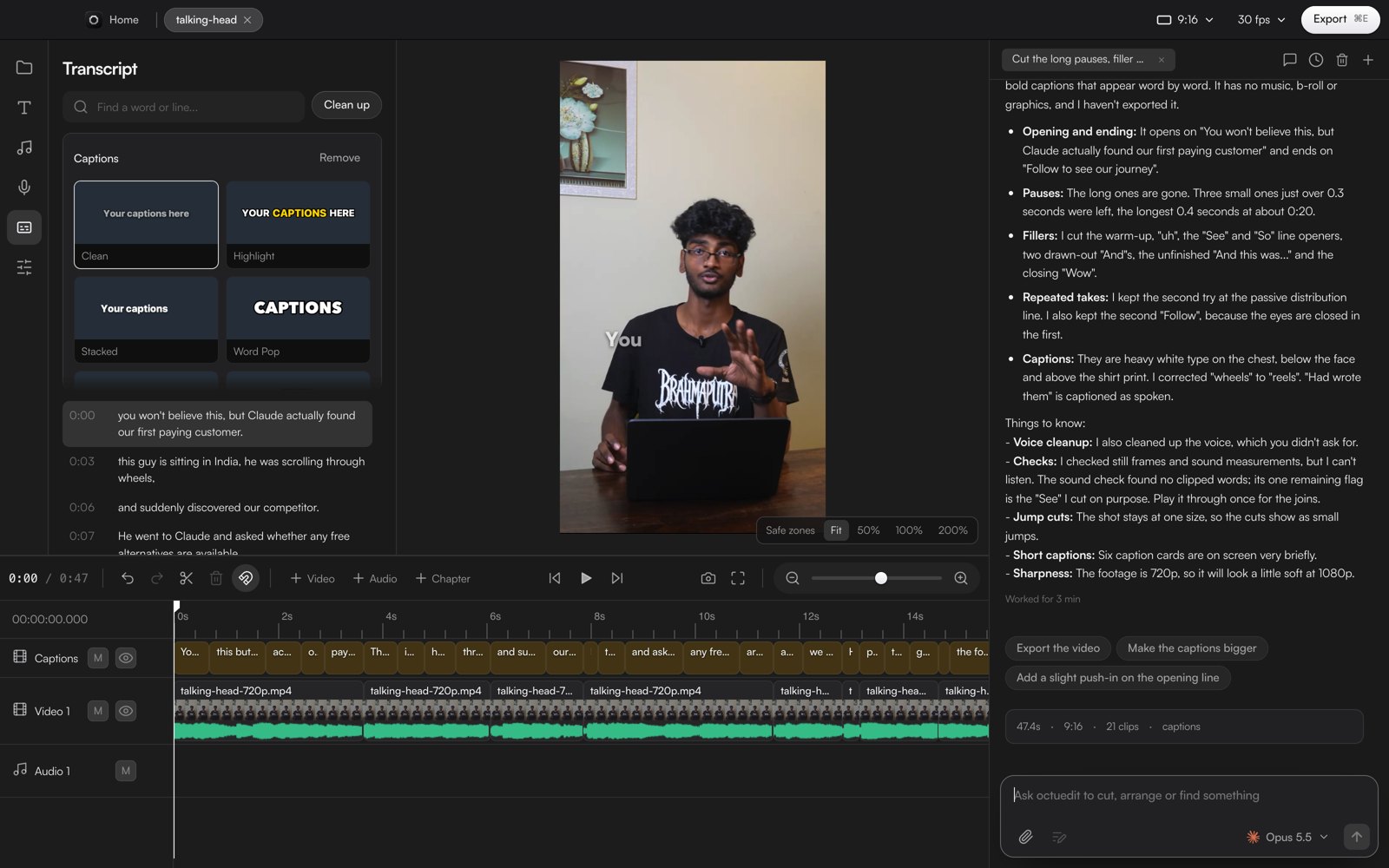
SRT files show whole lines, and YouTube ignores any style markup in them. WebVTT can mark word times inside a cue, but YouTube and the social apps don't animate them. So in practice the effect only exists burned in. That's why social video uses burned in captions and long YouTube videos use files.
CapCut on a Mac
CapCut's desktop app makes captions from speech and has a large library of animated caption templates. CapCut's help page says auto captions can include Pro-only features, and if they do, you need Pro to export. CapCut Pro is $19.99 billed monthly or $179.99 a year in the US. Our CapCut comparison goes deeper.
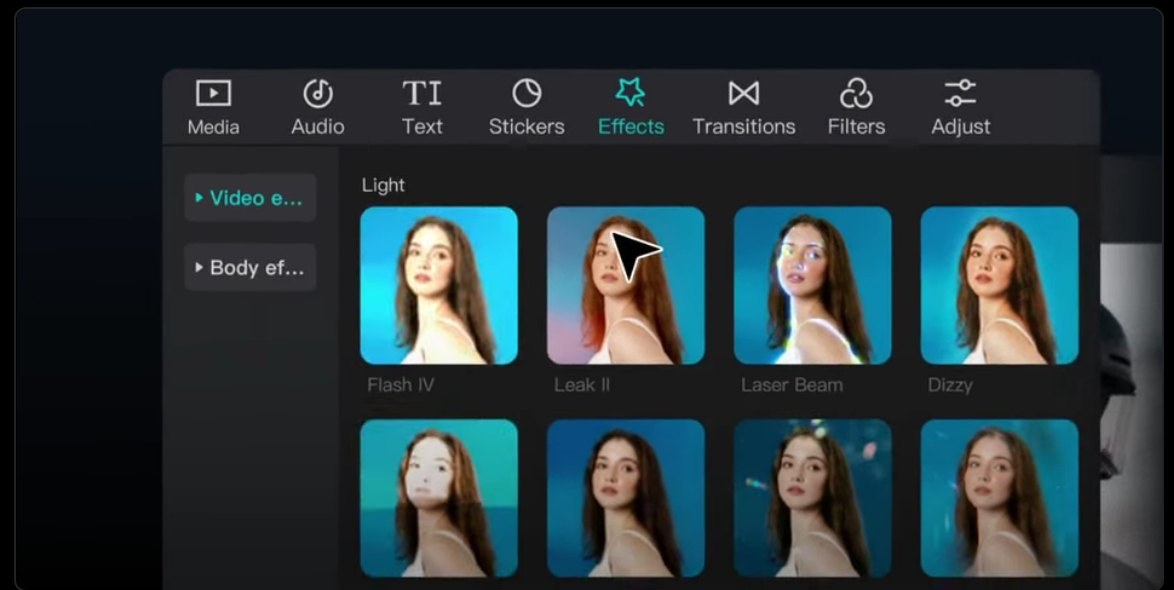
Recently updated and now auto captions in capcut is for pro. So dissappointing.
a commenter in r/CapCut thread
Descript and browser caption apps
Descript's Dynamic captions add animated captions with word highlighting you can restyle. The free plan has them too, with a watermark and 720p export. The Hobbyist plan is $24 billed monthly, or $16 a month billed annually, with 10 hours of media a month.
Browser apps such as Submagic, from $19 billed monthly or $144 billed annually, do the same for short clips. We compare those in a separate guide to Submagic alternatives.
Your own Claude Code or Codex
If you pay for Claude Pro or ChatGPT Plus, both $20 billed monthly, your agent can run the free tools for you. Ask it to install whisper.cpp and ffmpeg-full, transcribe with word times, write a styled subtitle file and burn it in. It works, but fixing one wrong word means editing a file and rendering again.
Open source helpers exist. video-use burns two-word captions but sends audio to ElevenLabs for transcription. Remotion builds TikTok style captions in code and is free for teams of up to three. Our Claude Code video editing guide covers this route in full.
octuedit
octuedit is an AI video editor, a desktop app you download, and we make it, so read this with that in mind.
Type a request like "bold word by word captions, highlight the key word in each line" in the chat. It transcribes the speech on your computer by default, with word timing. Caption cards land on a normal timeline inside the Reels, TikTok and Shorts safe area. You choose from 18 styles in four modes: whole line, karaoke highlight, reveal as spoken, or one word at a time.
You can edit any card by hand, and a locked card keeps your words if captions are rebuilt. A custom vocabulary of up to 60 names keeps brand names right. Export with captions burned into MP4, MOV or WebM, or save SRT or WebVTT. The captions feature page lists every style.
The honest limits:
- It's $99 once with a 14 day refund, and it also needs your own paid Claude Code or Codex plan, such as Claude Pro at $20 billed monthly or $200 a year.
- Transcription runs on your computer by default (Groq is an option with your own key). Your agent sees the transcript lines it works with. If Claude Code is installed, your Claude gets still frames from each clip for search, with no off switch.
- It needs macOS 13 or later (Apple silicon and Intel), or Windows 10 or 11 (64-bit, beta).
- Caption styling doesn't carry over when you hand a project to Final Cut, Premiere or Resolve, so export an SRT for those.
If you already own Final Cut Pro on an Apple silicon Mac, its Highlight captions may be all you need.
Which caption styles are easiest to read?
Big, high contrast and short wins on a phone. These rules hold for every tool above.
- Show two to four words per card for word by word captions, and one or two lines for long videos.
- Use white or yellow text with a dark outline or box, so it reads over any background.
- Highlight one key word per line at most. Lighting up every word in a new color tires the eye.
- Break lines at natural pauses, not in the middle of a phrase.
- Avoid long all-caps blocks; they read slower than mixed case.
Where captions go on Reels, TikTok and Shorts
Keep captions in the middle band of a vertical video. Open any Reel and you'll see why: the app draws the caption, username and music line along the bottom. The like, comment and share buttons sit on the right edge.
Just below the speaker's chin is usually safe. Final Cut, Takes and octuedit have safe area options. Still, check each export on a phone. For more on vertical formats, see our vertical video page.
Should you burn captions in or export an SRT file?
Burn captions in for Reels, TikTok and Shorts, where styled, word by word captions do the most work and the apps won't read your file. Export an SRT file for YouTube, where viewers can switch captions off and the text stays editable. For a long video that also becomes clips, make both: an SRT for the full upload and burned in captions for each clip.
| Where it's going | Burned in | SRT or VTT file |
|---|---|---|
| Reels, TikTok, Shorts | Yes, styled | Rarely used |
| YouTube long videos | Optional | Yes, viewers toggle it |
| Another editor | No | Yes, import the file |
Fix words and timing before you export
Automatic captions get names, numbers and brand words wrong more than anything else. Read the whole transcript before you style anything. Fix words in the tool that keeps the timing, not after burning them in. If timing drifts, fix it in a tool that keeps word times rather than retyping titles.
If captions are generated with bad timing there is NOTHING that can be done to fix it!!!!!
a commenter in r/CapCut thread
Cut first, caption last. If you trim pauses or filler words after captioning, hand-timed titles and SRT files fall out of sync. Tools that keep word times redo the layout for you. Our guide to removing filler words and silences covers that step.
What we'd do next
Pick the route that matches what you already have. If you own Final Cut Pro on an Apple silicon Mac, run Generate Captions with the Highlight style today. If you post once a month, the free routes are enough: iMovie titles for a short clip, or an SRT file for YouTube.
Post short clips every week and want word by word captions inside the whole edit? Try octuedit, and use the 14 day refund if it doesn't fit. Whatever you choose, caption last and check every name on a phone before you post.
Questions
Can a Mac add captions to a video automatically for free?
Not with macOS alone, since Live Captions only shows text while audio plays. Free routes that make captions from speech are YouTube's automatic captions after upload, whisper.cpp in Terminal, and Shotnix. Shotnix is free, open source and transcribes on the Mac.
Can iMovie add captions automatically?
No. iMovie has no speech to text, and Apple lists no SRT import or export for it. You add captions by typing each line as a title and stretching it to fit the speech. That works for a short clip but takes hours on a long video.
How do I add an SRT file to a video on a Mac?
Upload the SRT next to the video on YouTube, and viewers can switch it on. To burn it into the picture, import it into DaVinci Resolve or Final Cut Pro. Then export the video with the captions shown, so they play everywhere.
Does Live Captions on a Mac save captions into a video?
No. Live Captions and the generated subtitles in macOS 27 are for watching. They show text on screen while audio plays, but they don't add anything to the video file. To keep captions, use an editor or a subtitle file.
What is the difference between captions and subtitles?
Captions write out speech, and closed captions can also note sounds, for viewers who can't hear the audio. Subtitles usually translate speech into another language. In editors the words blur together: both can be burned into the picture or saved as an SRT or VTT file.
Can QuickTime add captions or subtitles to a video?
No. QuickTime Player only plays video. VLC can save a copy with an existing subtitle file embedded, but neither makes captions from speech. To make captions, use iMovie, Final Cut Pro or DaVinci Resolve, or write an SRT file in TextEdit.
Can I translate captions into another language on a Mac?
Yes, in a few ways. You can upload a separate SRT file for each language on YouTube. Some Mac caption apps, such as Shotnix on macOS 15 or later, translate captions while keeping the timing. Have a native speaker read the result before you post it.
Do captions help a video get more views?
They make a video usable with the sound off and easier to follow when speech is fast. A subtitle file also gives YouTube the words spoken in your video as text. Whether views rise depends on the content, so judge from your own analytics, not a promised number.
Sources
- Apple, Use subtitles and closed captions on Mac
- iMovie on the Mac App Store
- Apple, Add titles in iMovie on Mac
- Shotnix, How to add captions to a screen recording on Mac
- YouTube Help, Use automatic captioning
- Apple, Final Cut Pro User Guide, captions
- Final Cut Pro on the Mac App Store
- Apple Creator Studio
- Adobe Premiere plans and pricing
- Adobe, Speech to Text in Premiere
- Adobe Community, automatic animated subtitles with word highlighting request
- Blackmagic Design, DaVinci Resolve edit page
- Blackmagic Design, DaVinci Resolve Studio
- CapCut Help, Pro features for Standard users
- CapCut pricing
- CapCut auto caption generator
- Descript pricing
- whisper.cpp, word level timestamps
- Homebrew, ffmpeg formula
- Homebrew, ffmpeg-full formula
- video-use issue 118, subtitle burn-in on macOS
- video-use on GitHub
- Takes, add captions to a video on Mac
- Remotion, createTikTokStyleCaptions
- Remotion license
- Claude pricing
- OpenAI, Codex pricing
- octuedit pricing
- Elmedia, How to add subtitles to a video on Mac
- Submagic pricing
- Apple, Get captions of spoken and computer audio on Mac
- W3C, WebVTT: The Web Video Text Tracks Format
- YouTube Help, Supported subtitle and closed caption files
- whisper.cpp, command line tool options
- Adobe, export caption tracks in Premiere
Facts about other tools come from each company's own website, checked 23 November 2026, and may change.