Which Claude Code video editing skill should you use in 2026?
A skill is a folder of steps Claude Code loads to edit your footage. Pick one by the job. video-use is the most complete all-rounder but sends audio to ElevenLabs. ffmpeg-skill and cut-video run fully on your Mac. tenfoldmarc and ghost-editor make talking-head reels, claude-shorts cuts long videos into shorts. All are free to install on a $20 a month plan, and most render a file. octuedit, an AI video editor, adds a timeline.
Updated 24 November 2026 · By Shivank Goura, co-founder of octuedit. We make octuedit.
Which Claude Code video editing skill fits your video?
Choose the skill by the video you make, then check two things: where it transcribes your audio and what licence it carries. Some of these skills run fully on your Mac, while others send audio to a paid service. The table below lists both for each skill, next to the job it does best.
Use the Claude Code video editing skill that matches your video. video-use is the most complete all-rounder for filler, dead air and subtitles, but it needs an ElevenLabs key and sends audio there. ffmpeg-skill and cut-video keep every cut on your Mac, and cut-video suits long talks and podcasts. For Instagram reels from repeated takes, use tenfoldmarc's video-edit-skill or ghost-editor. For vertical shorts from a long video, use claude-shorts. For talking-head YouTube with code-built visuals, use claude-youtube-editor. For vlogs and classes you finish in DaVinci Resolve, use the appariciojunior skills, which carry a non-commercial licence. Herk Edit Kit adds motion graphics to Reels and Shorts. All are free to install on a $20 a month plan. Most render a file, so pick an editor if you need a timeline.
We make octuedit, so read this with that in mind. Every fact below comes from each project's own README, issues and GitHub page, checked on 23 November 2026. We did not run these skills for this page, so nothing here is a speed or quality score.
A skill is a folder with a SKILL.md file of instructions, plus any scripts it needs. Claude Code loads it when a task fits, or when you type its slash command. Personal skills live in ~/.claude/skills/. For every route to editing with Claude Code, not only skills, see the Claude Code video editing hub.
| Skill | Best for | Transcribes with | Licence |
|---|---|---|---|
| video-use | Any footage: filler, dead air, subtitles | ElevenLabs Scribe (key required) | MIT |
| ffmpeg-skill | Reliable cuts, captions, reframes, loudness | Local faster-whisper (optional) | MIT |
| cut-video | Tightening long talks and podcasts | Local Whisper plus forced alignment | MIT |
| Herk Edit Kit | Reels and Shorts with motion graphics | ElevenLabs by default | MIT |
| claude-youtube-editor | Talking-head YouTube with code-built visuals | AssemblyAI | MIT |
| video-edit-skill | Instagram reels from repeated takes | Local faster-whisper | No licence file |
| ghost-editor | Styled talking-head reels | Local Whisper | MIT |
| claude-shorts | Long video to vertical shorts | Local faster-whisper | MIT |
| appariciojunior | Vlogs and classes finished in Resolve | A speech API you choose | CC BY-NC 4.0 |
Which route fits you?
- Podcast or long talk, nothing leaves the Mac: cut-video. Type
/cut-video, read the cut list it prints, then say "go". - Mixed footage, an ElevenLabs key is fine: video-use. Drop the takes in a folder and ask it to cut filler and dead space.
- Reels from takes you repeat on camera: tenfoldmarc's skill. Its README example is
/video-edit I just dropped 5 clips in my downloads. - Clips from a long video: claude-shorts, run as
/shorts ~/Videos/my-talk.mp4. The shorts guide covers every other route. - A weekly talking-head video: the talking-head routine covers that one job end to end.
For a weekly talking-head channel on a Mac, I'd start with cut-video. It is local, it waits for your go, and it adds nothing you didn't ask for.
What does each skill do, and where does it break?
Every skill below cuts your own footage and renders a new file. They differ in what they decide for you, what they install and which service hears your audio. Each entry gives setup, what it does, the weak spots its README or issue list admits, the licence and the last update on GitHub. Star counts change weekly, so I left them out.
Here is what each one needs on a Mac, and whether its README names Codex.
| Skill | Needs on a Mac | Codex named | Updated |
|---|---|---|---|
| video-use | ffmpeg, uv, ElevenLabs key | Yes | 8 Oct 2026 |
| ffmpeg-skill | ffmpeg 6.1+, Python 3.10+ | Yes | 23 Nov 2026 |
| cut-video | Apple silicon, local Whisper | No | 9 Jul 2026 |
| Herk Edit Kit | Node 22, Git, ffmpeg, Chrome | Yes | 14 Oct 2026 |
| claude-youtube-editor | Python 3.10+, Node 18+ | No | 5 Nov 2026 |
| video-edit-skill | Node 22, Python 3.10+ | No | 15 Oct 2026 |
| ghost-editor | Apple silicon, about 4 GB | No | 18 Nov 2026 |
| claude-shorts | Python, PyTorch; runs on CPU | No | 11 Jul 2026 |
| appariciojunior | Resolve Studio, speech API key | No | 23 Oct 2026 |
video-use (browser-use)
You drop raw takes in a folder, chat with Claude Code or Codex, and get edit/final.mp4. It cuts filler words, false starts and dead space, adds 30 ms audio fades at every cut and burns subtitles. It proposes a plan and waits for your OK before cutting. It does not watch the video: it reads a word-level transcript plus filmstrip and waveform images.
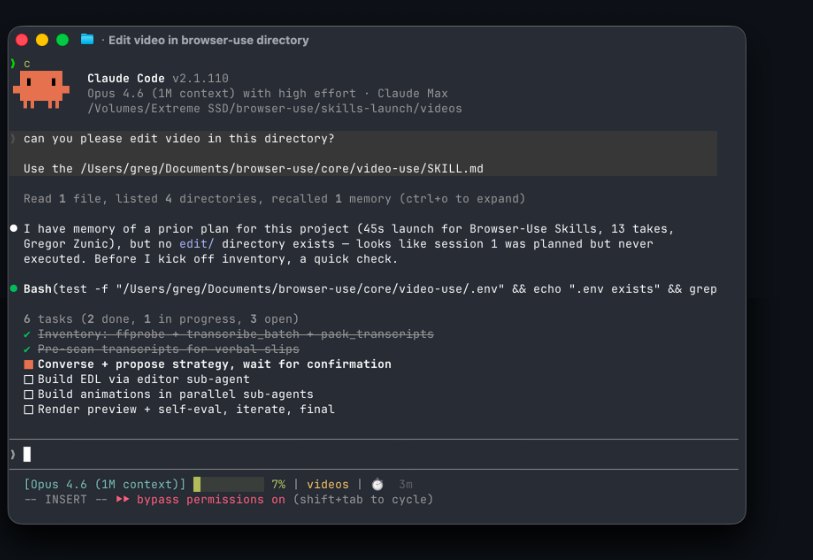
Setup is a pasted prompt, or a clone with uv sync, brew install ffmpeg and an ElevenLabs key in .env. The install guide is blunt: "Without a key, nothing transcribes." One open issue reads portrait clips as landscape on ffmpeg 4.4. MIT, last updated 8 October 2026.
ffmpeg-skill (kajisho5)
ffmpeg-skill gives Claude Code, Codex or Cursor 42 local ffmpeg tools with a probe, edit, check and verify routine. It covers cuts, joins, silence and filler removal from measured word timings, 9:16 crops, captions, loudness, multicam sync and batch folders. There are no API keys, and its README says the audio is never uploaded.
The catch is in its own words: it "does not decide what to cut." You or the model still make the editorial calls. Caption placement is listed as unverified, so check a contact sheet first. Install with npx ffmpeg-skill. MIT, last updated 23 November 2026.
cut-video (Louise de Sadeleer)
cut-video tightens long recordings. It removes silences, ums, false starts and retakes "while preserving laughs and comedic pauses", with four tone presets. It prints a cut list and waits for "go", then checks the render for stutters. An optional browser page shows a waveform where you drag to delete ranges, then paste the new keep list back for a quick re-render.
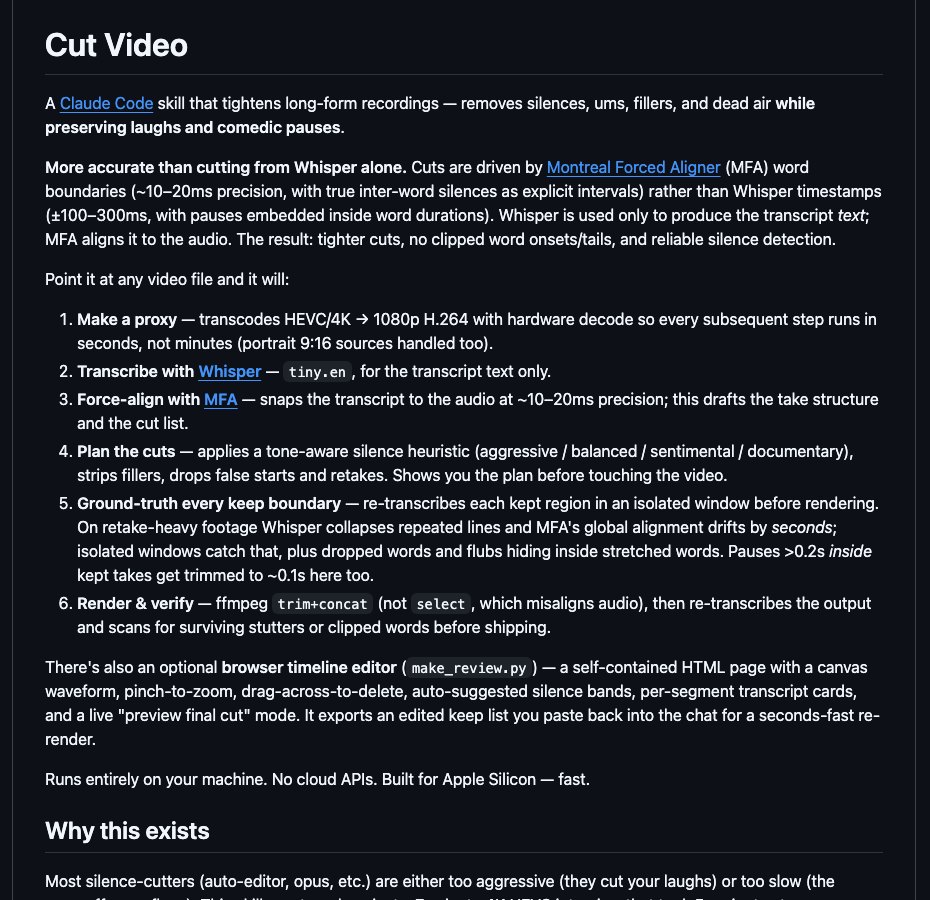
It is built for Apple silicon, runs entirely on your machine and adds no zooms, b-roll, captions or motion graphics. The README warns that "ASR timestamps lie on real footage. Whisper collapses retakes, drops words", so it adds forced alignment on top of Whisper. MIT, last updated 9 July 2026.
Herk Edit Kit (Nate Herk)
Herk Edit Kit is 15 skills mirrored for Claude Code and Codex, built on HyperFrames, with 406 draft motion graphics cards. It cuts silences, finds mistakes and shows proposed cuts for review, then adds captions, b-roll and beat sync. You run /edit-video in Claude Code or $edit-video in Codex.
It needs Node 22, Git, ffmpeg and Chrome or Chromium. The included transcriber uses ElevenLabs, and local Whisper takes extra setup. One open issue matters: the Kie.ai helper "uploads any local file path it is given". MIT, last updated 14 October 2026.
claude-youtube-editor (Hasan Aboul Hasan)
This is a six-step pipeline from a raw talking-head recording to a private YouTube draft. It covers the clean cut, Remotion visuals synced to your words, voice cleanup, sound effects, a title with three thumbnails, and the upload. Before the render, a local cut editor in the browser lets you drag the keep and cut edges yourself.
The author's guide is worth reading for its cost table and FAQ. It says setup takes about 30 minutes and was tested on Windows 11 only; on a Mac, "It should" work.
Transcription runs on AssemblyAI, and ElevenLabs and Gemini are paid extras for voice and thumbnails. The README warns that unchanged, your videos will look like someone else's channel. MIT, last updated 5 November 2026.
video-edit-skill (tenfoldmarc)
tenfoldmarc's skill turns phone talking-head clips into an Instagram reel. It picks the best take of each line, cuts dead air and can place words behind your head. It offers three looks and keeps text inside Instagram's safe zone. You paste one install line into Claude Code, then run /video-edit.
Transcription is local with faster-whisper, and it was built and tested on a Mac. Windows support is new and lightly tested, per the README. It suits one format, a vertical reel with you on camera.
The bigger issue is legal: the repo has no licence file, and a user asked for one on 27 October. Last updated 15 October 2026.
ghost-editor (kurbaitaev)
ghost-editor takes a raw talking-head take and returns a styled reel. It offers 19 named styles and an "edit mine like this reel" mode. An approval page shows a frame at every cut before it renders. It then checks pauses, levels and caption size itself.
The install is about 4 GB. The README asks for a Mac with Apple silicon and says Linux and Intel Macs are untested.
The README says a 60-second reel takes about 15 to 25 minutes of machine time on an M3 MacBook Air. Its b-roll check needs a free Gemini key, and "the frames it checks go to Google". MIT, last updated 18 November 2026.
claude-shorts (AgriciDaniel)
claude-shorts finds 8 to 12 candidate clips in a long video and scores them on a five-part rubric. You approve the picks, then Remotion renders 1080 x 1920 shorts with animated captions. It can also track the cursor in screen recordings.
Setup installs faster-whisper, mediapipe, OpenCV and PyTorch. The README recommends an NVIDIA GPU for transcription and encoding, which Macs don't have, so they use the CPU fallback. Windows needs WSL 2. MIT, last updated 11 July 2026, so it has been quiet for four months.
video-editor-skills for DaVinci Resolve (appariciojunior)
These 12 skills make Claude Code a "first-pass video editor" inside DaVinci Resolve Studio, for vlogs and classes. Claude adds new timelines and clips in Resolve and never touches your template. That makes this the one skill on the list where you finish on a real timeline.
There is no code in the package: Claude builds the small scripts with you. You need Resolve Studio, which is paid, plus a speech-to-text API key you set up yourself. The licence is CC BY-NC 4.0, which bars use "in anything sold". Our Claude and DaVinci Resolve guide covers every route.
Do you need a Remotion or HyperFrames skill?
Only for graphics. Remotion's official skills teach Claude Code to write correct Remotion code, and HyperFrames renders HTML to video. They make titles, lower thirds and overlays, but they don't pick the best take from an hour of footage. Remotion is free for individuals and companies of up to 3 people.
Also on the lists
The claude-video-effects skill adds one of 51 effects to a reel you already cut, and does no cutting. SeeCut sends your video to Gemini to review its own drafts and uses a non-commercial licence. Aakash Gupta's 30-skill zip runs locally but is "tuned for one kind of shot: head and shoulders".
How do you install a Claude Code skill on a Mac, and is it safe?
Most video skills install the same way on a Mac. Install ffmpeg with Homebrew, copy the skill into ~/.claude/skills/ and call its slash command. Claude Code notices a new skill there without a restart, and keys go in only if the skill needs one. Treat every skill as code you are about to run, because its scripts run with your user permissions.
- Install ffmpeg:
brew install ffmpeg. If captions fail to burn in, that is a known gap. Homebrew's default ffmpeg on Apple silicon lacks the caption filters. ffmpeg-skill also notes its HDR tools needffmpeg-full. - Add the skill: clone it, for example
git cloneinto~/.claude/skills/cut-video. Or paste the README's install line into Claude Code, which tenfoldmarc and ghost-editor both offer. - Reload if needed: Claude Code picks up changes in
~/.claude/skills/live. If that folder did not exist when the session started, run/reload-skillsor restart. - Add keys to the
.envfile the README names, such asELEVENLABS_API_KEYfor video-use. - Call it:
/cut-video,/video-edit,/shortsor/edit-video. - Start on a copy of a short clip, and keep the original somewhere the skill can't write.
When the install script fails
Install scripts are where people get stuck, on any system. Here is one Windows user of a folder-based captions skill.
I keep getting stuck on install.sh with it stating Chrome/Chromium isn't installed, i've already had Chrome installed
a commenter, r/ClaudeAI thread
When that happens, ask Claude Code to read the install script and tell you which check failed. I'd try that before reinstalling.
Check before you trust a skill
A video skill reads your files and runs shell commands. The agentskillshub directory grades skills with a rule-based scan and calls it "a first-layer scan, not a manual audit". It also cites a 2026 study that found security flaws in about a quarter of the skills it checked. Herk Edit Kit's open upload issue shows how small helpers can reach further than you expect.
- Read
SKILL.mdand skim the scripts it calls. - Look for anything that uploads, and to where.
- Check the open issues for the last month.
- Prefer a repo updated in the last few months.
What do these skills cost, and what leaves your Mac?
The skills themselves are free to install. What you pay for is the plan Claude Code or Codex runs on, and sometimes a transcription service. Claude Code is included from Claude Pro at $20 a month, and ChatGPT Plus at $20 a month includes the Codex CLI. Local skills keep your footage on the Mac; cloud transcribers receive your audio.
| Skill | Extra cost | Leaves your Mac | Adjust a cut by hand? |
|---|---|---|---|
| video-use | Scribe, $0.20 an hour | Audio | No, ask again |
| ffmpeg-skill | $0 | Nothing | No, ask again |
| cut-video | $0 | Nothing | Browser page |
| Herk Edit Kit | ElevenLabs | Audio | No, review cuts first |
| claude-youtube-editor | AssemblyAI | Audio, final video | Browser editor |
| video-edit-skill | $0 | Nothing | No, ask again |
| ghost-editor | $0 (free Gemini key) | Checked frames | Approval page |
| claude-shorts | $0 | Nothing | No, ask again |
| appariciojunior | Resolve Studio, speech API | Audio | Yes, in Resolve |
The plan is the real cost
Claude Pro is $20 a month billed monthly, or $17 a month billed annually. Max is $100 and Ultra is $200. ChatGPT Plus is $20 a month with Codex in the CLI, and Pro starts at $100. Long editing sessions count against your plan's usage limits, so heavy weeks can push you to a bigger plan.
Transcription, worked out
ElevenLabs lists Scribe on its API at $0.20 per hour of audio. Ten hours of raw footage a month on video-use is 10 x $0.20 = $2. Add Claude Pro and the month costs $20 + $2 = $22.
AssemblyAI lists $0.15 to $0.21 per hour, depending on the model. claude-youtube-editor's ElevenLabs voice and Gemini thumbnails are optional and paid on top. Gemini's API has a free tier with limits.
What the cloud services see
Most cloud services here receive only your audio, with three exceptions. SeeCut sends the video to Gemini, and ghost-editor sends the frames it checks to Google. And claude-youtube-editor uploads the final video to your YouTube as a private draft. Claude Code itself also reads transcripts and the images a skill makes, under your Anthropic account.
Can you use these skills for client or paid work?
Mostly yes: seven of the nine skills compared here use the MIT licence, which allows commercial use. The appariciojunior skills are CC BY-NC 4.0 and bar use in anything sold. The tenfoldmarc repo has no licence file, so the author keeps default copyright. This is not legal advice, so read each licence file yourself.
- MIT: video-use, ffmpeg-skill, cut-video, Herk Edit Kit, claude-youtube-editor, ghost-editor, claude-shorts.
- Non-commercial: appariciojunior (CC BY-NC 4.0) and SeeCut (PolyForm Noncommercial).
- No licence file: video-edit-skill and Remotion's official skills.
- AGPL: OpenChatCut, an open source editor, not a skill.
Two catches hide under the skill's own licence:
- Remotion: claude-shorts and claude-youtube-editor render with Remotion, which is free only for individuals and companies of up to 3 people. A company seat costs $25 a month.
- Demo files: ghost-editor's code is MIT, but its demo clips are not for reuse.
agentskillshub gives the same advice: check the licence file on each repo before commercial use. If you edit for clients, note which skill touched which project.
When is an editor app easier than a skill?
An editor app is easier when you want to fix one cut without asking again. Most skills above render a file: to move a join by half a second, you describe it, wait for a new render and watch again. Three soften that: cut-video, claude-youtube-editor and the Resolve skills. A skill is the better pick when you want free, you work on Linux, or you batch one edit.
Plenty of people are happy with render-only. One skill author wrote about their own /editor skill:
Finally finished this and it's been my main workflow for a few weeks. The skill (
the post author, r/ClaudeCode thread/editor) does the full edit on raw recordings with no manual cuts
Others want a timeline back. A comment on a post about editing with Claude Code and open source tools:
Not sure I'd want a text based video editor, maybe for a rough cut or as like an assistant while cutting.
a commenter, r/ClaudeAI thread
Claude Code can't watch the video
The second gap is seeing. Claude Code reads transcripts and still images, not moving video. Another user wrote:
i would love CC to be able to "view" a video. so far I've used self written mcp which grabs couple of jpg files from the video and feeds it to it which is sub optimal.
a commenter, r/ClaudeCode thread
Where a skill wins
- Free: every skill here costs nothing to install.
- Windows and Linux: ffmpeg-skill, Herk Edit Kit and tenfoldmarc's skill name both; octuedit has no Linux version.
- Scripts and batches: the same edit over 50 files is a loop, not a click.
- One fixed style: if every reel looks the same, tenfoldmarc or ghost-editor already encode it.
None of these skills replaces CapCut, Premiere or Descript for hand editing. They replace the first rough pass.
Where an app wins
octuedit is an AI video editor where your own Claude Code or Codex edits on a real multi-track timeline. It is a desktop app you download.
You can still trim, drag and split by hand, and undo covers the AI's edits. It costs $99 once with lifetime updates and a 14 day refund; your Claude or ChatGPT plan is billed separately. Its MCP mode also lets Claude Desktop and Cursor edit your projects.
It has limits too. It needs macOS 13 or later (Apple silicon and Intel), or Windows 10 or 11 (64-bit, beta). There is no free download, and the AI needs the internet. Transcription runs on your computer by default; Groq is optional.
Your Claude gets still frames from each clip for visual search, with no off switch. The app also sends octuedit diagnostics and a record of each AI edit, never media, linked to your licence email. Each has its own switch in Settings > Privacy, and shared edits start off in the EEA, the UK and Switzerland. The privacy policy has the full list, and the Claude Code page shows how it connects.
Open source editors in between
Open source editors sit in between. OpenChatCut (AGPL) and BaoCut (a source-available community licence) give Claude Code or Codex a timeline you can also drag by hand. Both are young projects, so check their issue lists as you would a skill's.
What we'd do next
Start with the skill that matches your most common video, not the one with the most stars. For nothing leaving your Mac, try cut-video or ffmpeg-skill first; if an ElevenLabs key is fine, try video-use. Run it on a two-minute copy and listen to every join.
- Read the licence before you use it on client work.
- Keep the request that worked as your template.
- If you keep re-asking to move cuts, try an editor with a timeline. The pricing page lists what octuedit includes.
Questions
Can Claude Code edit videos with a skill?
Yes. A skill gives Claude Code tested steps and scripts for ffmpeg and a transcriber. It cuts filler, pauses and retakes and renders a new file. Only the Resolve skills put the edit on a timeline you can adjust; the rest render a file you review and ask again to change.
Is there a free Claude Code video editing skill?
Every skill on this page is free to install. ffmpeg-skill, cut-video, claude-shorts and video-edit-skill transcribe locally, so they add no cost. You still need a paid plan to run Claude Code or Codex in a terminal, from $20 a month for Claude Pro or ChatGPT Plus.
Where do I find video editing skills on GitHub?
Search GitHub for the repo names on this page. Or browse the awesome-claude-video-skills list or agentskillshub, which grade their repos on security. Both mix editing with video generation, so filter for skills that cut footage you already shot.
Can Claude Code watch the video it edits?
Not as moving video. Skills like video-use give Claude Code a word-level transcript plus filmstrip and waveform images. ghost-editor shows a frame at every cut. SeeCut sends the video to Gemini to review. Always watch the final render yourself before you post it.
Do these skills work with Codex?
Some do. video-use, ffmpeg-skill and Herk Edit Kit name Codex in their READMEs, and Herk mirrors every command for it. cut-video, claude-shorts, ghost-editor and tenfoldmarc's skill name only Claude Code. For Codex in the CLI, ChatGPT Plus at $20 a month is the entry plan.
What is the difference between a skill, a plugin, a subagent and an MCP server?
A skill is instructions Claude Code loads for a task. A plugin bundles skills and commands for one install. A subagent is a helper Claude Code starts for one task. An MCP server exposes tools over a standard protocol (MCP guide).
Can a skill edit in Premiere Pro, Resolve or CapCut?
appariciojunior's skills work inside DaVinci Resolve Studio, on its own timeline. SeeCut hands over layered files and can push a Jianying (CapCut China) draft. For Premiere Pro, the options are MCP bridges, not skills; the hub covers each one.
Should I build my own skill?
If your videos follow one format, yes. Start from an MIT skill close to your style and edit its SKILL.md for your pacing and captions. The hard part is checking cuts, so have it write a cut list you can read before every render.
Sources
- video-use, browser-use (README)
- video-use install guide
- video-use issue 232, portrait clips on ffmpeg 4.4
- video-use issue 118, caption filters in Homebrew ffmpeg on Apple silicon
- ffmpeg-skill, kajisho5 (README)
- Herk Edit Kit, Nate Herk (README)
- Herk Edit Kit issue 16, Kie.ai helper uploads any path
- claude-youtube-editor, Hasan Aboul Hasan (README)
- Claude Code video editing guide, Learn With Hasan
- video-edit-skill, tenfoldmarc (README)
- video-edit-skill issue 2, request for a licence file
- video-editor-skills, appariciojunior (README)
- cut-video, Louise de Sadeleer (README)
- claude-shorts, AgriciDaniel (README)
- ghost-editor, kurbaitaev (README)
- claude-video-effects, Vibha Ramprakash (README)
- SeeCut, YeJe-cpu (README)
- Edit videos with Claude Code, Aakash Gupta
- Remotion agent skills (README)
- Remotion pricing
- HyperFrames, HeyGen (README)
- Claude plans and pricing
- ChatGPT plans and Codex access
- ElevenLabs API pricing
- AssemblyAI pricing
- DaVinci Resolve Studio, Blackmagic Design
- Claude video editing and Remotion skills, agentskillshub
- awesome-claude-video-skills, zhuyansen
- OpenChatCut (README)
- BaoCut (README)
- Extend Claude with skills, Claude Code docs
- Gemini API pricing
Facts about other tools come from each company's own website, checked 23 November 2026, and may change.