How do I get Claude to cut my weekly talking videos on my own Mac?
Yes. octuedit, an AI video editor for Mac, lets your own Claude Code cut a weekly talking head video. You record, import, ask it to remove pauses, filler words and repeated lines and keep the best take, check the cuts on a timeline, then add captions last and export. Transcription stays on your Mac. It costs $99 once, plus the Claude plan you already pay for.1
Updated 4 November 2026 · By Shivank Goura, co-founder of octuedit. We make octuedit.
Can Claude cut a talking head video on my Mac?
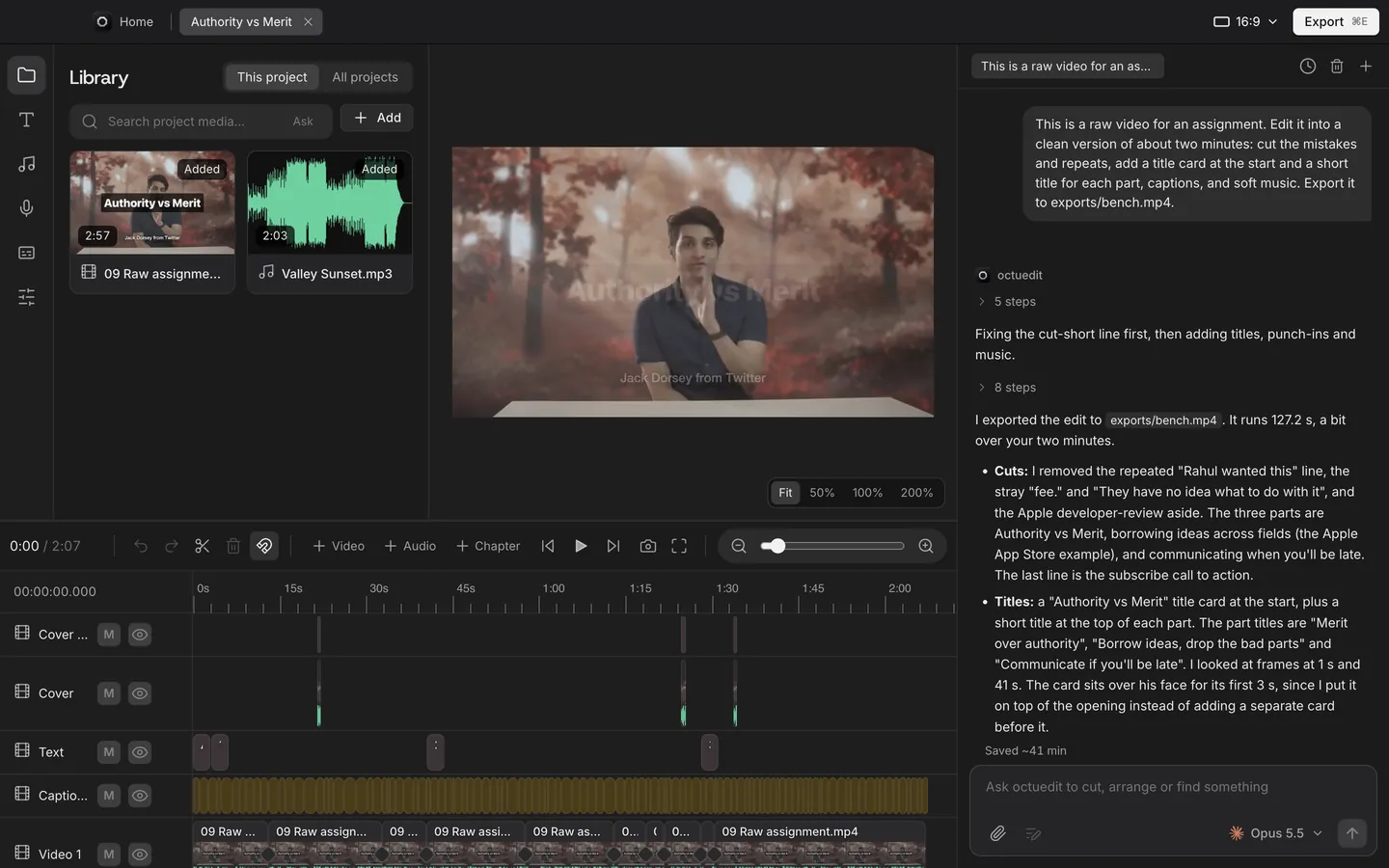
Yes, if Claude has an editor to work in. Claude Code on its own reads files and runs commands, but it has no timeline.2 octuedit, an AI video editor for Mac, gives your own Claude Code one. It removes pauses, filler words and repeated lines, keeps the best take, and leaves every cut on a timeline you can change by hand.
A creator on r/ContentCreators described the problem well. They record 20 minutes to camera once a week, then lose two hours to the same chores. They scrub four takes of one sentence, trim dead air, fix captions that drift and hunt for something to show besides their face.7
None of that is creative. It repeats every week, so it is worth handing to a tool. The same poster noticed that the ratio never improved with practice, because the work is mechanical and not a skill problem.
We make octuedit, so read this with that in mind. Competitor facts below come from each company's own pages, checked on 4 November 2026. I'll also say where another tool is the better pick.
Here is what each piece does in this routine:
- Your Claude Code plan does the thinking: it reads the transcript and decides what to cut.
- octuedit transcribes on your Mac, holds the timeline and applies the cuts.
- You decide what stays, because only you know which take sounded right.
What Claude Code does without an editor
Claude Code runs in your terminal. It can install Whisper, which turns speech into text, and ffmpeg, a command line tool that cuts and joins media files.3 Ask it to transcribe a recording and cut out the gaps, and it will write the commands for you.
That route works, and it is free beyond your Claude plan. The trouble shows up in week two. Each change means a new command and a new render. Nothing shows you the cut, so you check it by watching the whole file again.
An editor fixes the part that hurts: you see each cut as a clip, and you can fix one without redoing the rest. If you want the wider view of how Claude Code and Codex connect to editors, the claude-code hub lists every route. This page covers one job: the weekly talking head.
What is the weekly routine, step by step?
The routine has seven steps. Record with a marker, import, ask for the cut, check it, add captions, export, and hand off if you finish elsewhere. Captions come last, after the cut is locked. Each step below says what to type and what to look at.
Before you record
- Keep the camera running between takes. One file is easier to search and cut than six.
- Mark the keeper out loud. After a take you like, say "that one" or clap once. A commenter on the same thread put it this way:
Mark the keeper on camera - say "that one" or clap after the good take so it spikes the waveform - and that whole pass goes away.
u/garse, r/ContentCreators thread
A spoken marker shows up in the transcript, which gives Claude something to go on. It moves the decision to the moment you know the answer.
In the editor
- Import the recording. octuedit transcribes the speech on your Mac with word timings. Footage and transcription stay on the Mac.
- Ask for the cut. Type one request in the chat. For example: "Cut the filler words and long pauses at medium strength, remove repeated lines and keep the best take of each. Where I say 'that one', keep that take."
- Check the cuts. Play the timeline at normal speed. Every cut is a real edit, so you can restore a word, drag an edge or undo the agent's step.
- Punch in and caption, in that order. Ask for "punch in on the key lines", then "add bold word by word captions". Do captions last.
Why last? The same commenter explained it:
if you're captioning before the cut is locked, you pay for it twice. Captions last, always.
u/garse, r/ContentCreators thread
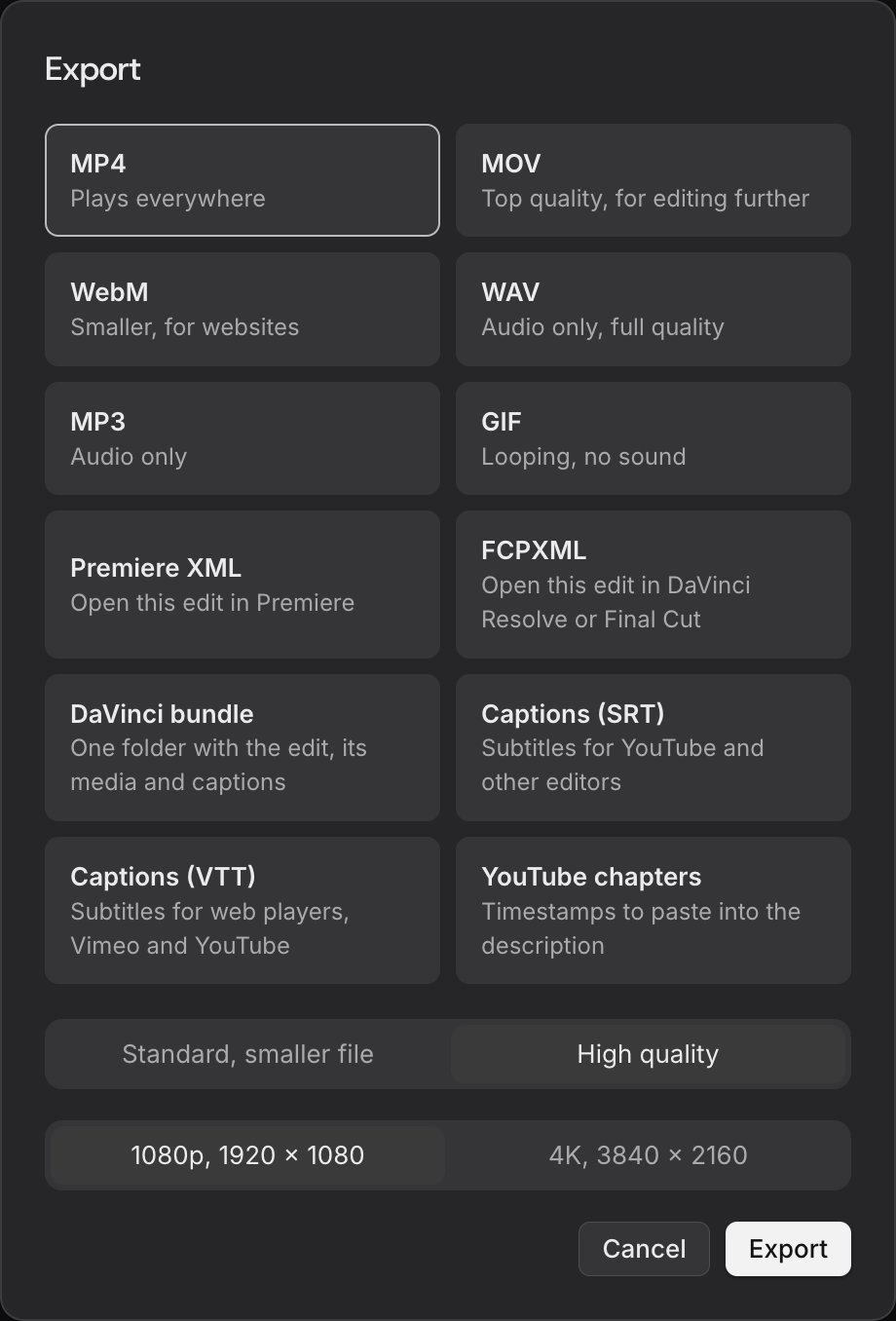
- Export. Pick MP4 for YouTube, or a project file if you finish in another editor. Ask for chapters too, and octuedit gives you a list to paste into the description.
What to check before you publish
Run this list on every episode. It takes a few minutes and catches most of what an automatic pass gets wrong.
- The first and last five seconds. Hooks and sign-offs are where a cut hurts most.
- Every place a line was repeated. Confirm Claude kept the take you would have picked.
- Joins that start with a hard consonant. Listen for a clipped p, t or k.
- Pauses before a key number or a punchline. Keep these. A beat of silence can be the point.
- Names, numbers and product words in the captions. Fix them before export.
- The chapter list. The first chapter must start at 00:00, and each needs to be at least 10 seconds long to work on YouTube.
Batch by task, not by episode
The thread had one more useful idea. A commenter did take selection for four episodes, then all the trimming, then all the captions. Their point was that much of the two hours is mode-switching, not work.
The routine above fits that. Run the cut request on every episode, check them in one sitting, and caption them in the next.
Finishing in Final Cut, Resolve or Premiere
If your last pass happens elsewhere, export FCPXML for Final Cut Pro or DaVinci Resolve, or Premiere XML for Premiere Pro. Project files do not carry transforms, keyframes, grades or caption styling, so export an SRT file for captions. The export guide has the steps.
How does Claude choose the take, and what can go wrong?
Claude reads the transcript, finds lines said more than once and marks the better take. That works well for mechanical retakes, such as a stumble followed by a clean repeat. It cannot hear energy or conviction, so you still judge delivery. Cuts also need a listen, because a cut that lands too tight can clip the start of a word.
Retakes are a guess you can check
A line said three times is easy to find in a transcript. Which one is best is harder. One commenter on the thread was blunt about it:
ASR word onset is on the consonant. So a word onset cut chops the attack off the first word and the resulting edit sounds clipped even though transcript says all the words are correctly placed.
u/MRRmaker, r/ContentCreators thread
That comment was about speech recognition timestamps in general, not about octuedit. The lesson holds for any tool: listen to the joins, especially where a sentence starts with a hard consonant like p, t or k. If a word sounds clipped, drag the edge a few frames earlier or undo that cut.
Pick a cut strength you can live with
octuedit removes filler words, stutter repeats and long pauses at light, medium or aggressive strength. I'd start at medium, then go lighter if the video sounds like someone reading. The filler word guide explains which fillers to keep.
Try the same recording at two strengths and compare them side by side. Undo makes this cheap, and it teaches you which setting suits your voice.
- Light: shortens only the longest pauses. The most natural pace.
- Medium: shortens shorter pauses too. A sensible starting point for a weekly show.
- Aggressive: the tightest pace. Better for short vertical clips than long talks.
Caption accuracy depends on the audio
Captions are transcribed from your audio, so accents, background noise and names can cause mistakes. Check names, numbers and product words before you export.
Some people should leave the flaws in
Not every video needs tightening. Another commenter called themselves a "one take, no edit guy" and said a few flaws make a video "More human." That is a fair choice. If your value is presence, a light pass for dead air may be all you need.
How does this compare with scripts, Descript, Gling and Auto-Editor?
All four routes below can remove pauses or retakes. They differ in cost, where your footage goes and whether you get a timeline you can edit. The table uses list prices from each company's own pages, checked on 4 November 2026.
| Route | Cost | Where footage goes | Retakes | Hand-off |
|---|---|---|---|---|
| octuedit with your Claude Code | $99 once, plus Claude plan | Stays on your Mac | Marks the better take of repeated lines | FCPXML, Premiere XML, SRT |
| Claude Code with Whisper and ffmpeg | Claude plan only; Whisper is MIT licensed3 | Stays on your Mac | What your script and prompt do | Whatever you build |
| Descript | Plans with media hours and AI credits5 | Cloud project | Remove Retakes keeps the best take | Final Cut Pro and Premiere export |
| Gling | Free with a watermark; Plus $20 a month, $10 a month paid annually6 | Uploaded | Removes bad takes | XML for Premiere, Final Cut Pro and Resolve (paid plans) |
| Auto-Editor | Free, public domain4 | Runs on your computer | None; cuts by loudness or motion | Premiere, Resolve and Final Cut Pro |
The cost of the Claude plan
octuedit has no AI credits, but the editing runs on your Claude plan. Claude Code is listed on Pro, Max and Ultra, not on Free.1 Pro is $17 a month billed annually ($200 up front) or $20 monthly. Here is the sum at list prices:
| Route | Year one | Year two onward |
|---|---|---|
| octuedit plus Claude Pro, annual | $99 + $200 = $299 | $200 |
| Gling Plus, billed annually | $10 x 12 = $120 | $120 |
| Gling Plus, billed monthly | $20 x 12 = $240 | $240 |
The Claude plan may already be paid for other work. If it is, the extra cost of this route is the $99. If it is not, Gling Plus is cheaper on paper, with fewer hours of footage (10 a month) and a cloud upload.6
Doing it yourself with Whisper and ffmpeg
Claude Code can install and run Whisper and ffmpeg. Whisper is an open speech recognition model that needs ffmpeg installed.3 You then ask Claude to write a script that turns the transcript into a cut list.
It costs nothing beyond your plan, and you control every step. The catch is that you also own the timestamps, the padding and the captions. There is no timeline to fix a bad cut.
Subscription editors
Descript lists Remove Filler Words, Shorten Word Gaps and Remove Retakes among its AI tools. Its Hobbyist plan includes 10 media hours and 400 AI credits a month.5 Gling lists bad takes, silences, filler words and captions, and its free plan has a watermark and no export to other editors.6 Both work well for a weekly show if a monthly bill suits you.
Auto-Editor
Auto-Editor is a free command line tool. It cuts silence by audio loudness or motion, and it exports timelines for Premiere, Resolve and Final Cut Pro.4 It does not judge retakes. It is a good first pass if you are comfortable in Terminal.
When is another tool the better pick?
Pick something else when the constraint is not on this page's side. octuedit needs a paid Claude Code or Codex plan, runs only on a Mac and needs the internet for the AI. It edits your own footage and does not generate video or images.
- You have no Claude or Codex plan and don't want one. Gling or Descript includes the AI in the price.56
- You want free. Auto-Editor costs nothing and is a command line tool.4
- You are on Windows. octuedit is Mac only, so you need a different tool.
- You edit with a team. octuedit has no shared workspace. Descript has team seats.5
- You want the AI to work offline. Transcription and export run on your Mac, but editing by request needs the internet. See the local editing page for what leaves the Mac.
If you already pay for Claude and use a Mac, the list of editors that work with Claude Code and Codex shows the other routes.
What we'd do next?
Run one episode through the seven steps and listen to every join before you trust it. Fix anything that sounds clipped, then keep the request that worked as your weekly template. Once it holds up, record a few episodes in one sitting and batch the cutting, so the checking happens in one pass. You can see the pricing and what is included before you decide.
Questions
Can Claude Code edit video?
Claude Code can run ffmpeg and read transcripts, but it has no timeline of its own. With octuedit, your own Claude Code cuts on a real multi-track timeline that you can change by hand, and undo covers the agent's edits too.
Do I need Whisper and ffmpeg?
Not with octuedit. It transcribes on your Mac with word timings when you import the recording, so there is nothing to install or script. You only need Whisper and ffmpeg if you build your own pipeline with Claude Code.
Does my footage get uploaded?
No video or audio files go to octuedit. Your Claude Code receives your requests and its work, such as steps and transcript lines. A few still frames per clip also go to your Claude account so search can see the screen. That can be switched off.
How much does it cost?
octuedit is $99 once, with updates included and a 14 day refund. The AI runs on your own Claude Code or Codex plan, billed separately by Anthropic or OpenAI. Claude Pro is $17 a month billed annually, or $20 monthly, at list price.
Will it cut off the start of words?
It can happen with any tool that cuts on transcript timings, so listen to the joins before you export. If a word sounds clipped, drag the edge a few frames earlier on the timeline or undo that one cut. Nothing is locked.
Can I finish in Final Cut or Resolve?
Yes. Export FCPXML for Final Cut Pro or DaVinci Resolve, or Premiere XML for Premiere Pro. Project files skip transforms, keyframes, grades and caption styling, so export an SRT file if you want the captions in the other editor.
Does it work with Codex?
Yes. The chat inside octuedit runs on Claude Code, and Codex edits the same project through Terminal. One of the two is enough, and octuedit does not sell AI credits, so the editing cost stays on the plan you already have.
Sources
- Claude plans and pricing
- Claude Code overview
- Whisper, OpenAI
- Auto-Editor
- Descript pricing
- Gling pricing
- Two hours of editing for twenty minutes of talking, r/ContentCreators
Facts about other tools come from each company's own website, checked 4 November 2026, and may change.