Which AI video editing agents edit your own footage, not generate new video?
An AI video editing agent takes a goal in plain words, cuts and captions footage you shot, checks the result and revises. Descript Underlord suits transcript editing, OpusClip short clips, Eddie AI interview rough cuts, and ChatCut, Cardboard and Palmier mix in generated shots. octuedit is an AI video editor where your own Claude Code or Codex edits a real timeline, $99 once.
Updated 26 November 2026 · By Shivank Goura, co-founder of octuedit. We make octuedit.
What is an AI video editing agent?
An AI video editing agent, also called an agentic video editor, takes a goal, such as "cut this interview to five minutes with captions". It then works toward it on footage you recorded. It picks the steps, runs real editing tools in order, looks at the result and fixes what is off. A one-click filler remover doesn't count: it does one step and stops.
AI video editing agents that edit your own footage come in three groups. Hosted agents live in the vendor's app: Descript Underlord, OpusClip AI Producer, Eddie AI, Odysser, Vugola and Mosaic Motion. You upload, you ask, and their AI edits on their credits. Desktop editors your own agent drives are ChatCut, Cardboard, Palmier Pro, Diffusion Studio and octuedit. Claude Code or Codex does the edit, so the reasoning bills to your AI plan. Open source frameworks such as HKUDS VideoAgent, video-db Director and VEED OpenEdit are code for developers, and most have no timeline. Some tools, including Mosaic Motion, ChatCut and Cardboard, also generate new shots. To choose, ask three questions. Do you get an editable timeline or a rendered file? Whose AI and credits pay for the thinking? And does your footage leave your computer?
Tella's guide to agentic editors lists four traits of a real agent.
- It works from a goal, not a single command.
- It uses real editing tools in sequence.
- It checks its own work.
- It revises in context when you ask for changes.
OpusClip describes its agent the same way: raw footage in, a finished video out, then changes directed in plain language.
We make octuedit, so read this with that in mind. Competitor facts come from each company's own page or GitHub README, plus Tella's agentic editor roundup where noted, checked on 23 November 2026. We say plainly where another tool is the better pick.
Which route fits you?
- You record a podcast or screen demos in Riverside or Tella: use the agent already inside your recorder.
- You think in text or share projects with a team: a hosted agent built on a transcript editor, such as Descript Underlord.
- You want many short clips from long videos: a clip agent such as OpusClip AI Producer or Vugola.
- You already pay for Claude Code or Codex and want a timeline you can fix by hand: a desktop editor your own agent drives.
- You write code and want full control: an open source framework from GitHub.
Can you edit your own footage with a prompt, not generate new video?
Yes. To edit a video with an AI prompt, you describe a change and the agent applies it to clips you already shot. It cuts pauses, drops the second take, adds captions or makes a 9:16 version. What comes out still shows you, your guest or your product exactly as recorded.
Generators such as Runway, Pika or Luma invent new frames from text instead. If the video must show real people or a real product, you want an editing agent.
OpusClip puts the line well on its own agent page: "Real footage in, finished video out. No avatars, no generated speakers." Tella notes that invideo's plans are credit based and built around generation. Mosaic Motion and Cardboard straddle both: they edit your footage and can also generate shots.
Requests an editing agent can take
- "Remove the long pauses and the false starts, but keep the jokes."
- "Make three vertical clips under a minute where I talk about pricing, with word by word captions."
- "Cut to whoever is speaking in the two camera recording."
- "Add a lower third with my name the first time I appear."
Why the timeline matters
What comes back decides how cheap a fix is. On a timeline, a cut that clipped a needed sentence is one drag of a clip edge. With a rendered file, you ask again and pay for another pass. VEED OpenEdit says it outright: "There is no GUI and no timeline." OpusClip's answer is "Chat for intent, timeline for precision".
One creator on r/aitubers wasn't convinced the label means much.
Yeah I think youre right, most "AI video editors" are really just traditional editors with AI features bolted on.
a user on r/aitubers thread
How do the agents compare on output, footage and price?
The biggest split is what you get back and who pays for the AI. Hosted agents edit in the vendor's cloud on the vendor's credits. Desktop editors let your own Claude Code or Codex make the edit on your computer, and open source agents are free code that needs setup.
Prices below are regular list prices, with monthly and annual billing labelled, checked 23 November 2026. Where a pricing page shows a struck-through or launch price, we print neither and point you to the page instead.
Where each agent runs and what it costs
| Agent | Runs on | You get back | Regular price (monthly, then annual billing) |
|---|---|---|---|
| Descript Underlord | Web, Mac (macOS 14+), Windows 11 | Script and timeline | Free; $24, $35 or $65 billed monthly per person; $16, $24 or $50 a month billed annually |
| OpusClip AI Producer | Web | Edited video with an edit log | Free; Starter $15 billed monthly; Pro $29 billed monthly or $174 a year |
| Eddie AI | Web, Mac, Windows | Rough cut and editor project | 500 free credits, then packs from $15 once |
| Odysser | Web | Talking-head clips with layers | Free; $25 or $60 billed monthly; $150 or $360 billed annually |
| Vugola | Web | Clips and a Studio timeline | $19.99, $49.99 or $99.99 billed monthly; annual price on its page |
| Mosaic Motion | Web | Timeline and editor exports | $6 for 200 credits, no subscription; Pro from $29 billed monthly |
| Tella Agent | Web | Edited screen recording | $29 or $39 billed monthly per user; annual price on its page |
| Riverside Co-Creator | Web | Edited recording | Free; $29 or $39 billed monthly; $288 or $408 billed annually |
| ChatCut | Web, Mac (macOS 13+), Windows | Timeline | Free; Starter $25 billed monthly or $252 billed annually |
| Cardboard | Browser, Apple silicon Mac app | Timeline | Lite free in the Mac app; paid plans on its pricing page |
| Palmier Pro | Mac (macOS 26+) | Timeline, render or editor XML | Free; paid plans on its pricing page |
| octuedit | macOS 13+ (Apple silicon and Intel), or Windows 10 or 11 (64-bit, beta) | Multi-track timeline | $99 once, 14 day refund, plus your AI plan |
| Open source agents | Your computer, mostly a terminal | Mostly rendered files | Free code, plus API or agent plan costs |
Whose AI edits, and does your footage leave your computer?
| Agent | Whose AI makes the edit | Footage leaves your computer? |
|---|---|---|
| Descript Underlord | Underlord; Claude or ChatGPT through MCP | Yes, processed in Descript |
| OpusClip AI Producer | Built in; Claude or ChatGPT through MCP | Yes, uploaded |
| Eddie AI | Built in; Claude, ChatGPT or Codex | Yes, uploaded |
| Odysser | Built in | Yes, uploaded |
| Vugola | Built in; MCP on paid plans | Yes, uploaded |
| Mosaic Motion | Built in; MCP | Yes, a web app |
| ChatCut | Built in, or your Claude Code or Codex | Partly: media local, generation in the cloud |
| Cardboard | Its Director agent, or your Claude Code or Codex | Partly: Mac app edits local, transcription and generation in the cloud |
| Palmier Pro | Your Claude, Codex or Cursor; paid in-app chat | Partly: editing local, generation in the cloud |
| octuedit | Your Claude Code or Codex | No video upload; your agent gets requests and transcript lines, and, with Claude Code installed, your Claude gets still frames |
Which agents export to Premiere, Resolve or Final Cut?
| Agent | Export to a pro editor |
|---|---|
| Descript Underlord | FCPXML, Premiere XML and Resolve XML |
| OpusClip AI Producer | Premiere and Resolve, on Pro |
| Eddie AI | Premiere, Resolve and Final Cut, originals relinked |
| Odysser | Premiere and DaVinci, on Pro |
| Mosaic Motion | Premiere, After Effects and Resolve |
| ChatCut | Premiere and Resolve XML; Final Cut on its site |
| Cardboard | Editor exports from Starter |
| Palmier Pro | Editor XML, on the free plan |
| octuedit | Premiere, Final Cut and Resolve projects |
What does a year cost at list price?
A year is twelve times the regular monthly price, plus any AI plan the tool needs. Claude Pro, which includes Claude Code, costs $20 billed monthly ($200 billed annually), and ChatGPT Plus, which includes Codex, costs $20 a month. That AI plan is shared with your other work and has its own usage limits. Credits and media hours cap how much each paid plan edits.
| Route | First year at regular monthly prices |
|---|---|
| OpusClip Starter | 12 x $15 = $180 |
| Vugola Starter | 12 x $19.99 = $239.88 |
| Palmier Pro free plan plus Claude Pro | 12 x $20 = $240 (macOS 26 only) |
| ChatCut, 100 credit plan | 12 x $25 = $300 |
| octuedit plus Claude Pro | $99 + 12 x $20 = $339 |
| Riverside Pro | 12 x $29 = $348 |
| Descript Creator | 12 x $35 = $420 |
| Eddie AI | No yearly fee; credit packs from $15 |
Each agent, one by one
Most agents are strong in one lane: transcripts, short clips, interviews, generated shots or code. Where one is plainly the better pick for a job, we say so and link our longer comparison.
Descript Underlord
Descript calls Underlord "your all-in-one video agent". It can read your script, watch your video and decide what to do next. It lives inside Descript's transcript editor, next to filler and retake removal, Studio Sound, captions, clips and translation.
Hobbyist costs $24, Creator $35 and Business $65 per person billed monthly, or $16, $24 and $50 a month billed annually. Underlord is limited on Hobbyist and fully available from Creator. Every plan caps media hours: 1 on Free, 10 on Hobbyist, 30 on Creator.
Descript's MCP page warns that automated editing uses credits faster than editing by hand. It is the better pick if you like editing by text or edit with a team. Our Descript comparison goes deeper.
OpusClip AI Producer
AI Producer turns raw talking-head footage into a captioned video with b-roll, motion design, music and an edit log of what changed and why. You can then undo, restore or regenerate single effects. Starter costs $15 billed monthly. Pro adds Premiere and Resolve export for $29 billed monthly or $174 billed annually.
Tella points out that clip tools like this make clips from one long recording and are not built for a full-length tutorial. For many short clips a week, it is the better pick. See whether OpusClip is worth it.
Eddie AI
Eddie's pitch is "Upload. Ask. Export." It builds rough cuts of interviews, multicam shoots and scripted edits, and works from Claude, ChatGPT and Codex through its MCP server. Exports go to Premiere, Resolve or Final Cut with the original files relinked.
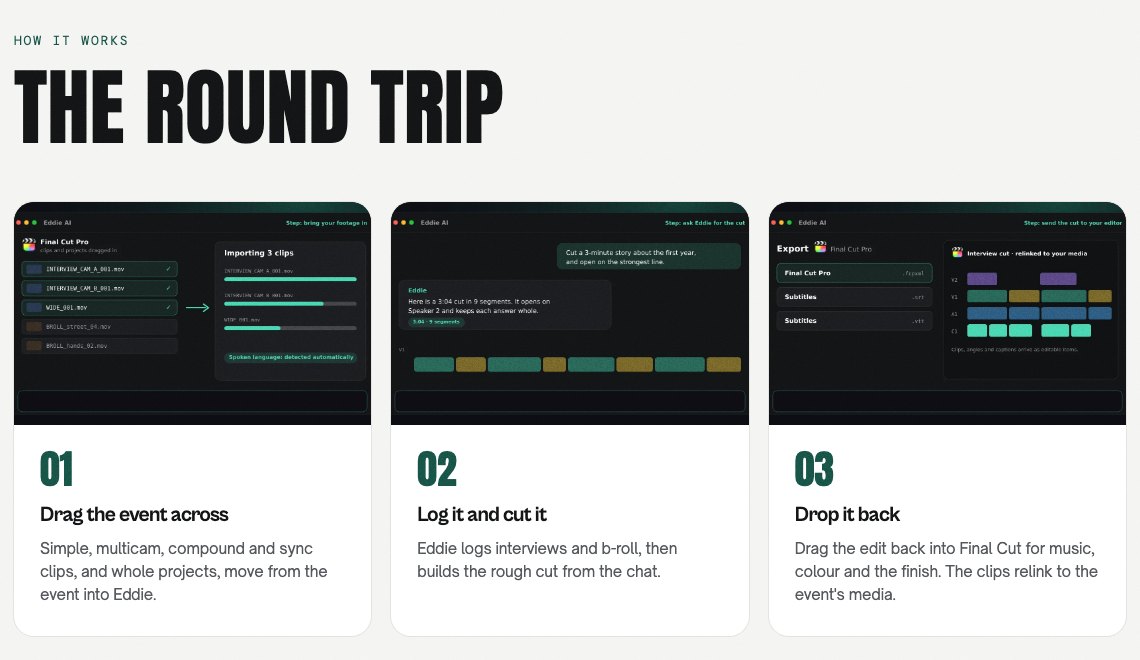
No subscription is required. New accounts get 500 credits, then packs run from $15 for 1,000 credits to $350 for 50,000. Packs never expire, and importing footage costs about 250 credits an hour.
For documentary and interview editors who finish in a pro editor, Eddie is the better pick. More in our Eddie AI comparison.
Odysser and Vugola
Odysser turns talking-head videos into clips with captions, b-roll, split screens and motion graphics, and learns your style from what you approve. Its free Guided mode has you approve most actions, with 10 exports a month. It says it works best with clear audio and a stable camera.
Vugola calls itself "The AI video editing agent for creators and brands". You ask for cuts and captions, then fine-tune in its timeline, and it can schedule posts. Plans cost $19.99, $49.99 or $99.99 billed monthly with 50, 300 or 800 AI credits, and every plan exports at up to 1080p.
Mosaic Motion
In Mosaic's words, Motion "plans the video, builds every shot and watches the cut before you see it".
It edits talking heads, multicam and podcast clips, and also generates shots. You can chat, mark up a frame or trim on the timeline, then export to Premiere Pro, After Effects or Resolve. A Flex pack costs $6 for 200 credits with no subscription, Pro starts at $29 billed monthly, and editing and generation both use credits.
Tella Agent and Riverside Co-Creator
These agents sit inside a recorder. Tella Agent edits screen recordings and demos by chat, in public beta, and plans start at $29 billed monthly, per user.
Riverside's Co-Creator is built into its editor and works on content you record or upload there. Riverside has a free plan, and Pro costs $29 or Grow $39 billed monthly, or $288 and $408 billed annually. If you already record in either one, its agent is the better pick.
ChatCut
ChatCut is a chat-first editor on the web, Mac and Windows. Its plugin and MCP server let Codex, ChatGPT, Claude Code or Cursor edit your own footage. ChatCut Desktop needs macOS 13 or newer and a sign-in, and its README says your media stays local.
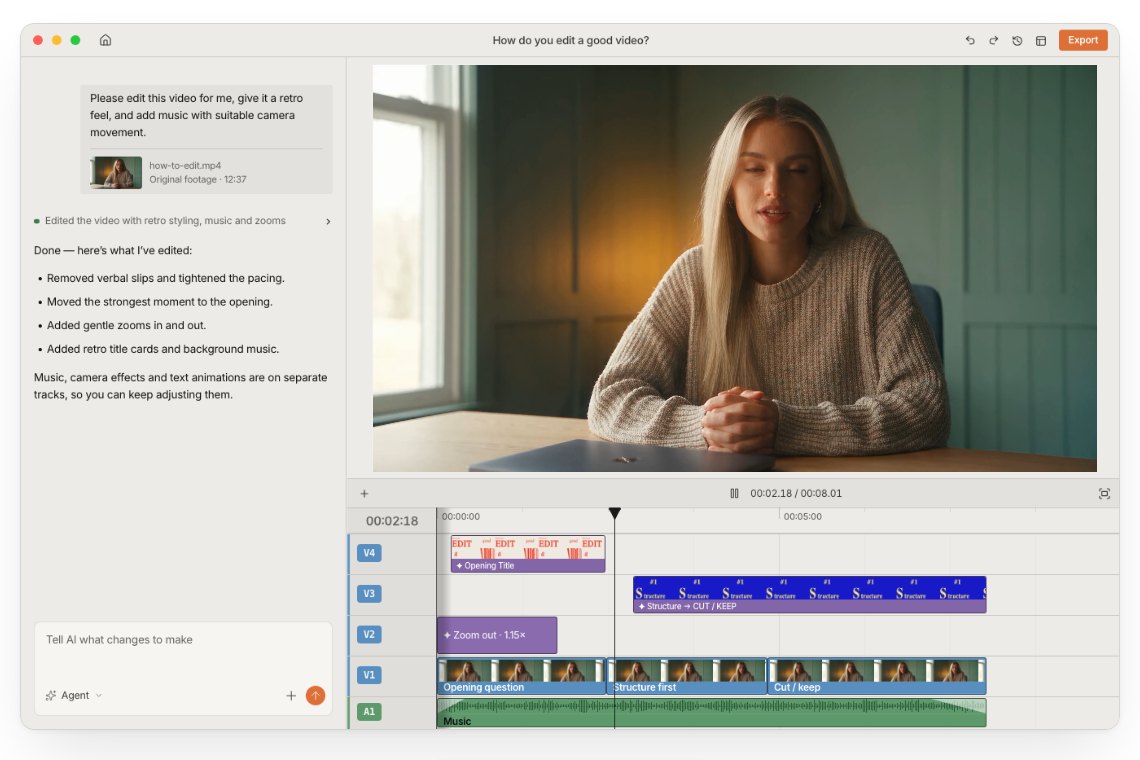
It covers cleanup, captions, translation and dubbing with lip sync, motion graphics and generated shots, plus Premiere and Resolve XML. Generation uses ChatCut credits. There is a free plan, and Starter costs $25 billed monthly or $252 billed annually. Larger plans show struck-through prices, so check its pricing page.
For motion graphics and generated shots in the same project, ChatCut is the stronger tool. See our ChatCut comparison.
Cardboard
Cardboard runs in Chrome, plus a Mac app for Apple silicon only. Tella calls its agent Director, and Cardboard says it "can connect to Claude Code and Codex" through its command line or MCP server. The Mac app edits and exports locally, while transcription and generation use the cloud.
Lite is free in the Mac app with a watermark. Paid plans currently show sale pricing, so check its pricing page. For product videos and ads with generated media, it is a strong pick. See our Cardboard comparison.
Palmier Pro
Palmier Pro is a Mac editor where Claude or Codex edits your video and generates media on the same timeline. The free plan includes the full multi-track editor, the MCP link to Claude, Codex or Cursor, local transcription and editor XML export, with no account. Credits pay for generation.
The catch is the system: it needs macOS 26 Tahoe. Tella adds that outside agents reach it only while the app is open. If you're on macOS 26 and want to spend nothing on the editor, start here. More in our Palmier Pro comparison.
octuedit
octuedit is our app, a desktop app you download. You describe the edit in the app's chat. Your own Claude Code or Codex makes it on a real multi-track timeline you can change by hand.
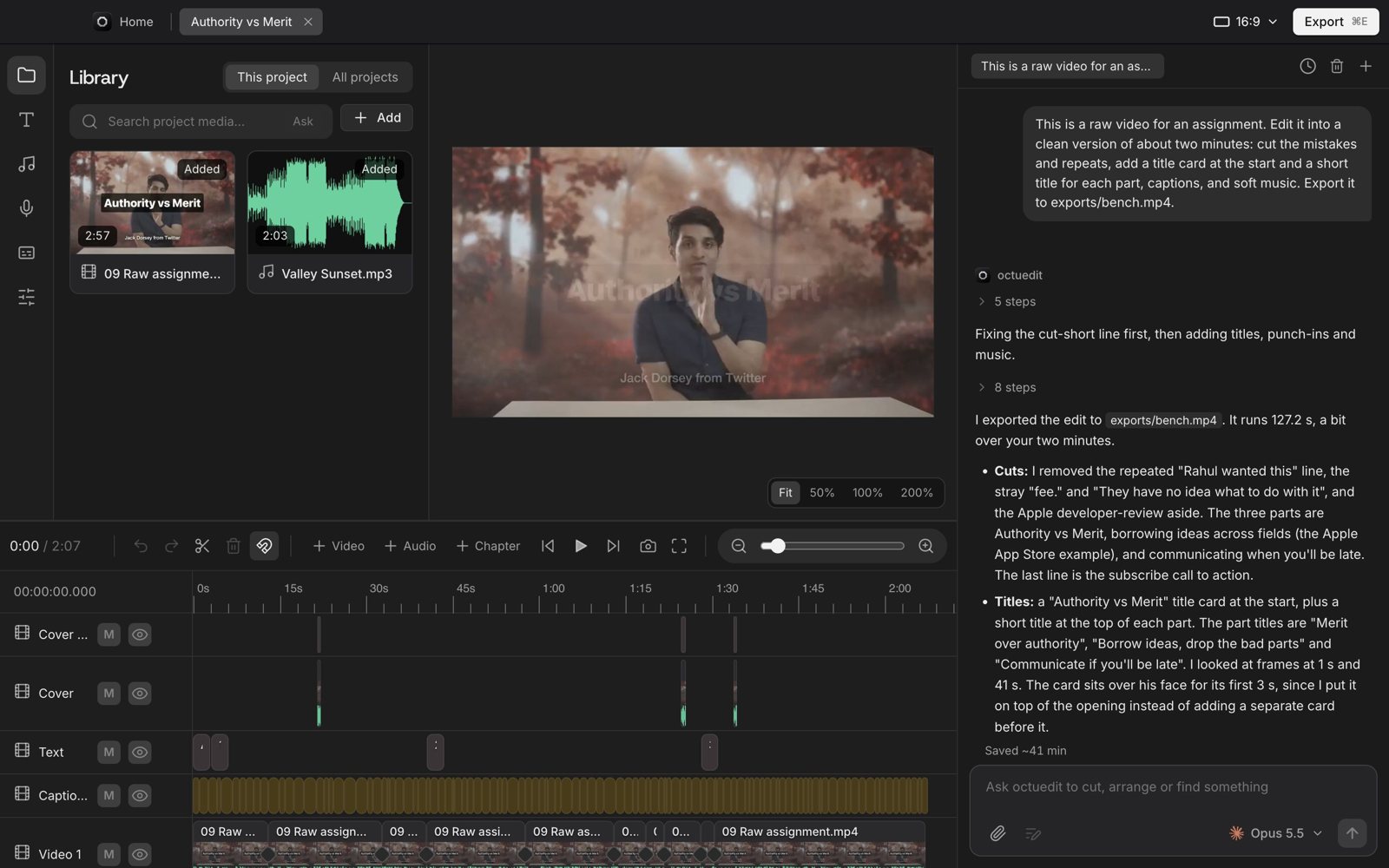
Before each request, the app saves the timeline, so "Restore to before this" undoes a whole agent turn. The agent can also stop and ask you a question before it cuts, instead of guessing.
It costs $99 once with lifetime updates and a 14 day refund, plus your Claude Code or Codex plan. It runs on macOS 13 or later (Apple silicon and Intel), or Windows 10 or 11 (64-bit, beta). Its limits are real:
- No browser or phone version, and Windows is still a beta.
- No free tier, only the 14 day refund.
- No generated video or images; it edits your own footage.
- No colour wheels or scopes, so grade in Resolve or Final Cut.
Where do agents still fall short?
Agents are good at a first pass: removing pauses and retakes, adding captions, cutting vertical versions and sorting footage. They still miss taste calls on long edits, sometimes cut a sentence you needed, and spend credits every time you ask again. Treat the output as a draft you check, and favour tools where fixing a cut by hand costs nothing.
Credits are where most complaints land, as one person editing long footage found.
I tried an online cloud-based AI video editor (invideo) which had an "agent mode", but my credits ran out after 3 prompts.
a commenter in r/AI_Agents thread
Common failure points
- Wrong cuts. An agent can drop a line you needed or keep a slate. A timeline makes that a quick fix; a rendered file means another prompt.
- Footage type. Odysser says it works best with clear audio and a stable camera, and clip tools target short talking heads. For long or multicam shoots, Eddie AI and Mosaic Motion name multicam on their own pages.
- Metering. Media hours, import credits, AI credits and export caps all run out on their own schedules.
- Generation costs. Generated shots often bill separately from editing.
Agents will not replace a good editor's judgement on a long story. They do the first pass: pauses, retakes, captions and vertical versions.
Which agents can your own Claude Code, Codex or ChatGPT drive?
Two ways, with different bills. Hosted tools such as Descript, OpusClip, Eddie and Mosaic expose an MCP server. Your agent calls their tools, but the vendor's credits still pay for edits. Desktop editors such as ChatCut, Cardboard, Palmier, Diffusion Studio and octuedit let Claude Code or Codex make the edit itself.
That difference shows up in what you get back too. Descript's MCP page says nothing hands you an MP4 on request, and that automated edits use credits faster. One Descript user put it bluntly.
Been editing my reels by having Claude drive Descript through their official MCP integration, and the design is baffling. There is no actual editing API.
a user on r/Descript thread
Who names Codex
ChatCut, Cardboard, Palmier, Eddie, Tella, VEED OpenEdit and Diffusion Studio all name Codex on their own pages. Descript and OpusClip name Claude and ChatGPT but not Codex.
Three checks before you connect your agent
- Find out whose AI makes the edit: the vendor's built-in agent, or your Claude Code or Codex.
- Check whether each tool call also spends the vendor's credits on top of your AI plan.
- Check what comes back: a timeline you can fix, a share link, or a rendered file.
octuedit also has an MCP mode, so Claude Desktop or Cursor can drive it as well as the in-app chat. Our Claude Code and Codex pages list what each agent can do in octuedit, and the Claude Code video editing guide covers the wider setup.
Are there free or open source AI video editing agents?
Yes, of two kinds. Free plans exist for Descript, OpusClip, ChatCut, Odysser, Palmier Pro and Cardboard Lite, with caps on hours, exports or watermarks. Open source agents on GitHub cost nothing to download, but most are frameworks for developers. They need Python or Node, a terminal and your own API keys or coding agent, and several have no timeline at all.
| Project | What it is | What it needs | Timeline? |
|---|---|---|---|
| HKUDS VideoAgent | Research framework to understand, edit and remake video | Python, an 8 GB GPU, Linux or Windows, several API keys | No |
| video-db Director | Framework to build video agents | Python, Node and VideoDB's cloud | No |
| VEED OpenEdit | Your coding agent renders an MP4 | Node, plus Claude Code, Codex or Gemini CLI | No |
| Diffusion Studio | Desktop editor your agent drives | Apple silicon Mac or Windows, plus Codex or Claude Code | Yes |
| BaoCut | Agent edits, you review in a browser timeline | Apple silicon Mac or Windows | Yes |
| FireRed-OpenStoryline | Chat editing for story-style social videos | An install on macOS, Linux or Windows | No |
HKUDS VideoAgent is a research codebase. Its README lists Linux and Windows, not Mac, and says "Claude is required as it powers the Agentic Graph Router".
Director builds on VideoDB's cloud for storage and indexing, so footage goes there. OpenEdit can transcribe locally with WhisperX, so transcription stays on your computer. BaoCut is source-available: free for personal use and for content you sell, with a separate commercial licence to resell or host it.
The author of one terminal agent, Vex, gave the honest case for this route.
I built this because I think “AI video editing” should not mean uploading everything into a black-box web app.
the Vex author on r/AI_Agents thread
If you want to build your own pipeline with Claude Code and ffmpeg, our Claude Code skills guide shows what that takes.
Which agent should you pick for your footage?
Pick by your footage and where the edit has to end up. Short clips at volume point to OpusClip or Vugola, and transcript editing points to Descript. Interview rough cuts for a pro editor point to Eddie AI. Generated shots in the same project suit ChatCut, Cardboard or Palmier.
- Podcast recorded in Riverside: Co-Creator, since the footage is already there.
- Screen recordings and product demos: Tella Agent.
- Editing by transcript, or a team sharing projects: Descript Underlord.
- Many short clips from long videos: OpusClip AI Producer or Vugola.
- Interviews or multicam you finish in Premiere, Resolve or Final Cut: Eddie AI. For the Final Cut side, see finishing an AI edit in Final Cut Pro.
- Generated b-roll next to your own footage: ChatCut, Cardboard or Palmier Pro.
- Footage that must stay on your computer: a desktop editor; our privacy comparison covers each one.
- A browser, with nothing to install: Descript, ChatCut or Eddie AI.
- You already pay for Claude Code or Codex and want a timeline without editor credits: octuedit.
- You write code and want full control: an open source agent from the table above.
If you want every AI editor for Mac, agent or not, see our Mac roundup.
What we'd do next
Take one real recording of about ten minutes. Give the same plain request to one hosted agent and one desktop editor your own Claude Code or Codex drives. Use free plans and refunds so the trial costs little, then compare three things.
- Did it cut what you asked, and nothing you needed?
- How fast can you fix a bad cut by hand?
- What did the run cost in credits or plan usage?
Keep the one whose output you would publish after a short review.
Questions
Is there an AI agent that can edit my videos?
Yes. Descript Underlord, OpusClip AI Producer, Eddie AI, Odysser, Vugola and Mosaic Motion edit footage you upload. ChatCut, Cardboard and Palmier Pro let Claude Code or Codex edit on your computer. Each cuts, captions and reframes from a plain request.
What is the best AI video editing agent?
It depends on your footage and where the edit ends. OpusClip AI Producer suits many short clips, Descript Underlord transcript editing, Eddie AI interview rough cuts for Premiere or Resolve, and ChatCut generated shots next to your own footage.
Is there a free AI video editing agent?
Descript, OpusClip, ChatCut, Odysser and Palmier Pro have free plans, and Cardboard Lite is free in its Mac app, with caps or watermarks. Eddie AI gives 500 free credits. Open source agents are free code but need setup and an AI plan.
Which AI video editing agents can ChatGPT or Claude control?
Several. Descript, OpusClip and Eddie AI take Claude or ChatGPT through MCP, while ChatCut, Cardboard and Palmier Pro let Claude Code or Codex edit directly. ChatGPT Plus and Claude Pro each cost $20 a month before editor fees.
Do AI video editing agents upload my footage?
Hosted agents such as Descript, OpusClip, Eddie AI, Odysser and Vugola process your footage in their cloud. Desktop editors like ChatCut Desktop, Cardboard's Mac app and Palmier Pro keep editing local, though generation and some transcription still use the cloud.
Can I open an agent's edit in Premiere Pro, DaVinci Resolve or Final Cut Pro?
Often, yes. Eddie AI exports to all three with originals relinked. Descript exports FCPXML, Premiere XML and Resolve XML timelines. OpusClip and Odysser export to Premiere and Resolve on Pro. Check which plan includes export before you pay.
Is an agentic video editor the same as an AI video generator?
No. An agentic editor works on footage you recorded: it cuts, captions, reframes and arranges it. A generator like Runway or Pika makes new frames from text. Some tools, including Mosaic Motion, ChatCut and Cardboard, do both in one project.
Will AI video editing agents replace human editors?
Not for long stories or taste calls. Agents handle the first pass well: pauses, retakes, captions and vertical versions. A person still decides what the video is about, which moments stay, and whether the cut actually works.
Sources
- Descript, Underlord
- Descript, pricing
- Descript, MCP
- OpusClip, AI Producer
- OpusClip, pricing
- ChatCut, agent plugin README
- ChatCut, pricing
- Cardboard, home page
- Cardboard, pricing
- Palmier Pro, home page
- Palmier Pro, pricing
- Eddie AI, home page
- Eddie AI, pricing
- Odysser, home page and pricing
- Vugola, home page
- Vugola, pricing
- Mosaic, Motion
- Tella, best agentic video editors
- Riverside, Co-Creator
- HKUDS VideoAgent README
- video-db Director README
- VEED OpenEdit README
- Diffusion Studio editor README
- BaoCut README
- FireRed-OpenStoryline README
- Claude, pricing
- OpenAI, Codex pricing
- octuedit, pricing
- octuedit, facts
- Tella, pricing
- Riverside, pricing
- Descript, download
- ChatCut, home page
Facts about other tools come from each company's own website, checked 23 November 2026, and may change.