Is Descript worth it in 2026, and which plan do you need?
Descript is worth it if you edit talk by editing the transcript, record remote guests or share projects with a team. Paid plans start at $24 a person billed monthly, or $16 a month billed yearly. It is weaker value for a solo Mac creator who mostly cuts pauses and adds captions, because every upload spends media minutes and every AI fix spends credits. We make octuedit, an AI video editor, so weigh our view with that in mind.
Updated 24 November 2026 · By Shivank Goura, co-founder of octuedit. We make octuedit.
Is Descript worth it, and who should skip it?
Descript is worth it when your videos are mostly people talking and you like editing them as text. It also fits podcasters who record remote guests in Descript and teams who share projects in the cloud. It is a harder sell for one person on a Mac who mainly trims pauses and adds captions. You pay every month and work inside two usage meters.
Descript is worth it in 2026 if you edit talk as text, record remote guests or share projects with a team, and the plan depends on how your files arrive. Start on Free with one real episode. Hobbyist, at $24 billed monthly or $16 a month billed yearly, fits one person with one mixed file per episode who finishes inside Descript. It has no top-ups or timeline export. Creator, at $35 billed monthly or $24 a month billed yearly, fits several camera files, daily uploads or a Final Cut hand-off. Business is the plan with translation proofreading for dubs. Minutes follow files, so each camera or microphone file counts by its own length. Skip it if you only cut pauses and add captions, want a flat bill, or must keep footage on your own Mac.
Every Descript fact below comes from Descript's own pricing page and help centre, read on 23 November 2026. I'll say where Descript is the better pick, and there are several.
Worth it if
- You edit interviews, podcasts, courses or webinars by deleting words in a transcript.
- You record guests remotely and want recording and editing in one app (Rooms is included on every plan).
- Two to five people need to open the same projects from the cloud.
- You work on Windows or in a browser as well as on a Mac.
- You need video dubbed into other languages. Dubbing is on every paid plan; proofreading the translation is Business only.
Skip it, or start on Free, if
- You only cut pauses and filler and add captions to one video a week.
- You upload raw multi-camera footage every week and want a flat, predictable bill.
- Your connection is slow. Descript asks for at least 50 Mbps down and 10 Mbps up, and slower links delay uploads and loading.
- You must keep footage on your own Mac. Descript writes every edit to its cloud and has no offline editing.
Which route fits you?
- You want to try transcript editing first: Free.
- One person, one mixed file per episode: Hobbyist.
- Several camera files or a Final Cut hand-off: Creator.
- Recording quality with remote guests comes first: compare Riverside before you pay.
- You already pay for Claude Code or Codex and want an agent to make the edit: octuedit, a desktop app at $99 once.
One Reddit user put the upside in their own words:
what used to take me 2.5 hours of scrubbing through a waveform takes about 40 minutes.
a Reddit user, r/podcasting thread
For transcript-first work, that is the upside people pay for. The rest of this page is about what it costs you to get it.
How much does Descript cost per month and per year?
Descript pricing in 2026 has four self-serve plans plus custom Enterprise pricing. Billed monthly, Hobbyist costs $24, Creator $35 and Business $65, each per person a month. Billed yearly, they cost $16, $24 and $50 a month. Totals below use the monthly price.
| Plan | Billed monthly | Per month, billed yearly | Media hours a month | AI credits a month |
|---|---|---|---|---|
| Free | $0 | $0 | 1 | 100, once |
| Hobbyist | $24 a person | $16 a person | 10 | 400 |
| Creator | $35 a person | $24 a person | 30 | 800 |
| Business | $65 a person | $50 a person | 40 | 1,500 |
Source: Descript's pricing page, read 23 November 2026. Prices are in US dollars per person; local tax may apply.
What each plan adds on top of the one before:
- Free: 720p export with a watermark, 5 GB of storage.
- Hobbyist: 1080p with no watermark, 100 GB of storage, 1 editor.
- Creator: 4K, top-ups, timeline export, up to 3 editors.
- Business: translation proofreading, native-sounding AI speakers, SLA support, up to 5 editors.
What a year costs at the monthly price
- Hobbyist: $24 x 12 = $288 a person.
- Creator: $35 x 12 = $420 a person. Two editors pay $840, three pay $1,260.
- Business: $65 x 12 = $780 a person.
Billed yearly, one person pays $192 for Hobbyist, $288 for Creator or $600 for Business.
Each editor is a separate seat, and each one is billed.
The plan line most reviews miss
Two features buyers often assume are on every paid plan start at Creator. Top-ups (buying more minutes or credits) are not on Free or Hobbyist.
Timeline export to Premiere Pro, Final Cut Pro, Pro Tools, Logic and similar apps is also Creator and Business only. So a Hobbyist user who finishes in Final Cut has to pay for Creator, or finish inside Descript. Our guide to exporting an edit to Final Cut Pro, Premiere or Resolve shows what a hand-off carries over.
Why older reviews quote different limits
Some reviews still talk about "transcription hours". Descript replaced that model with media minutes and AI credits. From 17 November 2025 it moved every Legacy and Sunset subscriber onto the new plans at their next renewal. If a review lists transcription hours, its limits are out of date.
How do Descript media minutes and AI credits work?
Descript meters two things. Media minutes count the length of everything you upload or record, whether you transcribe it or not. AI credits pay for AI features: Underlord, Studio Sound, Remove Filler Words, Eye Contact, Green Screen, AI speech and generation. Each plan gives a monthly allowance of both, pooled across the editors on a drive, and neither rolls over.
Media minutes
Descript spends media minutes when you upload audio or video, or record in Descript. A still image counts as one second. A Rooms recording counts the length of the session, not each person in it, so one hour with five guests is 60 minutes.
Reusing a file is free if you do it the right way. Adding it to another project from the media library, or importing it from another project, does not charge again. Uploading the same file by hand into a second project does.
The catch is in how minutes are counted. If each camera and microphone arrives as its own file, each one is an upload with its own length. One Reddit user did that math:
A standard 1 hour, 3 camera, two microphone podcast is 5 hours of media minutes.
a Reddit user, r/Descript thread
The meter runs on everything you bring in, including takes you later throw away.
I used up all of my media minutes because when you upload a file that you delete, it STILL costs you.
a Reddit user, r/Descript thread
AI credits
Manual AI tools cost credits by the length of the media and the model you pick. Descript caps Studio Sound and Remove Filler Words at 30 credits per file each time you apply them. Editing the transcript by hand and cutting on the timeline are not on Descript's list of features that spend credits. Dynamic captions are unlimited on every plan, though asking Underlord to add them spends credits.
Underlord, Descript's AI co-editor, is different. Descript says there is "no fixed price per action", and two similar requests can cost different amounts. Underlord picks the model for each request, and models carry different prices.
Even chatting with it uses a few credits per message, and when it runs a tool you pay for both the agent and the tool. Descript itself admits this "makes it harder to estimate credit costs than a flat rate".
The Usage tab shows what each run cost. It shows the cost after the run, not before.
How to spend fewer credits
- Do rough cuts by hand in the transcript, then use AI for the steps you cannot do by hand.
- Run Studio Sound and Remove Filler Words once on the final file, not on every take.
- Check the Usage tab after each Underlord request until you know your usual cost.
- When you generate images or video, pick a model with fewer coins next to it, since advanced models cost more.
Using Descript from Claude or ChatGPT (MCP)
Descript has an MCP connection that lets Claude, Claude Code, ChatGPT and Cursor drive a Descript drive with your Descript login. It can import, transcribe, run Underlord edits and publish. Descript says the API and MCP use the same media minutes and AI credits as the app. So you pay for your AI plan and still spend Descript credits, and your footage still uploads to Descript's cloud.
Thought that my claude credits would be used to do the work in Descript but I still have to upgrade my Descript AI credits to implement the changes identified in Claude.
a Reddit user, r/Descript thread
What happens when you run out of minutes or credits?
On Free and Hobbyist, nothing can be bought: you wait for the next billing cycle or upgrade. On Creator and Business, you can buy top-ups, which are used only after the monthly allowance is gone. Top-ups are shared across the drive, expire 12 months after purchase and cannot be refunded. Unused monthly minutes and credits never carry over.
| Top-up | Price | Per unit |
|---|---|---|
| 350 AI credits | $35 | $0.10 a credit |
| 1,000 AI credits | $80 | $0.08 a credit |
| 4,000 AI credits | $200 | $0.05 a credit |
| 5 media hours | $25 | $5 an hour |
| 20 media hours | $80 | $4 an hour |
| 50 media hours | $150 | $3 an hour |
Source: Descript's top-ups help page, read 23 November 2026. Descript's own advice there is that if you buy top-ups often, a bigger plan will likely cost less.
Put another way, Creator gives 20 more media hours than Hobbyist for $11 more, billed monthly. Buying 20 hours as a top-up costs $80 on Creator, and Hobbyist cannot buy them at all.
Refunds and cancelling
Descript refunds a plan payment only within 48 hours of the invoice. Extra editor seats can be refunded within 7 days, and top-ups never. There is no prorated refund for the rest of a month or year.
Cancelling moves the drive to Free at the end of the paid period. Your projects stay, but any leftover top-ups cannot be used on Free, and their 12-month clock keeps running. If you are trying Descript, decide inside that 48-hour window, or start on Free instead.
Which Descript plan does a real month of work need?
Most solo creators who upload one mixed file per episode fit inside Hobbyist. Creators who upload several camera and microphone files, or record every day, outgrow Hobbyist's 10 hours quickly. Because Hobbyist has no top-ups, they end up on Creator. The examples below are plain arithmetic from Descript's published allowances, not measurements of our own.
| Your month | Minutes used | Plan | A year at monthly price |
|---|---|---|---|
| 4 YouTube videos, 30 minutes of raw footage, one file each | 4 x 30 = 120 of 600 | Hobbyist | $288 |
| 4 podcast episodes, 60 minutes, one mixed file each | 4 x 60 = 240 of 600 | Hobbyist | $288 |
| 4 episodes, 2 cameras and 2 mics, each file counted | 4 x 4 x 60 = 960 | Creator | $420 |
| 30 minutes of raw talking-head footage a day | 30 x 30 = 900 | Creator | $420 |
| 3 people sharing one drive on Creator | 3 x 1,800 = 5,400 pooled | Creator, 3 seats | $1,260 |
Descript's own plan advice is stricter. Its help centre suggests Hobbyist for people who edit "one or two compositions a month" and Creator for those making content "about once a week". The table above counts only minutes. If you also lean on Underlord, Descript's stricter guidance is the safer guess.
What the credits look like in the podcast example
Studio Sound and Remove Filler Words cost at most 30 credits each per file. Run both once on four episodes and you spend at most 4 x 60 = 240 credits. That leaves about 160 of Hobbyist's 400 for Underlord, clips and AI speech. How far 160 goes is hard to say, because Underlord has no fixed price per request.
One decision line per plan
- Free: for trying transcript editing on one short project. One hour a month and a one-time 100 credits will not carry a weekly show.
- Hobbyist: for one person with light, single-file uploads who finishes inside Descript.
- Creator: for multi-camera podcasts, daily uploads, 4K, top-ups, or a hand-off to Final Cut Pro or Premiere Pro.
- Business: for teams that need translation proofreading, native-sounding AI speakers or SLA support.
If your month sits close to a limit, expect the meters to shape how you work. You may skip a retake upload or ration Underlord.
Where does Descript fall short, and when does another tool fit better?
Descript has four weak spots for a solo Mac creator. Its AI cost is hard to predict, footage lives in its cloud, a Final Cut finish needs Creator, and older Macs struggle. Each one is a trade-off you accept for its transcript editing. For hand-editing, recording or short clips, another tool often fits better and costs less over a year.
- Its AI cost is hard to predict before a run.
- Footage must live in its cloud.
- A Final Cut or Resolve finish needs Creator.
- Its system needs are steep for older Macs: macOS 14 or later, and 16 GB of memory recommended.
| Option | Regular price | Footage lives | Better pick when |
|---|---|---|---|
| Descript Creator | $35 a person billed monthly, $24 billed yearly | Descript's cloud | You edit talk as text and share projects |
| Final Cut Pro | $299.99 once | Your Mac | You edit by hand on a Mac and want to pay once |
| octuedit | $99 once, plus your Claude Code or Codex plan | Your computer | You want an agent to edit and already pay for Claude Code or Codex |
Prices from each company's own pages, read 23 November 2026. The full field, with more tools and prices, is in our list of Descript alternatives for Mac.
Is Descript good on a Mac?
Descript has a Mac app, but it is a front end to Descript's cloud. There is no Save button: edits are written to the cloud as you make them, and offline editing is not supported. It needs macOS 14 Sonoma or later and an M1 or 7th generation Intel chip. Descript warns that fanless Intel MacBook Air models may struggle with heavy work.
Some features also pass data to sub-processors such as OpenAI, under agreements that they do not train on it. You can opt out of sharing data with Descript's own research in Settings. On a fast connection none of this gets in the way. On a slow one, uploads and project loading wait on the network.
Is Descript good for YouTube video editing?
For talking-head videos, interviews and tutorials, yes. You cut by deleting words, remove filler and clean the audio in one place, and captions are unlimited on every plan.
If your edit leans on B-roll, effects or colour grading, plan where you finish it. Sending a Descript timeline to Final Cut Pro, Premiere or Resolve needs Creator. A YouTuber who finishes elsewhere pays $35 billed monthly, not $24.
When another tool is plainly better
- [Riverside](https://riverside.com/pricing) if the recording itself matters most and you have several remote guests. Pro is $29 billed monthly, or $24 a month billed yearly.
- [OpusClip](https://www.opus.pro/pricing) if all you want is short clips picked from long videos. Our OpusClip review covers its credits.
- CapCut if you mostly make short vertical videos from templates and want a free start. Our octuedit vs CapCut comparison covers its plans.
- [Final Cut Pro](https://www.apple.com/final-cut-pro/) ($299.99 once) or [DaVinci Resolve Studio](https://www.blackmagicdesign.com/products/davinciresolve/studio) ($295 once) if you are happy editing by hand and want a one-time cost. Our list of video editors you can buy once compares them.
Where octuedit fits, and where it does not
octuedit is an AI video editor, a desktop app you download. Your own Claude Code or Codex makes the edit on a real multi-track timeline that you can still change by hand. For video podcasts, see how multicam podcast editing works in it.
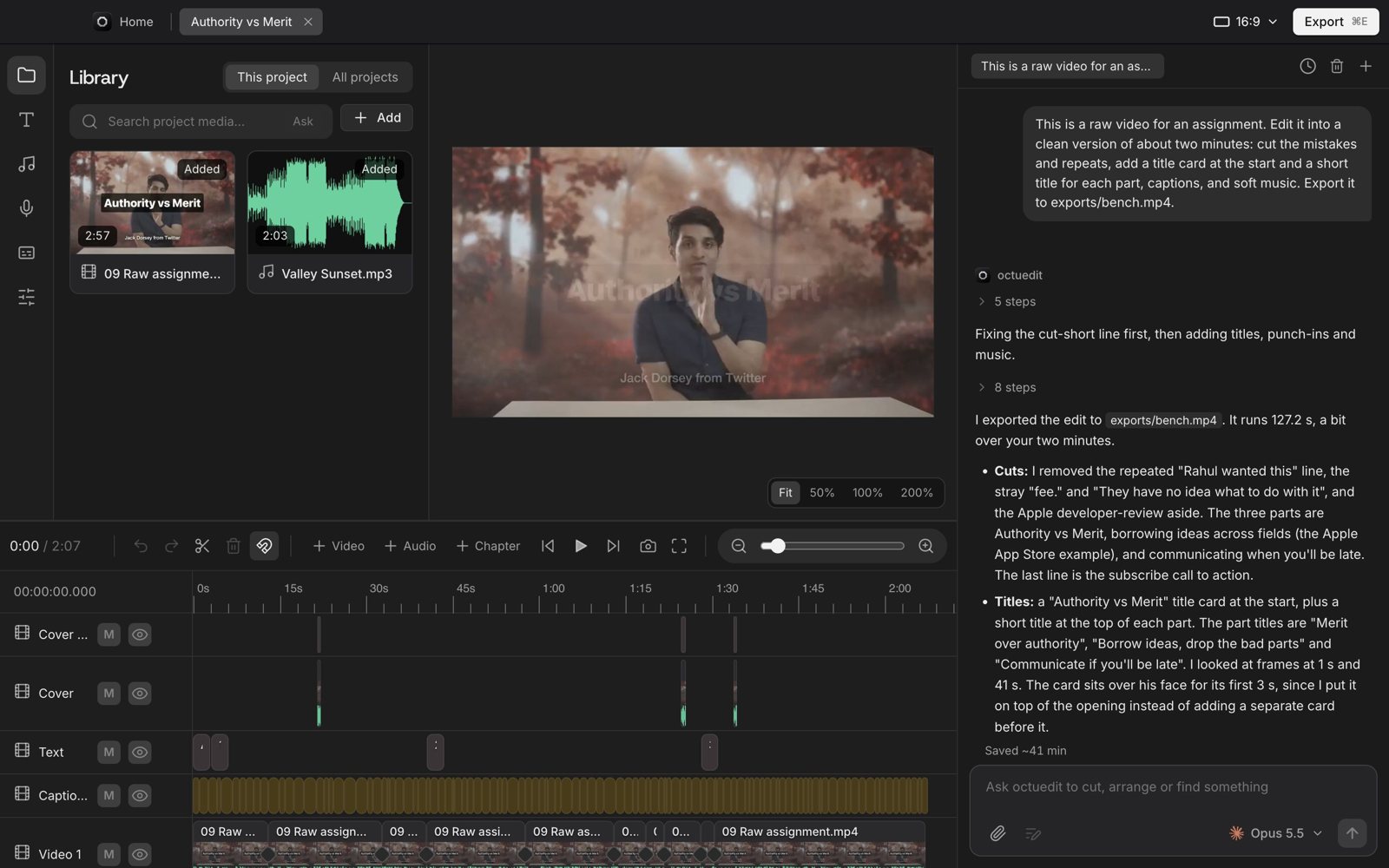
- Price: $99 once, a lifetime license with updates, with a 14 day refund. No media minutes or credits.
- Runs on: macOS 13 or later (Apple silicon and Intel), or Windows 10 or 11 (64-bit, beta).
- AI cost: the AI runs on your own plan, such as Claude Pro at $20 billed monthly or $200 billed yearly, or ChatGPT Plus at $20 a month, billed by Anthropic or OpenAI. So the AI is still a monthly cost.
Footage and exports stay on your computer, and transcription runs there by default. Your Claude Code or Codex receives your requests and its work on the project, such as steps, file names and transcript lines. If Claude Code is installed, your Claude also gets still frames from each clip for search, with no off switch.
octuedit itself gets edit records and diagnostics, never media, both linked to your licence email. Each has its own switch in Settings, and edit records start off in the EEA, the UK and Switzerland. Our privacy guide compares what each AI editor uploads, Descript included.
What octuedit cannot do
It is not a Descript replacement for everyone. octuedit has no editing by deleting words in a transcript, no recording, no dubbing, and no web version or shared team workspace. If those matter, Descript is the better tool. The octuedit vs Descript comparison goes feature by feature.
What we'd do next
Start on Descript Free with one real episode, and watch the Usage tab. Note how many media minutes your normal upload uses and what one Underlord request costs. Multiply by a month. If the total fits Hobbyist and you finish inside Descript, pay monthly for a month and decide inside the 48-hour refund window.
Maybe your month needs Creator mainly for multi-camera uploads or a Final Cut hand-off. Then price Creator against the tools above for a full year, not a month. For the cleanup steps themselves, our guide to removing filler words and silences shows the options, including ones that cost nothing.
Questions
Is Descript free?
Yes, Descript has a Free plan with 60 media minutes a month and 100 AI credits that are given once, not monthly. Exports are 720p with a watermark and storage is 5 GB. It is enough to try transcript editing, not to run a weekly show.
How much does Descript cost per year?
At the regular monthly price, Hobbyist costs $288 a person a year, Creator $420 and Business $780. Each editor seat is billed separately. Billed yearly, they are $192, $288 and $600. These are list prices before any local tax.
Do Descript media minutes and AI credits roll over?
No. Descript resets both allowances at each renewal, and unused minutes and credits are lost. Top-ups, sold on Creator and Business only, are different: they last 12 months from purchase and are used after the monthly allowance runs out.
Can you buy more AI credits on the Hobbyist plan?
No. Top-ups for credits and media hours are only sold on Creator and Business. A Hobbyist user who runs out has to wait for the next billing cycle or upgrade. Credit top-ups start at $35 for 350 credits.
Does editing the transcript use AI credits?
Deleting words in the transcript and cutting on the timeline are not on Descript's list of credit features. Underlord, Studio Sound, Remove Filler Words, Eye Contact, Green Screen and AI speech do spend credits, and chatting with Underlord uses a few per message.
Is Descript priced per person?
Yes. Every paid price is per editor per month. Creator allows up to 3 editors and Business up to 5, and each one is billed. Three people on Creator pay 3 x $35 = $105 billed monthly, or 3 x $24 = $72 a month billed yearly.
Can Claude or ChatGPT edit in Descript, and does it cost credits?
Yes, through Descript's MCP connection for Claude, Claude Code, ChatGPT and Cursor. Descript says MCP and API work use the same media minutes and AI credits as the app, so you pay your AI plan and still spend Descript credits.
Can I get a refund from Descript?
Only within 48 hours of the invoice for a plan payment, or 7 days for an extra editor seat. Top-ups are never refunded. Cancelling moves the drive to Free at the end of the paid period, and your projects stay accessible.
Sources
- Descript pricing and plan comparison
- Descript help, track and understand your media minutes and AI credits
- Descript help, top-ups
- Descript help, refund policy
- Descript help, cancel your plan
- Descript help, Legacy and Sunset plans moving to new plans
- Descript help, system requirements
- Descript help, how saving works
- Descript help, Descript MCP
- Descript help, timeline exports
- Riverside pricing
- OpusClip pricing
- Final Cut Pro
- DaVinci Resolve Studio
- Claude pricing
- ChatGPT and Codex pricing
- Descript help, data privacy
- Descript help, media library overview
Facts about other tools come from each company's own website, checked 23 November 2026, and may change.