How do I get an AI rough cut of my footage into Final Cut, Premiere or Resolve?
An AI rough cut is a first assembly of your own footage, built from what was said. It lands in your editor as a timeline you still fix. Pick the tool by footage and editor. Eddie AI suits interviews in any editor, Filmit works inside Premiere or Resolve Studio, and RoughCut sends one take to Final Cut. octuedit, an AI video editor, builds one from a footage folder for all three.
Updated 28 November 2026 · By Shivank Goura, co-founder of octuedit. We make octuedit.
What is an AI rough cut, and how is it different from an assembly or a fine cut?
An AI rough cut is the first watchable version of an edit, built by software from your own footage. The tool transcribes the clips, finds the usable lines, puts them in an order and trims the dead air. You get a timeline or a project file, not a finished video. It saves the logging and first assembly, but pacing, story and polish are still your job.
To get an AI rough cut into Final Cut, Premiere or Resolve, pick a tool by your footage and editor, then open its project file there. Eddie AI suits documentaries and many interviews, and works with any of the three. Filmit works inside Premiere or Resolve Studio. RoughCut sends one take to Final Cut. In Premiere, try Adobe's AI Assistant beta first. In Resolve Studio, IntelliScript works from a script. For a folder of mixed clips, octuedit has your own Claude Code or Codex build the cut. It exports FCPXML for Final Cut and Resolve, and Premiere XML. Most of these tools read the transcript, so they suit talking footage best. Whichever you pick, expect a first version to fix: pacing, intentional silence and music-led trims stay with you.
We make octuedit, so read this with that in mind. Competitor facts below come from each company's own pages, checked on 23 November 2026, and I'll say plainly where another tool is the better pick.
Which route fits you?
- You talk to camera and redo lines: a cleanup tool that removes retakes. See one take to camera.
- You cut documentaries or many interviews: see many interviews.
- You live in Premiere Pro: see your editor.
- You work from a script in Resolve Studio: see your editor.
- You have a folder of mixed clips: see the footage folder walkthrough.
Assembly, rough cut, fine cut
Editors use three words for the stages, and AI tools blur them:
- Assembly cut: every usable take laid out in story order, long and loose.
- Rough cut: the assembly cut down to the story, with the best takes chosen and the order settled.
- Fine cut: the rough cut tightened frame by frame, with pacing, B-roll timing and transitions decided.
Most AI tools land somewhere between an assembly and a rough cut. Vidio describes its job as choosing: it "pulls the selects and builds a first assembly you can shape". Wideframe's own guide calls its output "assembly cut level". It also lists what AI still struggles with: the most emotional take, intentional silence, rhythm trims and music-led pacing.
What the AI actually reads
Almost every tool here works from the transcript. Filmit says its AI "only ever sees the transcript text you choose to send". A recipe, a skate session or a travel day has little dialogue to read, so the tool has less to go on.
Which AI rough cut tool fits your footage?
Pick by what you shot. One talking-head take needs a cleanup tool that removes retakes and pauses, while many interviews need a story tool that finds soundbites and orders them. A folder of mixed clips plus notes needs a tool that reads the whole folder and follows a brief. A script needs a tool that matches lines to takes, and Resolve Studio already has one.
| Your footage | Tools that fit |
|---|---|
| One talking-head take | RoughCut (roughcuteditor.com), Gling |
| Many interviews, a story to find | Eddie AI, Filmit RoughCut, Wideframe, Doza Assist |
| A folder of mixed clips plus notes | octuedit, Vidio, NemoVideo |
| A script you already wrote | Resolve Studio IntelliScript |
Where each one finishes matters as much. RoughCut targets Final Cut, while Gling, Eddie, Doza Assist and octuedit export to all three editors. Filmit works in Premiere or Resolve Studio, and Wideframe in Premiere only. Vidio and NemoVideo work in the browser, though Vidio's paid plans add XML export.
One take to camera
If you record yourself and redo lines until they land, the "rough cut" you want is the take with the mistakes gone.
RoughCut, a Mac App Store app from thaka2.ai, flags silences, filler, false starts and retakes. You approve each cut, then it exports FCPXML for Final Cut Pro. Gling, a desktop app, does the same job and exports XML to Premiere, Final Cut or Resolve. Our guide to removing filler words and silences covers this job in depth.
Many interviews
Eddie AI logs interviews and B-roll, then "finds the best soundbites and builds a rough cut from the story you describe in chat". It also lays B-roll over the result.
Filmit RoughCut runs as a panel inside Premiere Pro or DaVinci Resolve Studio, the paid edition, and builds a live multi-source sequence there. Doza Assist is a free, open source Mac app that does a similar job with a local model.
A folder of mixed footage and notes
Event days, vlogs and client shoots arrive as a folder, not a set of interviews. Vidio and NemoVideo take uploads in the browser and give back a draft you shape there. octuedit imports the folder on your computer and builds the cut on a timeline you can export. The walkthrough below shows that route step by step.
Three products called RoughCut
Searching "rough cut AI" turns up at least three tools with the same name, so check the maker before you buy. RoughCut from roughcuteditor.com is the Mac App Store app for Final Cut. Filmit RoughCut is the Premiere and Resolve Studio panel. The third, roughcut-ai-local-first-editor, is a free open source project on GitHub.
Which editor does each AI rough cut tool hand off to?
Each tool lands in your editor one of two ways. Some build the sequence inside the editor as a panel, like Filmit in Premiere or Resolve Studio. Others write a file you import: FCPXML for Final Cut, a .prproj or XML for Premiere, FCPXML or EDL for Resolve. The file route works across editors, but it carries the cut more reliably than the look.
| Tool | Lands in | File or method |
|---|---|---|
| Eddie AI | Premiere, Resolve, Final Cut, Avid (beta) | Export file |
| Wideframe | Premiere Pro only | .prproj |
| Filmit RoughCut | Premiere Pro, Resolve Studio | Panel in the editor |
| RoughCut (roughcuteditor.com) | Final Cut; also opens in Resolve | FCPXML |
| Gling | Premiere, Final Cut, Resolve | XML |
| Doza Assist Core | Final Cut, Premiere, Resolve | FCPXML, XML or EDL |
| Vidio | Browser; XML on paid plans | MP4 or XML |
| NemoVideo | Browser | Video files |
| Resolve Studio IntelliScript | Resolve Studio | Built in |
| octuedit | Final Cut, Resolve, Premiere | FCPXML, Premiere XML or a DaVinci bundle |
Each row comes from the tool's own pages, checked on 23 November 2026. The octuedit row comes from its export options in the app.
What each one costs
| Tool | Regular price |
|---|---|
| Eddie AI | $15 per 1,000 credits, one time, about an hour of footage by Eddie's estimate; 500 free |
| Wideframe | $100 a month (month to month), plus Premiere |
| Filmit RoughCut | $20 billed monthly, or $192 a year (Filmit Studio Pro) |
| RoughCut (roughcuteditor.com) | 5 cuts free, then $49.99 once (US); optional Pro $6.99 a month or $49.99 a year |
| Gling | Free (1 hour, watermark); Plus $20 billed monthly, $10 a month billed annually |
| Doza Assist Core | Free, open source |
| Final Cut Pro | $299.99 once, or $12.99 a month or $129 a year in Apple Creator Studio |
| Premiere Pro | $22.99 a month on Adobe's annual plan, billed monthly |
| octuedit | $99 once, 14 day refund, plus Claude Pro ($20 a month or $200 a year) or ChatGPT Plus ($20 a month) |
Each price comes from the tool's own page, checked on 23 November 2026. Wideframe plus Premiere comes to $122.99 a month ($100 plus $22.99). octuedit's first year is $99 plus $240 for the AI plan billed monthly, so $339, and later years are $240. Eddie credits are one-time packs that never expire.
Prices we left out on purpose
NemoVideo shows struck-through prices next to "Limited Time" ones, so we print neither; check its pricing page. DaVinci Resolve Studio is $295 once. Vidio has a free plan; for paid plans, see Vidio's pricing page.
What survives the handoff
A handoff file carries cuts, clip order and timing. It does not always carry the look. Eddie's own export table is honest about this. Its FCPXML for Final Cut carries crop, motion, colour and audio levels only in part, and no multicam angles.
Its Premiere and Resolve project files carry multicam angles but not the colour grade. Its FCPXML for Resolve carries the grade but not the angles.
Two more details decide whether the project opens cleanly.
- Original media or proxies. Eddie relinks desktop imports to your original files, but web uploads point to Eddie's proxy media. Wideframe's .prproj uses your original media paths, so moving the footage breaks the links.
- Which file opens where. RoughCut says its FCPXML opens in DaVinci Resolve, and Premiere Pro needs a conversion step. Premiere reads its own .prproj or the older Final Cut Pro 7 XML.
The Final Cut side, including what FCPXML keeps, is covered in finishing an AI rough cut in Final Cut Pro.
Can Premiere Pro, Resolve or Final Cut Pro make a rough cut on their own?
Partly, as of November 2026: Premiere Pro's AI Assistant, in public beta, can build a stringout or rough assembly as an editable sequence. Resolve Studio's IntelliScript builds a cut of a scene when you give it a script. Final Cut Pro finds spoken phrases and shots, but assembles nothing. For an unscripted shoot outside Premiere's beta, the add-ons above still do the assembly.
AI rough cut in Premiere Pro
Adobe's AI Assistant runs in Premiere Pro (beta), under Window, then Assistant. Adobe lists "Build a stringout or rough assembly and place organized media on a timeline" among what it does. The result is a normal, editable Premiere sequence.
It is a beta. Adobe says its abilities and credit limits may change, gives beta users free daily credits, and advises testing on duplicate projects, not client work. Media Intelligence also finds clips by what is in them, which makes selects faster.
Premiere costs $22.99 a month on Adobe's annual plan, billed monthly. Wideframe, Filmit and Eddie all add a fuller rough cut step on top. Our Premiere Pro comparison covers the wider choice.
Premiere and Resolve both do transcription for free now. So I'm trying to figure out where tools like Eddie actually earn their keep.
an editor on r/editors thread
AI rough cut in DaVinci Resolve
In Resolve 21, IntelliScript "compares the script text to the original transcribed audio and creates a cut of the scene". It now reads Final Draft and plain text scripts. IntelliSearch finds people, objects or words in dialogue.
Blackmagic lists the AI Neural Engine and text based editing as Studio features, so expect IntelliScript and IntelliSearch to need Studio, the paid edition. For an unscripted shoot, Filmit builds the sequence inside Resolve Studio. Eddie, Gling, Doza Assist and octuedit hand Resolve a file. For Claude working inside Resolve, see using Claude with DaVinci Resolve.
AI rough cut in Final Cut Pro
Apple lists Transcript Search, which "analyzes speech to instantly find spoken phrases". It also lists Visual Search and Beat Detection. None of them assembles a rough cut.
Final Cut Pro costs $299.99 once, or $12.99 a month or $129 a year in Apple Creator Studio. It needs macOS 15.6 or later. For Final Cut, the AI rough cut comes from outside as an FCPXML: RoughCut, Eddie, Doza Assist or octuedit.
How do you go from a footage folder to a rough cut on a Mac?
Keep one shoot in one folder and write a short brief. Let a tool build the first pass, then watch the whole thing before you touch a frame. Fix the story by hand, and export to your editor before you grade, reframe or style captions. That order works with any tool here, because grades and styling often stay behind in the handoff.
The steps, with any tool
- Sort the folder. One shoot per folder. Name clips in the order they happened, because some tools import in name order.
- Write the brief. Give a target length, the opening line, the order of topics, what to leave out, and how to pick between takes.
- Let the tool build the first pass. Don't steer it mid-way; judge the whole draft first.
- Watch it end to end. Note where the story drags or jumps before you trim anything.
- Fix it by hand. Move, trim and swap takes on the timeline. This is the editing you were going to do anyway.
- Hand off before you style. Export the cut to Final Cut, Premiere or Resolve, then grade and add titles there.
Write the brief like a note to an assistant editor
A vague request gets a vague cut. "Make it good" gives the tool nothing to choose with. The brief below gives it a length, an opening, an order and a rule for takes.
Make a 6 minute rough cut from this folder. Open on the line about why we started, then the setup, the problem and the fix. Keep the best take of any repeated line and leave out the coffee break.
The same job in octuedit
octuedit, an AI video editor, is one way to do this without uploading the footage. You pick the folder, and it brings in the media inside, sub-folders too, in name order. One import takes up to 500 files.
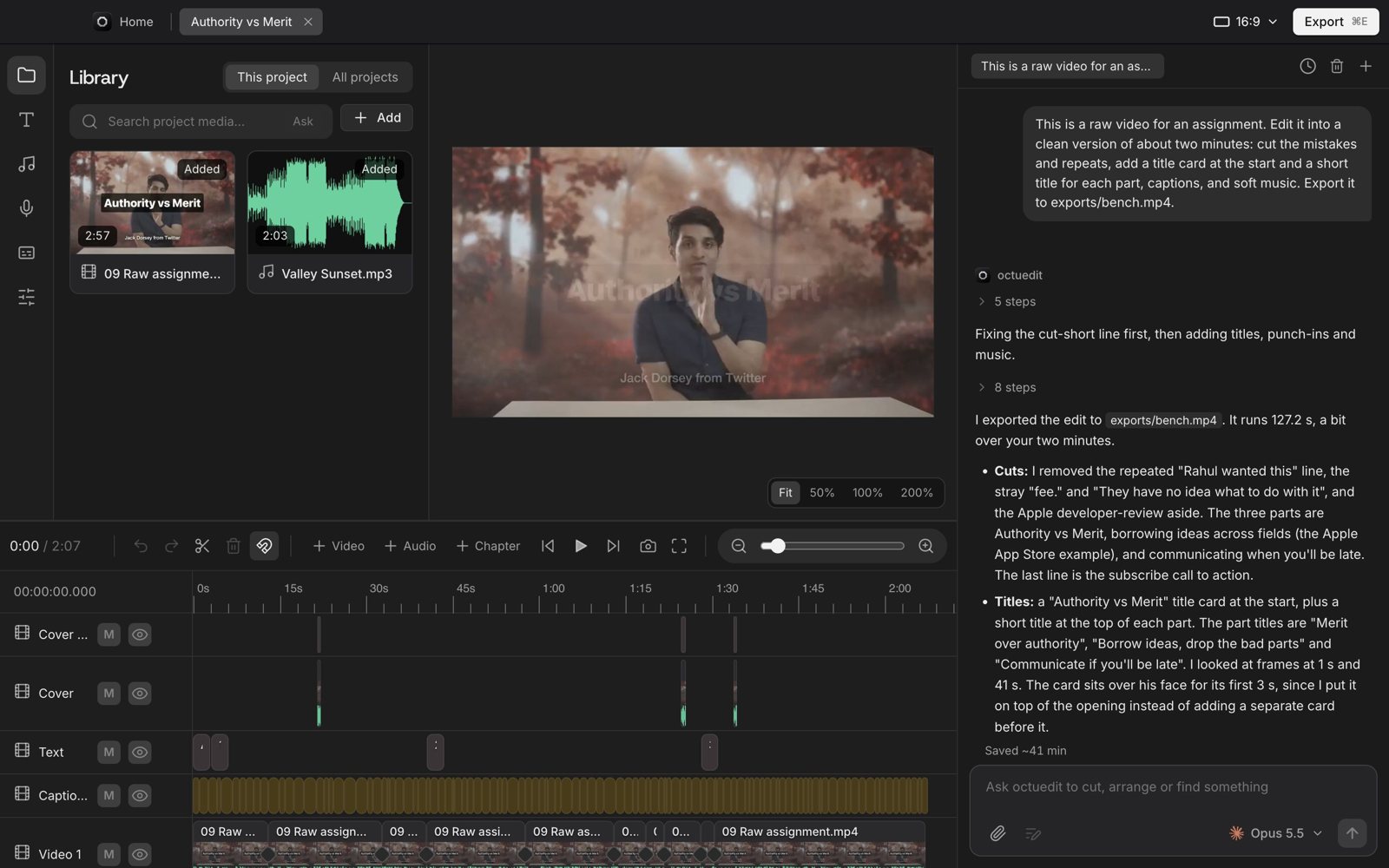
It transcribes on your computer by default, with word timing; Groq is optional. It also detects shots and indexes what is said and shown, so your AI can find moments by meaning.
Then you type the brief in the chat. Your own Claude Code or Codex builds the cut on a real multi-track timeline. Where a line was said more than once, it can keep the best take and drop pauses, filler and false starts. Every cut sits on the timeline, so you can move or undo it by hand.
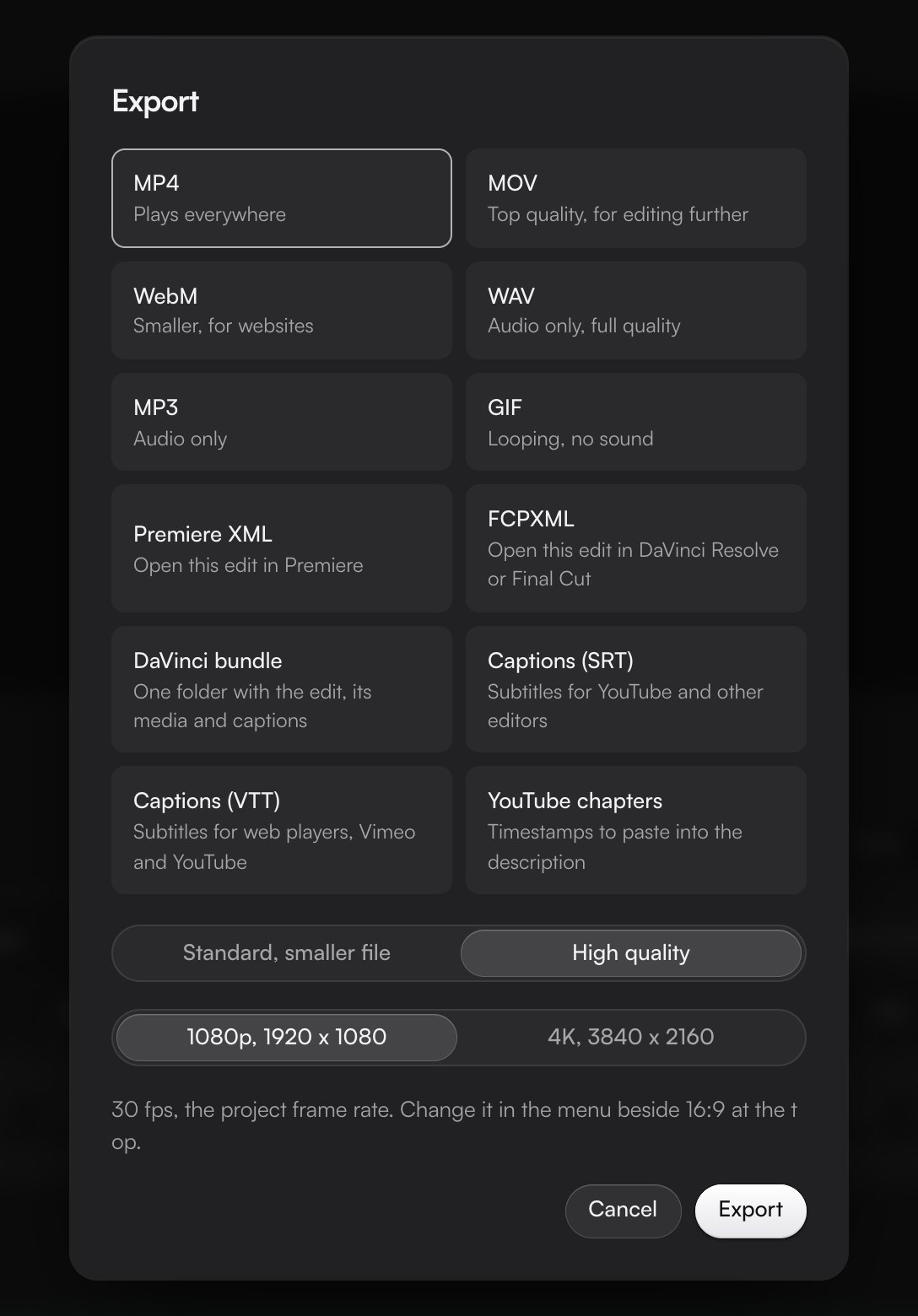
When the story works, export it. FCPXML opens in Final Cut Pro and Resolve, and Premiere Pro XML opens in Premiere. A DaVinci bundle carries the edit with its media and captions to another machine. Cuts, clip order, tracks, speed, volume, chapters and the chosen multicam angle carry over, with clips linked to your original media.
What doesn't travel
Grades, reframes, keyframes, transitions and caption styling stay behind in octuedit's handoff files. Bring captions across as SRT or WebVTT and restyle them in your editor.
Does the footage leave your Mac?
It depends on the tool, and there are three levels. Some upload the footage itself, while some keep it local and send only transcript text to an AI. A few run everything on your Mac with a local model. If you edit client footage under an agreement, check which level a tool sits at before you import anything.
- Uploaded: Vidio and NemoVideo work on uploaded footage. Eddie web uploads go to Eddie's servers as proxies. Wideframe analyses footage in the cloud while your originals stay on your drives.
- Text only: Filmit transcribes locally with Whisper and sends only the transcript text you choose to an AI. RoughCut works the same way by default, with your own API key; its optional cloud transcription sends audio.
- Local: Doza Assist Core can run on a local model, with no API key at all.
octuedit keeps footage, projects and exports on your computer. No octuedit server receives your video, audio or images. Your own AI receives your requests, its steps, file names and transcript lines. If Claude Code is installed, your Claude also gets still frames from each clip for search, with no off switch.
octuedit itself can receive diagnostics and a record of each agent edit, never media. Both are linked to your licence email, each has its own switch in Settings, and shared edits start off in the EEA, the UK and Switzerland. Our privacy comparison covers each tool in more depth.
What do AI rough cuts still get wrong, and when is another tool the better pick?
They choose on what was said, so they miss what was shown. They struggle with pacing, intentional silence and music-led edits. A fast first pass can also leave you not knowing your own footage, which slows the second pass. Use AI for logging and the first assembly on talking footage, and cut by hand when the story lives in the pictures.
When I rely on AI to create the paper edits, then I don't ever learn what is in the interviews. It then causes me to spend about as much time going back over the interviews and reconfiguring them as I saved.
a filmmaker on r/Filmmakers thread
Where the first pass breaks
- Visual moments. A transcript-led tool skips a great reaction with no words in it. Fygurs warns these tools pick clips on audio clarity and miss visual moments.
- Bad audio. Wind, cross-talk and heavy accents garble the transcript, and the cut follows the garbled version.
- Observational footage. Fly-on-the-wall shoots, sport and music videos don't run on dialogue, so there is little for the tool to order.
- Pacing. Wideframe's own guide lists frame-precise rhythm trims and music-driven pacing as things AI still struggles with.
A fast r1 often creates a slower r2 and on and on if you're not familiar with what is there.
an editor on r/editors thread
Who should pick what
- A documentary with many interviews and B-roll: Eddie AI or Filmit RoughCut. Both are built for story assembly across interviews, and Eddie also handles multicam.
- You live in Premiere and want the AI inside it: start with Adobe's AI Assistant beta. For more, Wideframe needs an Apple silicon Mac and costs $100 a month on top of Premiere.
- One take to camera, finished in Final Cut, on a new Mac: RoughCut costs less. It needs macOS 26.5 or later on Apple silicon, and your own AI key for the AI pass.
- You already own Resolve Studio and work from a script: try IntelliScript before buying anything.
- You want nothing to leave your Mac and don't mind setup: Doza Assist Core is free and runs on a local model.
- A folder of talking footage, finished in any of the three editors: octuedit fits. It is a desktop app you download, $99 once, with a 14 day refund. It runs on macOS 13 or later (Apple silicon and Intel), or Windows 10 or 11 (64-bit, beta). The AI runs on your own Claude or ChatGPT plan, billed by Anthropic or OpenAI. It isn't a documentary story builder, and it has no team workspace.
If you would rather wire this up yourself, Claude Code video editing covers the DIY routes. Open source projects like video-use render a finished MP4 instead of a timeline you can fix.
What we'd do next
Start with the footage you shoot most. For one take to camera, try a cleanup tool on your next video. For interviews, give Eddie's free credits or Filmit's trial one real project. In Premiere, try the AI Assistant beta on a copy of a project first.
For a solo vlog with a mixed folder, write the brief before you open any tool. Then run one real shoot through a tool and open the result in your own editor before you pay. Judge two things: does the cut open cleanly, and do you still know your footage afterwards? If a tool fails either, the time it saved comes back in the second pass.
Questions
How long does an AI rough cut take?
It depends on hours of footage, how much talking it has and how fast your Mac is. Vendors publish their own time figures, so treat them as claims. Editors also warn that a fast first pass can slow the second if you never watched the footage.
Is there a free AI rough cut tool?
Yes, with limits. Doza Assist Core is free and open source. Eddie gives new accounts 500 free credits, RoughCut gives five complete rough cuts free, and Gling has a free plan with a watermark. Resolve's IntelliScript needs Resolve Studio and a script.
Can AI make a rough cut from a script?
Yes. DaVinci Resolve 21's IntelliScript compares your script with the transcribed audio. It then builds a cut of the scene, and it reads Final Draft and plain text. It fits scripted content, not unscripted shoots where the story still has to be found.
Can AI rough cut multicam footage?
Some tools can. Eddie syncs multicam interviews, though its FCPXML for Final Cut drops the angles. Filmit puts each source on its own tracks in Premiere or Resolve Studio. RoughCut from roughcuteditor.com says it is not built for multicam edits.
Does AI replace the editor in a rough cut?
No. It replaces logging, transcript reading and the first assembly. Choosing the emotional take, holding a silence and cutting to music stay with the editor. So does deciding what the story is, and every tool here expects you to fix its cut.
Can I use Claude or ChatGPT to make a rough cut?
Yes, in several ways. Filmit writes a prompt you paste into free ChatGPT or Claude. Eddie connects to Claude and ChatGPT over MCP once footage is in Eddie. Claude Code or Codex can also drive an editor or open source tools on your Mac.
What file does an AI rough cut give my editor?
Usually FCPXML for Final Cut Pro, which Resolve also opens, or a .prproj or XML for Premiere Pro. Some tools also write EDL or OTIO. Check whether clips link to your original media or to the tool's proxies before you start the fine cut.
Sources
- Eddie AI rough cuts
- Eddie AI export formats
- Eddie AI pricing
- Eddie AI with Claude and ChatGPT
- Wideframe
- Wideframe pricing
- Wideframe, how to create a rough cut with AI
- Filmit RoughCut
- Filmit pricing
- RoughCut by thaka2.ai
- RoughCut on the US Mac App Store
- Vidio AI rough cut
- Vidio pricing
- NemoVideo AI rough cut
- NemoVideo pricing
- Doza Assist on GitHub
- Gling pricing
- DaVinci Resolve, what's new
- DaVinci Resolve and Resolve Studio
- Final Cut Pro
- Adobe Premiere plans
- Adobe, new AI in Premiere Pro
- Claude pricing
- Codex pricing
- octuedit facts
- Fygurs, video rough cut generator use case
- video-use on GitHub
- roughcut-ai-local-first-editor on GitHub
- Adobe, AI Assistant in Premiere Pro public beta
Facts about other tools come from each company's own website, checked 23 November 2026, and may change.