What is the best AutoPod alternative for Final Cut Pro in 2026?
AutoPod only runs in Premiere Pro and DaVinci Resolve, and its own FAQ says there are no plans for Final Cut Pro. The closest match is CastCut if you record on one mic and want the whole cleanup. Doza Cuts fits if you want live multicam cuts. MC Auto Cut is the cheapest switch, Speaker Cut is free on a new Mac, and octuedit, an AI video editor, suits an agent-driven edit.
Updated 28 November 2026 · By Shivank Goura, co-founder of octuedit. We make octuedit.
Does AutoPod work with Final Cut Pro?
No. AutoPod is a set of panels for Adobe Premiere Pro 2023 or newer, with a separate version for DaVinci Resolve. Its pricing FAQ asks if it is available for Final Cut Pro or Avid. The answer: "No, there are no plans to add AutoPod for these programs." It costs $29 a month per licence, or 12 months for the price of 11 billed annually, on one computer.
The best AutoPod alternative for Final Cut Pro depends on how you record and what you want back. CastCut is the closest match if you record on one shared mic and want silences and filler removed too. Doza Cuts and MC Auto Cut suit you if you want to keep re-switching angles in the Angle Viewer, and MC Auto Cut costs $19.99 once. Speaker Cut's camera cut is free. OnAirCut suits an ATEM setup with a mic per person. Selects, Eddie AI and Descript are account based AI editors with a Final Cut hand-off. octuedit is the agent route: your own Claude Code or Codex syncs, cuts and cleans up from one chat. If you edit one show a month, Final Cut's own multicam, switched by hand, costs nothing extra.
What AutoPod does
AutoPod does three jobs. The Multi-Camera Editor cuts between up to 10 cameras and 10 microphones, with solo, two shot and wide options. The Jump Cut Editor removes silences, and the Social Clip Creator makes 16:9, 4:5 and 9:16 clips.
If you searched from Final Cut, you probably want the first job: a camera switch to whoever is talking.
That wish is old. A Final Cut editor on Reddit put it like this:
I've been frantically looking today but there doesn't seem to be an equivalent out there without signing up to the Adobe beast
an editor on r/finalcutpro thread
We make octuedit, so read this with that in mind. Every competitor fact below comes from that company's own page, checked on 23 November 2026. We say plainly where another tool is the better pick, and for several readers it is.
Which route fits you?
- You want to keep re-switching angles in the Angle Viewer: start with Doza Cuts or MC Auto Cut.
- You record on one shared mic: CastCut.
- You record through an ATEM: OnAirCut matches the live cut and the edit.
- You want an AI agent to sync, cut and clean up from one chat: octuedit, covered step by step below.
- You edit one show a month: Final Cut's own multicam.
What Final Cut does on its own
Final Cut Pro has no automatic speaker switching. It builds a multicam clip and syncs angles by audio or timecode. You then cut and switch angles yourself as the clip plays. Apple's podcast guide points video podcasters to that same multicam workflow.
Editors have asked Apple for a "cut to whoever is speaking" tool. An Apple Community thread asks for exactly that, and Final Cut still has no such feature.
Tools that look like answers but are not
AutoCut, FireCut and WizCut come up in the same searches. AutoCut runs in Premiere Pro and DaVinci Resolve.
FireCut sells Premiere Pro, Resolve and Shorts plans, none for Final Cut. WizCut says it is "Premiere Pro only". None of the three opens in Final Cut, so we leave them out below.
AutoPod vs AutoCut
If you searched "AutoPod vs AutoCut": both are Premiere and Resolve plugins. AutoCut's menu lists AutoCut Podcast and AutoCut Angles next to its silence and caption tools. So neither one changes the Final Cut picture.
Which AutoPod alternatives work with Final Cut Pro?
Eleven routes end in a Final Cut timeline. Five are Mac apps that cut by speaker and write FCPXML: CastCut, Speaker Cut, Doza Cuts, MC Auto Cut and OnAirCut. Three are AI editors with a Final Cut hand-off: Selects, Eddie AI and Descript.
The last three are octuedit, a Claude agent with an open source Final Cut MCP server, and Final Cut's own multicam. With that one, you switch by hand.
| Option | Also cleans silences? | Regular price |
|---|---|---|
| Final Cut by hand | No | Included with Final Cut |
| CastCut | Yes, silences and filler | $14 a month or $99 a year |
| Speaker Cut | Not listed | Free cut; AI layer paid |
| Doza Cuts | Not listed | One time, see its page |
| MC Auto Cut | Not listed | $19.99 once |
| OnAirCut | Not listed | $19 a month or $190 a year after beta |
| Selects | Yes, silence and filler | Starter $20 billed monthly, $16 a month annually |
| Eddie AI | Yes, silence and filler | Credit packs from $15 |
| Descript | Yes, filler and word gaps | Creator $35 billed monthly, $24 a month annually |
| octuedit | Yes, filler and pauses | $99 once plus your AI plan |
| Agent plus MCP server | Only if you build it | Free tools plus your AI plan |
Prices are regular list prices from each company's page. Doza Cuts showed launch and Black Friday prices against a struck-through price on 23 November, so we print none. Check the Doza Cuts pricing page for today's figure.
CastCut
CastCut is a Mac and Windows app that does the whole podcast edit from raw files. It syncs cameras by sound, cuts to whoever talks and goes wide for crosstalk. It also removes silences and filler, finds shorts, and opens the edit in Final Cut Pro 10.6 or later.
It works from one shared mic. By default it makes a normal timeline with every camera on its own track. A setting can make one multicam clip instead, which you switch in the Angle Viewer.
It needs an Apple silicon Mac on macOS 14 or later, or a Windows PC. It says nothing is uploaded.
Speaker Cut
Speaker Cut builds the multicam from clips, an ATEM recording or an FCPXML you exported. It cuts to the talker, lets you override live with keys 1 to 8, and hands Final Cut one import with the cut.
The app, the speaker cut and the Final Cut export are "free forever". Transcripts, AI show notes and auto mix cost $247 once or $24 a month. The catch is the floor: Apple silicon, macOS 15.6 and Final Cut Pro 12 or later.
Doza Cuts
Doza Cuts starts after you build and sync the multicam clip in Final Cut. You export its XML, drop it on the app, pick a style, and open the result. It returns "real multicam cuts", so you can still switch any shot in the Angle Viewer.
It matches faces to voices by mouth movement and works without lav mics. It runs on the Mac with nothing uploaded, on Apple silicon with macOS 14. Doza's MCP connector, part of Doza Assist, lets Claude Code or Codex drive it. That route needs macOS 15 and a paid Claude or ChatGPT plan.
MC Auto Cut
MC Auto Cut is a Final Cut workflow extension from Automatic Duck. You drag in a multicam project and it writes a new FCPXML "with every cut already in place". In its voice mode, cuts happen "when the dominant audio source changes", with controls for sensitivity and minimum clip length.
It is the cheapest one time option and switches cameras only, with no silence or filler cleanup listed. It needs macOS 14 and Final Cut Pro 10.7 or later, and its App Store page lists no Apple silicon requirement.
OnAirCut
OnAirCut pairs a live ATEM switcher with a Podcast Editor. The editor builds the multicam edit after the recording and exports a multicam clip, separate clips or a cut list. It handles up to 20 cameras.
It "reads every mic on its own", so plan on one mic per person. It runs on Apple silicon or Intel. It is a public beta until 24 December 2026, followed by a 14 day trial. After that it costs $19 a month or $190 a year.
Selects, Eddie AI and Descript
Selects, by Cutback, has multicam sync and automatic camera switching from its $20 a month Starter plan. Its Final Cut hand-off is an FCPXML linked to your original media, but transitions, effects, titles and volume changes do not carry over. Selects also connects to Claude Code and Codex over MCP.
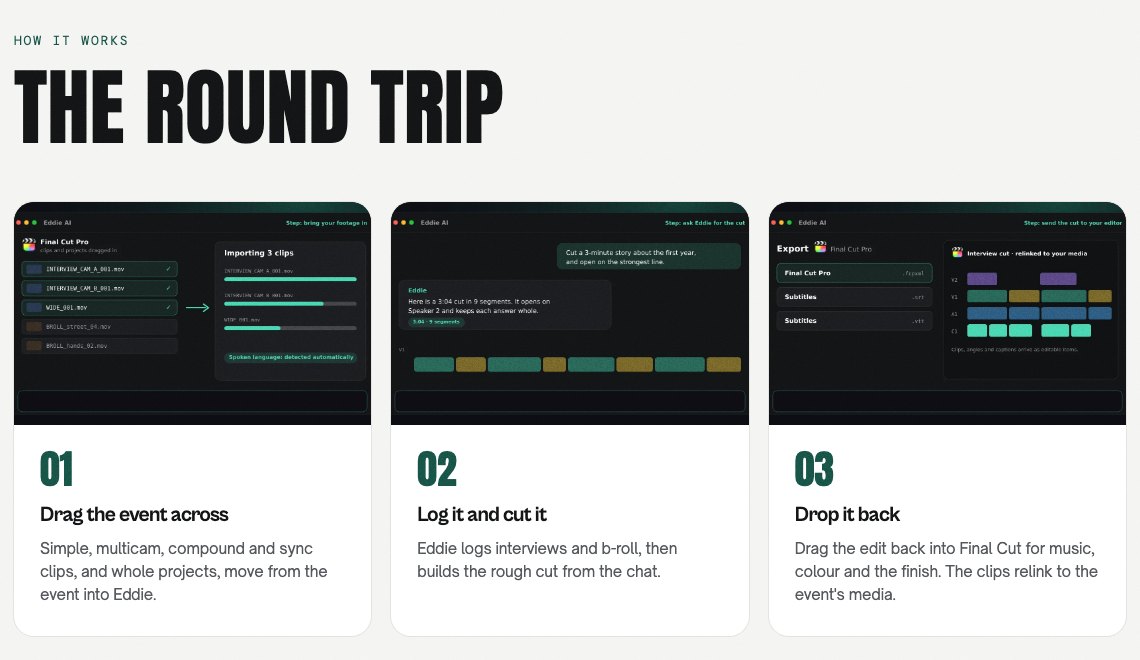
Eddie AI picks angles by who is on each one and how tight the shot is. Its help page says the FCPXML "carries the angles as a multicam structure". Its export table says multicam angles are not carried, so try one export first.
Eddie sells credit packs, not a monthly plan. Our Eddie AI comparison goes deeper.
Descript lists Automatic Multicam on its pricing page, marked Limited on one plan, so check yours. Final Cut Pro timeline export starts on Creator at $35 a month, or $24 billed annually. It is a cloud editor, so your footage is uploaded. Our Descript comparison covers it in depth.
An agent with a Final Cut MCP server
The fcp-mcp-server project is an open source MCP server that lets Claude "read, edit and generate real timelines" from FCPXML you export. Its README describes no speaker switcher, so you would prompt the agent to build that logic yourself. It needs Terminal and a Claude plan. It suits tinkerers more than a weekly show.
Final Cut by hand
You can do this for free if you already own Final Cut Pro. Make a multicam clip, sync it by audio, then play it and press the angle number to switch. Every switch is your own choice. It also means watching the whole episode in real time, once per edit.
What lands in your Final Cut timeline, and which mics do you need?
The tools differ most in what arrives in Final Cut. Doza Cuts, MC Auto Cut and OnAirCut give you a multicam edit you can re-switch in the Angle Viewer. CastCut stacks every angle on its own lane, or makes a multicam clip, and octuedit hands over ordinary clips already cut. Mic needs differ too: some tools need a track per speaker, others read faces.
This matters on the second pass. With a live multicam clip, a wrong shot takes one click in the Angle Viewer. With stacked lanes, you enable the lane you want. With flattened clips, you replace the shot by hand or re-cut it in the first app and export again.
| Option | What arrives | Mics it needs |
|---|---|---|
| Doza Cuts | Live multicam cuts | Lavs or camera sound; reads mouths |
| MC Auto Cut | Multicam switch points | Audio on each angle (level based) |
| CastCut | Every angle stacked, or a multicam clip | One shared mic is fine |
| OnAirCut | Multicam clip or separate clips | One mic per person |
| Eddie AI | Its pages disagree on multicam | Usable audio or timecode to sync |
| Selects | Clips linked to originals; multicam not stated | Usable audio or timecode to sync |
| octuedit | Ordinary clips, chosen angles | Every camera records the room sound |
Sources: each tool's own pages. AutoPod, for comparison, "needs separate audio tracks to properly make the editing decisions".
Which Mac and Final Cut each one needs
Check this before you pay. Final Cut Pro itself now needs macOS 15.6 or later, and the App Store build asks for macOS 26.6, so your Final Cut version sets the floor.
| Option | Mac and macOS | Final Cut version |
|---|---|---|
| CastCut | Apple silicon, macOS 14 | 10.6 or later |
| Speaker Cut | Apple silicon, macOS 15.6 | 12 or later |
| Doza Cuts | Apple silicon, macOS 14 | 10.4.1 or later |
| MC Auto Cut | macOS 14, no chip listed | 10.7 or later |
| OnAirCut | Apple silicon or Intel, macOS 14 | Not stated |
| octuedit | Apple silicon or Intel, macOS 13; or Windows 10 or 11 (64-bit, beta) | Not stated |
Sources: each tool's own pages. Selects, Eddie AI and Descript are account based editors, and their pricing pages do not list a Final Cut version.
Crosstalk and reaction shots
Treat any automatic switch as a first draft. Level based tools can pick the wrong camera when one mic hears everyone. Face based tools need a close-up of each person. No tool knows when a reaction says more than the speaker:
the craft of editing is knowing when to show the reaction and not the source.
an editor on r/finalcutpro thread
So whichever tool you pick, plan a watch-down pass in Final Cut. A working editor on r/editors described AutoPod the same way:
Autopod is great for a first pass at camera changes. Then I watch down and nudge things around
an editor on r/editors thread
What does each option cost in a year?
At regular monthly prices, AutoPod costs $29 x 12 = $348 a year, plus Premiere Pro. In Final Cut, the subscriptions run from $168 a year at CastCut to $420 at Descript Creator. One time options include MC Auto Cut at $19.99 and Doza Cuts. Speaker Cut's camera cut is free, and octuedit is $99 plus an AI plan.
One year at list prices, monthly billing first:
- AutoPod: $29 x 12 = $348, or $29 x 11 = $319 billed annually, and you also need Premiere Pro or Resolve.
- CastCut: $14 x 12 = $168, or $99 on the annual plan.
- OnAirCut, after the beta: $19 x 12 = $228, or $190 on the annual plan.
- Selects Starter: $20 x 12 = $240, or $16 x 12 = $192 billed annually.
- Descript Creator: $35 x 12 = $420, or $24 x 12 = $288 billed annually.
- MC Auto Cut: $19.99 once.
- Speaker Cut: $0 for the cut; $247 once or $24 x 12 = $288 for the AI layer.
- Eddie AI: $15 per 1,000 credits, one time, which Eddie says covers about an hour of footage.
- octuedit: $99 once with a 14 day refund, plus your own Claude Code or Codex plan. Claude Pro is $20 a month or $200 a year, so year one is $99 + $240 = $339, or $299 billed annually. If you already pay for Claude Pro, the extra cost is $99.
Most of these let you try a real episode first. AutoPod gives 30 days on monthly billing, and CastCut gives 2 free exports, with a small mark on trial MP4s. Doza Cuts gives 3 free exports, Eddie AI gives new accounts 500 credits, and Selects gives trial credits.
Add Final Cut itself
Every route here also needs Final Cut Pro. Apple sells it for $299.99 once, or inside Apple Creator Studio at $12.99 a month or $129 a year. If you already own it, the manual route costs nothing more. If you are buying an editor anyway, see our one-time purchase editors guide.
We would not pick on price alone. MC Auto Cut is cheapest but only switches cameras. CastCut costs more each year but also cleans silences and finds shorts. Weigh what you would otherwise do by hand each week.
How do you cut a multicam podcast with octuedit and finish in Final Cut?
octuedit is an AI video editor where your own Claude Code or Codex edits on a real multi-track timeline. For a multicam podcast, it syncs separate camera files and a recorder by their sound. It cuts to whoever is talking, or you pick angles by hand. Then you export FCPXML and open it in Final Cut Pro.
Step by step
- Add every camera file and the separate recorder, if you used one, to a project.
- Ask for the sync, for example: sync these cameras and the recorder by sound.
- Ask for the cut: cut to whoever is talking, go wide when they talk over each other.
- In the same chat, ask it to remove filler words and long pauses, medium.
- Watch it on the timeline and change any shot by hand.
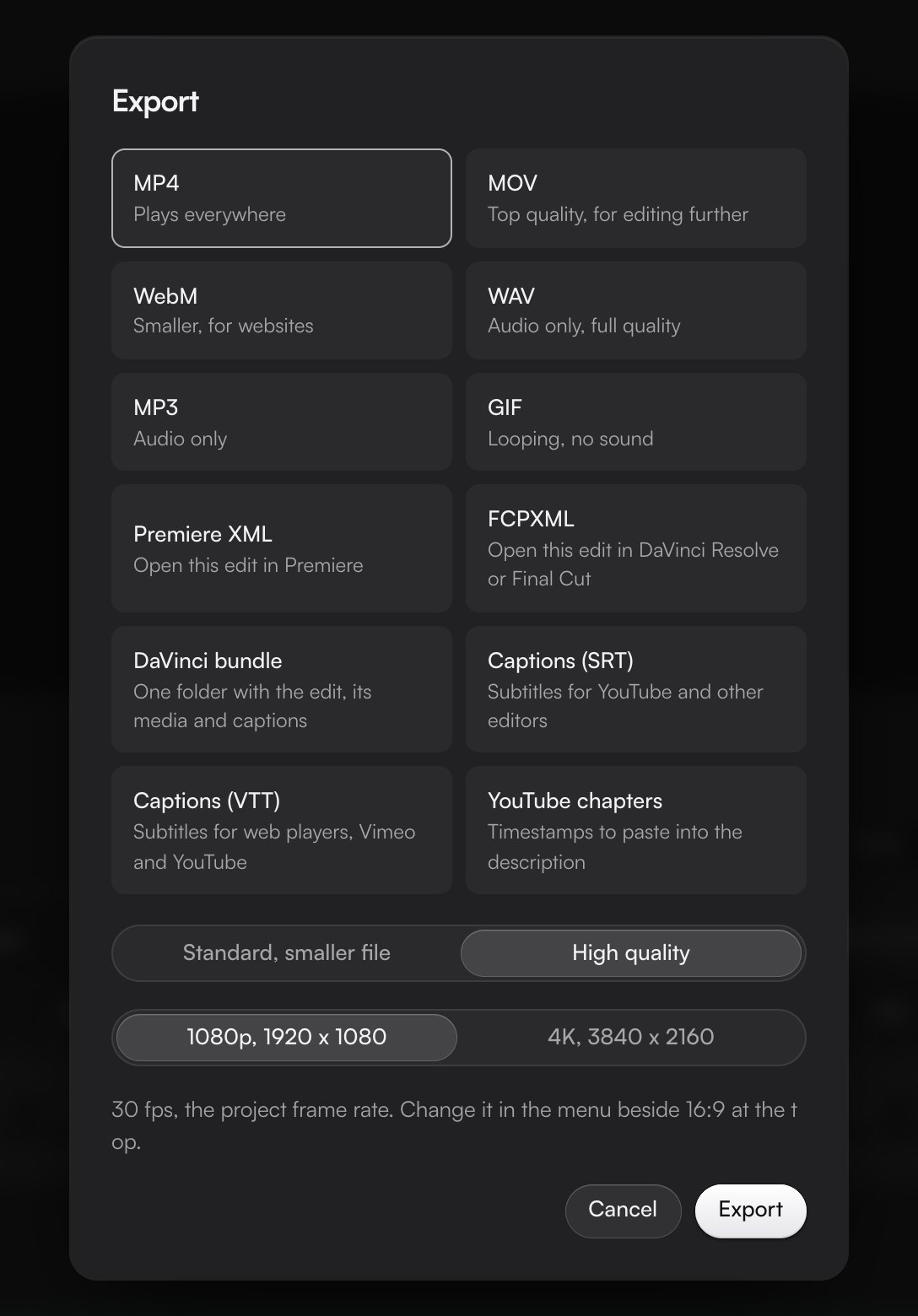
- Export, choose Final Cut Pro (FCPXML), and add SRT captions if you want them.
- Import the XML in Final Cut and finish there.
The sync keeps a camera whose clock drifts in step over a long recording. For the cut, give it a close-up of each person, plus a wide if you have one. You can then fix any shot on the timeline before you export.
The same request can clean the voice, level loudness to -14 LUFS, add chapters and cut captioned vertical clips. Transcription and audio processing run on your computer by default. If Claude Code is installed, your Claude gets still frames from each clip for search. The podcast editing page lists all of it, and the Final Cut export guide shows what carries over.
octuedit's limits for this job
- Angles arrive in Final Cut as ordinary clips, already cut. You cannot re-switch them in the Angle Viewer; you replace a shot by hand or re-cut and export again.
- It does not import a Final Cut multicam clip or library. You give it the camera files.
- Every camera must have recorded the conversation's sound, and auto switching needs a close-up of each person.
- Punch-ins, crops, colour grades, transitions and caption styling do not carry over in the FCPXML.
- The AI runs on your own Claude or ChatGPT plan, an ongoing cost, and requests need internet.
It runs on macOS 13 or later (Apple silicon and Intel), or Windows 10 or 11 (64-bit, beta). Final Cut itself still needs a Mac. octuedit is a desktop app you download, $99 once, with a 14 day refund (see octuedit pricing).
Which AutoPod alternative should you pick?
Pick by what you want in Final Cut afterwards. To keep re-switching angles, use Doza Cuts, MC Auto Cut or OnAirCut. For the whole podcast cleanup in one pass from one mic, CastCut is the better choice. For one show a month, switch by hand.
- You live in the Angle Viewer: Doza Cuts is the better pick. It returns live multicam cuts and runs locally.
- One shared mic, and you want silences, filler and shorts too: CastCut does all of it in one app.
- Newest Mac and Final Cut, small budget: Speaker Cut's free tier covers the camera switch.
- You already sync multicam clips yourself, and want the cheapest add-on: MC Auto Cut adds the switch points for $19.99.
- You record through an ATEM with a mic per person: OnAirCut matches the live and post cut.
- You already edit in Descript: its Creator plan exports your edit as a Final Cut timeline.
- You are leaving Final Cut anyway: AutoPod in Resolve or Premiere is the tool you know. Our guide to Claude and DaVinci Resolve covers the Resolve side.
- You want one chat to sync, cut and clean up: octuedit fits. The catch is that angles arrive as flattened clips.
What we'd do next
Take one real episode with the crosstalk you dread most. Run it through the free trial of your top two picks from the list above. Then open each result in Final Cut and time your watch-down pass. The tool that leaves you the fewest shots to fix wins, whatever its price.
If both feel close, keep the one whose output you can still change later. A live multicam edit or stacked lanes beat flattened clips when a guest asks for a recut. Check the Mac and Final Cut table first, so you don't trial a tool your Mac can't run.
Questions
Is AutoPod free?
No. AutoPod costs $29 a month per licence, on one computer, and monthly billing starts with a 30 day free trial. It needs Premiere Pro 2023 or newer, or its DaVinci Resolve version, so add that editor's cost too.
Does AutoPod work with DaVinci Resolve?
Yes. AutoPod now has a DaVinci Resolve version as well as the Premiere Pro panels. It still has no Final Cut Pro version, and its FAQ says there are no plans for one. Moving to Resolve means learning a new editor, so weigh that against the tools above.
Is there a free AutoPod alternative for Final Cut Pro?
Yes, two. Final Cut's own multicam is free if you own Final Cut, but you switch every angle yourself. Speaker Cut's camera cut is free forever on Apple silicon with macOS 15.6 and Final Cut Pro 12. Most paid tools also give free exports or credits.
Can I change camera angles after the cut lands in Final Cut?
It depends on the tool. Doza Cuts, MC Auto Cut and OnAirCut deliver a multicam edit you re-switch in the Angle Viewer. CastCut stacks every angle on lanes, or makes a multicam clip. Tools that hand over flattened clips need a manual replace or a re-export.
Do I need a separate mic for every speaker?
Not always. AutoPod and OnAirCut need one audio track per person. CastCut works from one shared mic. Doza Cuts can read each camera's own sound and mouth movement. Level based tools like MC Auto Cut can pick the wrong camera when every mic hears everyone.
Does my footage get uploaded?
CastCut, Doza Cuts, Speaker Cut and MC Auto Cut say they process on your Mac. OnAirCut is a desktop app, so check its privacy page. Descript is a cloud editor. Selects and Eddie AI pricing pages do not say clearly where analysis runs, so ask before you send client footage.
Do these tools work on an Intel Mac?
A few do. OnAirCut lists Apple silicon or Intel, and MC Auto Cut lists macOS 14 with no chip. CastCut, Doza Cuts and Speaker Cut need Apple silicon. Final Cut Pro itself now needs macOS 15.6 or later, so check that your Intel Mac can run it first.
Can Claude or Codex do the multicam cut for me?
Yes, through MCP. Doza's connector lets Claude Code or Codex drive Doza Cuts, and Selects connects to both. Open source servers such as fcp-mcp-server let Claude edit exported FCPXML, but you build the speaker switch logic yourself.
Sources
- AutoPod pricing and FAQ
- AutoPod features
- Apple Final Cut Pro (price, Creator Studio, requirements)
- Apple Final Cut Pro User Guide, create multicam clips
- Apple Podcasts for Creators, Final Cut Pro video podcasts
- Apple Community, AI smart cut for multicam podcasts
- CastCut, AutoPod for Final Cut Pro
- CastCut pricing
- CastCut, automatic camera switching in Final Cut Pro
- Speaker Cut
- Doza Cuts
- Doza, Final Cut Pro MCP guide
- MC Auto Cut on the Mac App Store
- OnAirCut
- OnAirCut pricing
- Eddie AI pricing
- Eddie AI help, multicam podcasts
- Selects plans and pricing
- Selects, Final Cut Pro integration
- Selects, MCP connection to Claude Code and Codex
- fcp-mcp-server on GitHub
- AutoCut pricing
- FireCut pricing
- WizCut, AutoPod alternatives for Premiere Pro
- Claude pricing
- octuedit pricing
- octuedit podcast editing
- Descript pricing
- octuedit, export to Final Cut Pro
- AutoCut features
- Eddie AI export formats
- Descript, timeline exports
- Mac App Store, Final Cut Pro
Facts about other tools come from each company's own website, checked 23 November 2026, and may change.